Hinweis
Für den Zugriff auf diese Seite ist eine Autorisierung erforderlich. Sie können versuchen, sich anzumelden oder das Verzeichnis zu wechseln.
Für den Zugriff auf diese Seite ist eine Autorisierung erforderlich. Sie können versuchen, das Verzeichnis zu wechseln.
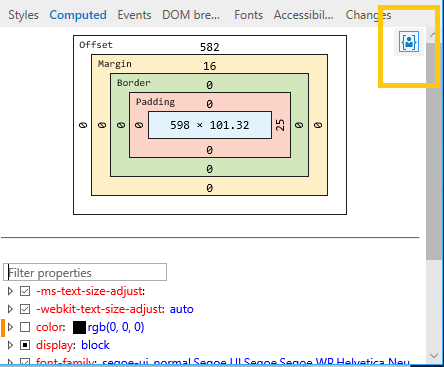
See a box model diagram (width, padding, border, margin and offset values) of the selected element. If you turn on the Element highlighting tool (Ctrl+Shift+L), the same colored regions in the diagram (for width, padding, etc.) that will overlay the rendered element when you select it on the page. You can edit any value in the diagram by clicking it.
Below the box model diagram is a filterable and editable list of computed style properties. Turning off a currently active property activates the next property in the cascade, if one exists. You can view your changes in the Changes pane.
The Display user styles only button is on by default. Depressing the button will include styles from the default stylesheet of Microsoft Edge in the computed styles list.