Hinweis
Für den Zugriff auf diese Seite ist eine Autorisierung erforderlich. Sie können versuchen, sich anzumelden oder das Verzeichnis zu wechseln.
Für den Zugriff auf diese Seite ist eine Autorisierung erforderlich. Sie können versuchen, das Verzeichnis zu wechseln.
Von Bedeutung
Dieses Feature befindet sich in der Public Preview.
Memory ermöglicht es KI-Agents, sich Informationen aus früheren Dialogen oder Gesprächen zu merken. Auf diese Weise können Agents kontextbezogene Antworten bereitstellen und personalisierte Erfahrungen im Laufe der Zeit erstellen. Verwenden Sie Databricks Lakebase, eine vollständig verwaltete Postgres OLTP-Datenbank, um den Konversationsstatus und -historie zu verwalten.
Anforderungen
- Eine Lakebase-Instanz finden Sie unter Erstellen und Verwalten einer Datenbankinstanz.
Kurzzeitgedächtnis vs. Langzeitgedächtnis
Kurzzeitspeicher erfasst Kontext in einer einzelnen Unterhaltungssitzung, während der Langzeitspeicher wichtige Informationen in mehreren Unterhaltungen extrahiert und speichert. Sie können Ihren Agenten mit einem der beiden Speichertypen oder mit beiden erstellen.
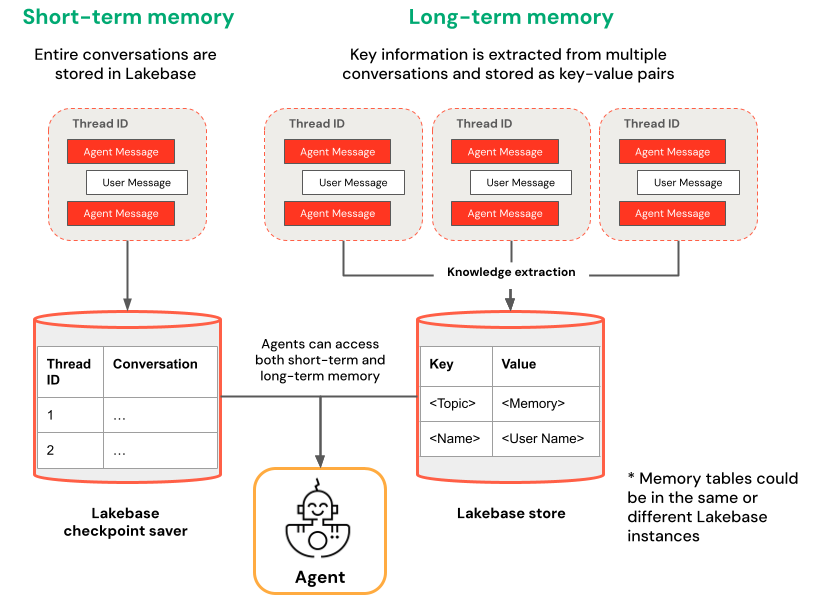
| Kurzzeitspeicher | Langzeitspeicher |
|---|---|
| Den Kontext in einer einzelnen Unterhaltungssitzung mithilfe von Thread-IDs und Checkpointing erfassen. Beibehalten des Kontexts für Folgefragen innerhalb einer Sitzung Debuggen und Testen von Gesprächsflüssen mithilfe von Zeitreisen |
Automatisches Extrahieren und Speichern wichtiger Erkenntnisse in mehreren Sitzungen Personalisieren von Interaktionen basierend auf früheren Einstellungen Erstellen einer Wissensbasis zu Benutzern, die die Antworten im Laufe der Zeit verbessern |
Notebook-Beispiele
Agent mit kurzfristigem Speicher
Agent mit langfristigem Speicher
Fragen Sie Ihren bereitgestellten Agenten ab
Nachdem Sie Ihren Agent auf einem Model Serving-Endpunkt bereitgestellt haben, finden Sie informationen zu Abfrageanweisungen unter Abfragen eines bereitgestellten Mosaik AI-Agents .
Um eine Thread-ID zu übergeben, verwenden Sie den extra_body Param. Das folgende Beispiel zeigt, wie Sie eine Thread-ID an einen ResponsesAgent Endpunkt übergeben:
   response1 = client.responses.create(
    model=endpoint,
    input=[{"role": "user", "content": "What are stateful agents?"}],
    extra_body={
        "custom_inputs": {"thread_id": thread_id}
    }
)
Wenn Sie einen Client verwenden, der ChatContext automatisch übergibt, z. B. die Playground- oder Überprüfungs-App, wird die Unterhaltungs-ID und die Benutzer-ID automatisch für kurzfristige/langfristige Speichernutzungsfälle übergeben.
Zeitreise durch das Kurzzeitgedächtnis
Verwenden Sie für Agenten mit kurzzeitigem Arbeitsspeicher LangGraph Time-Travel, um die Ausführung von Prüfpunkten wieder aufzunehmen. Sie können die Unterhaltung entweder wiedergeben oder ändern, um alternative Pfade zu erkunden. Jedes Mal, wenn Sie eine Sitzung von einem Prüfpunkt aus fortsetzen, erstellt LangGraph eine neue Verzweigung in der aufgezeichneten Unterhaltung, wobei das Original beibehalten wird und gleichzeitig experimentiert werden kann.
Erstellen Sie im Agentcode Funktionen, die den Prüfpunktverlauf abrufen und den Prüfpunktstatus in der
LangGraphResponsesAgentKlasse aktualisieren:from typing import List, Dict def get_checkpoint_history(self, thread_id: str, limit: int = 10) -> List[Dict[str, Any]]: """Retrieve checkpoint history for a thread. Args: thread_id: The thread identifier limit: Maximum number of checkpoints to return Returns: List of checkpoint information including checkpoint_id, timestamp, and next nodes """ config = {"configurable": {"thread_id": thread_id}} with CheckpointSaver(instance_name=LAKEBASE_INSTANCE_NAME) as checkpointer: graph = self._create_graph(checkpointer) history = [] for state in graph.get_state_history(config): if len(history) >= limit: break history.append({ "checkpoint_id": state.config["configurable"]["checkpoint_id"], "thread_id": thread_id, "timestamp": state.created_at, "next_nodes": state.next, "message_count": len(state.values.get("messages", [])), # Include last message summary for context "last_message": self._get_last_message_summary(state.values.get("messages", [])) }) return history def _get_last_message_summary(self, messages: List[Any]) -> Optional[str]: """Get a snippet of the last message for checkpoint identification""" return getattr(messages[-1], "content", "")[:100] if messages else None def update_checkpoint_state(self, thread_id: str, checkpoint_id: str, new_messages: Optional[List[Dict]] = None) -> Dict[str, Any]: """Update state at a specific checkpoint (used for modifying conversation history). Args: thread_id: The thread identifier checkpoint_id: The checkpoint to update new_messages: Optional new messages to set at this checkpoint Returns: New checkpoint configuration including the new checkpoint_id """ config = { "configurable": { "thread_id": thread_id, "checkpoint_id": checkpoint_id } } with CheckpointSaver(instance_name=LAKEBASE_INSTANCE_NAME) as checkpointer: graph = self._create_graph(checkpointer) # Prepare the values to update values = {} if new_messages: cc_msgs = self.prep_msgs_for_cc_llm(new_messages) values["messages"] = cc_msgs # Update the state (creates a new checkpoint) new_config = graph.update_state(config, values=values) return { "thread_id": thread_id, "checkpoint_id": new_config["configurable"]["checkpoint_id"], "parent_checkpoint_id": checkpoint_id }Aktualisieren Sie die Funktionen
predictundpredict_stream, um das Übergeben von Prüfpunkten zu unterstützen.Predict
def predict(self, request: ResponsesAgentRequest) -> ResponsesAgentResponse:
    """Non-streaming prediction"""
    # The same thread_id is used by BOTH predict() and predict_stream()
    ci = dict(request.custom_inputs or {})
    if "thread_id" not in ci:
        ci["thread_id"] = str(uuid.uuid4())
    request.custom_inputs = ci

    outputs = [
        event.item
        for event in self.predict_stream(request)
        if event.type == "response.output_item.done"
    ]

    # Include thread_id and checkpoint_id in custom outputs
    custom_outputs = {
        "thread_id": ci["thread_id"]
    }
    if "checkpoint_id" in ci:
        custom_outputs["parent_checkpoint_id"] = ci["checkpoint_id"]

    try:
        history = self.get_checkpoint_history(ci["thread_id"], limit=1)
        if history:
            custom_outputs["checkpoint_id"] = history[0]["checkpoint_id"]
    except Exception as e:
        logger.warning(f"Could not retrieve new checkpoint_id: {e}")

    return ResponsesAgentResponse(output=outputs, custom_outputs=custom_outputs)
Predict_stream
def predict_stream(
    self,
    request: ResponsesAgentRequest,
) -> Generator[ResponsesAgentStreamEvent, None, None]:
    """Streaming prediction with PostgreSQL checkpoint branching support.

    Accepts in custom_inputs:
    - thread_id: Conversation thread identifier for session
    - checkpoint_id (optional): Checkpoint to resume from (for branching)
    """
    # Get thread ID and checkpoint ID from custom inputs
    custom_inputs = request.custom_inputs or {}
    thread_id = custom_inputs.get("thread_id", str(uuid.uuid4()))  # generate new thread ID if one is not passed in
    checkpoint_id = custom_inputs.get("checkpoint_id")  # Optional for branching

    # Convert incoming Responses messages to LangChain format
    langchain_msgs = self.prep_msgs_for_cc_llm([i.model_dump() for i in request.input])

    # Build checkpoint configuration
    checkpoint_config = {"configurable": {"thread_id": thread_id}}
    # If checkpoint_id is provided, we're branching from that checkpoint
    if checkpoint_id:
        checkpoint_config["configurable"]["checkpoint_id"] = checkpoint_id
        logger.info(f"Branching from checkpoint: {checkpoint_id} in thread: {thread_id}")

    # DATABASE CONNECTION POOLING LOGIC FOLLOWS
    # Use connection from pool
Testen Sie dann die Verzweigung des Prüfpunkts:
Starten Sie einen Unterhaltungsthread, und fügen Sie einige Nachrichten hinzu:
from agent import AGENT
# Initial conversation - starts a new thread
response1 = AGENT.predict({
    "input": [{"role": "user", "content": "I'm planning for an upcoming trip!"}],
})
print(response1.model_dump(exclude_none=True))
thread_id = response1.custom_outputs["thread_id"]

# Within the same thread, ask a follow-up question - short-term memory will remember previous messages in the same thread/conversation session
response2 = AGENT.predict({
    "input": [{"role": "user", "content": "I'm headed to SF!"}],
    "custom_inputs": {"thread_id": thread_id}
})
print(response2.model_dump(exclude_none=True))

# Within the same thread, ask a follow-up question - short-term memory will remember previous messages in the same thread/conversation session
response3 = AGENT.predict({
    "input": [{"role": "user", "content": "Where did I say I'm going?"}],
    "custom_inputs": {"thread_id": thread_id}
})
print(response3.model_dump(exclude_none=True))
Abrufen der Checkpoint-Historie und Lenken der Unterhaltung in eine andere Richtung mit einer anderen Nachricht:
# Get checkpoint history to find branching point
history = AGENT.get_checkpoint_history(thread_id, 20)
# Retrieve checkpoint at index - indices count backward from most recent checkpoint
index = max(1, len(history) - 4)
branch_checkpoint = history[index]["checkpoint_id"]

# Branch from node with next_node = `('__start__',)` to re-input message to agent at certain part of conversation
# I want to update the information of which city I am going to
# Within the same thread, branch from a checkpoint and override it with different context to continue the conversation in a new fork
response4 = AGENT.predict({
    "input": [{"role": "user", "content": "I'm headed to New York!"}],
    "custom_inputs": {
        "thread_id": thread_id,
        "checkpoint_id": branch_checkpoint # Branch from this checkpoint!
    }
})
print(response4.model_dump(exclude_none=True))

# Thread ID stays the same even though it branched from a checkpoint:
branched_thread_id = response4.custom_outputs["thread_id"]
print(f"original thread id was {thread_id}")
print(f"new thread id after branching is the same as original: {branched_thread_id}")

# Continue the conversation in the same thread and it will pick up from the information you tell it in your branch
response5 = AGENT.predict({
    "input": [{"role": "user", "content": "Where am I going?"}],
    "custom_inputs": {
        "thread_id": thread_id,
    }
})
print(response5.model_dump(exclude_none=True))