Hinweis
Für den Zugriff auf diese Seite ist eine Autorisierung erforderlich. Sie können versuchen, sich anzumelden oder das Verzeichnis zu wechseln.
Für den Zugriff auf diese Seite ist eine Autorisierung erforderlich. Sie können versuchen, das Verzeichnis zu wechseln.
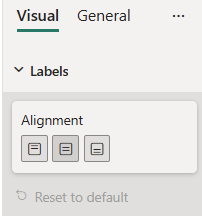
AlignmentGroup is a simple formatting slice which is used to represent alignment object type from capabilities.json file.
Example: AlignmentGroup implementation
In this example, we show how to build a AlignmentGroup slice using formatting model utils.
Capabilities object
Insert the following JSON fragment into the capabilities.json file.
{
  // ... same level as dataRoles and dataViewMappings
  "objects": {
    "labels": {
      "properties": {
        "alignment": {
          "type": {
            "formatting": {
              "alignment": true
            }
          }
        }
      }
    }
  }
}
Formatting model class
The following tabs show examples of the same AlignmentGroup slice in two available modes.

Insert the following code fragment into the settings file.
import { formattingSettings } from "powerbi-visuals-utils-formattingmodel";

class LabelsCardSetting extends formattingSettings.SimpleCard {
    name: string = "labels"; // same as capabilities object name
    displayName: string = "Labels";

    public labelsAlignment: formattingSettings.AlignmentGroup = new formattingSettings.AlignmentGroup({
        name: "alignment", // same as capabilities property name
        displayName: "Alignment",
        value: "center", // available values - "center", "left" or "right"
        mode: powerbi.visuals.AlignmentGroupMode.Horizonal
    });

    public slices: formattingSettings.Slice[] = [ this.labelsAlignment ];
}

export class VisualSettings extends formattingSettings.Model {
    public labels: LabelsCardSetting = new LabelsCardSetting();
    public cards: formattingSettings.SimpleCard[] = [this.labels];
}