Hi @Mattix, Marie,
Welcome to the Microsoft Q&A forum.
Thank you very much for reaching out regarding the issue with multiple calendars merging in Outlook. I really appreciate you taking the time to describe what you're experiencing.
From what you described, it sounds like events created in one calendar are also appearing in your other calendars under the same email address. I understand how confusing this can be, especially when you're trying to keep your calendars separate.
Outlook Web supports multiple calendars under one account but still relies on a single default calendar, so when you create a new event it automatically uses either the default or last‑used calendar meaning the event may be saved to the wrong one if the correct calendar isn’t selected, and the overlay view can make separate calendars appear merged even though they remain distinct.
Here are my recommendations, which I hope will be helpful to you:
1/ To ensure events go to the correct calendar:
When creating a new event:
- The calendar selector appears directly under the Save button at the top of the event window.
- Click that selector to choose the correct calendar before saving.
-
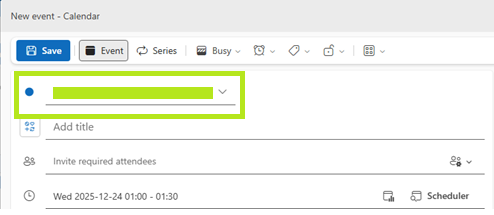
Note: If you don’t see the calendar selector, please make sure more than one calendar is enabled in the left panel. The option only appears when Outlook Web detects multiple active calendars.
Optional - to avoid the calendars appearing merged:
In Calendar view, open the left sidebar and uncheck the calendars you don’t want to display.
Outlook Web will only show the selected calendars, preventing them from appearing combined.
For additional details, you can refer to this Microsoft's article: Working with multiple calendars in Outlook on the web - Microsoft Support.
2/ Submit Feedback to Microsoft
As a forum moderator, I hope you understand that I don’t have the ability to modify or escalate product issues directly. However, I strongly recommend submitting your feedback through the Outlook · Community portal. This is the most effective way to ensure your voice reaches the product team and can be considered for future improvements.

Once you've submitted your feedback, feel free to share the link here in the comments. I’ll be happy to upvote it to help bring more visibility.
Additionally, since many other users have expressed similar concerns but may not know where to submit feedback, if my response has helped you better understand the situation and guided you toward a possible next step, please mark it as the “Accepted Answer.” Your action will help pin this post to the top, making it easier for others in the community who are experiencing the same issue to find your feedback and support it.
I hope this information is helpful. Please follow these steps and let me know if it works for you. If not, feel free to share them in the comments on this post so I can continue to assist you.
I look forward to hearing your thoughts on this.
If the answer is helpful, please click "Accept Answer" and kindly upvote it. If you have any extra questions about this answer, please click "Comment".
Note: Follow the steps in our documentation to enable email notifications if you want to receive email notifications related to this topic.
' cx='32' cy='32' r='32' /%3E%3Ctext x='50%25' y='55%25' dominant-baseline='middle' text-anchor='middle' fill='%23FFF' %3EMM%3C/text%3E%3C/svg%3E)


' cx='32' cy='32' r='32' /%3E%3Ctext x='50%25' y='55%25' dominant-baseline='middle' text-anchor='middle' fill='%23FFF' %3ECD%3C/text%3E%3C/svg%3E)