Note
Access to this page requires authorization. You can try signing in or changing directories.
Access to this page requires authorization. You can try changing directories.
This article provides instructions to guide you in migrating Java projects from Oracle to PostgreSQL database by using GitHub Copilot app modernization.
For app code changes related to database migration scenarios, GitHub Copilot app modernization provides a list of predefined tasks to support you on homogeneous migration. The scenarios include migration from PostgreSQL, Microsoft SQL Server, MySQL, Cassandra, MongoDB, and other databases to the corresponding Azure database offering. The tool also supports heterogeneous migration from Oracle to Azure PostgreSQL. The tasks mainly help you prepare your codebase for Managed Identity authentication to the Azure databases.
Another important factor to consider during database migration is SQL dialect conversion, which encompasses both static and dynamic SQL present in application code. For homogeneous migrations, SQL conversion is typically unnecessary because the database type remains the same. However, in heterogeneous migrations - such as transitioning from Oracle to PostgreSQL - the process of converting SQL can be complex and requires considerable effort.
New advances for Oracle to PostgreSQL migration
We now offer two significant advances for the Oracle to PostgreSQL migration scenario in partnership with the Azure PostgreSQL team:
AI-powered database migration tooling: PostgreSQL tooling powered by AI that can efficiently manage the database migration process from Oracle to PostgreSQL, thereby reducing manual intervention and minimizing the risk of errors.
Smart SQL conversion in app code: to support necessary application code changes, we offer built-in SQL conversion functionality in GitHub Copilot app modernization, seamlessly integrated as part of a unified task workflow.
Database migration with AI-powered database migration tooling
To understand how to install and use the AI-powered database migration tooling - the PostgreSQL Visual Studio Code extension for DB migration - see What is the PostgreSQL extension for Visual Studio Code preview?
Database-related app code change with smart SQL conversion
GitHub Copilot app modernization now provides a dedicated migration task designed to address both the database client update - using Managed Identity authentication - and SQL conversion required for the Oracle to PostgreSQL migration scenario.
A key feature is the ability to leverage coding notes. Coding notes detail schema changes for the database migration that you can optionally use to produce more precise and semantically aligned PostgreSQL-compatible code. Coding notes are metadata artifacts automatically generated during the database schema conversion phase using PostgreSQL Visual Studio Code extension. Coding notes can include the following information:
- Data type mappings and structural changes.
- Conversion details for sequences, identities, and composite types.
- Adjustments to date/time or interval implementations.
- References to tables with referential integrity constraints.
- Summaries of complex Oracle packages, including procedure and function signatures.
- Additional AI-generated hints to improve code translation accuracy.
Use the Oracle to PostgreSQL migration task
Use the following steps to run the Oracle to PostgreSQL migration task in GitHub Copilot app modernization:
To run the application assessment, follow the instructions in Quickstart: Assess and Migrate a Java Project Using GitHub Copilot app modernization.
After the assessment completes, review the generated report. If your application uses Oracle, the report reveals an Oracle-related issue Database Migration (Oracle) and the default solution is Migrate from Oracle DB to PostgreSQL.
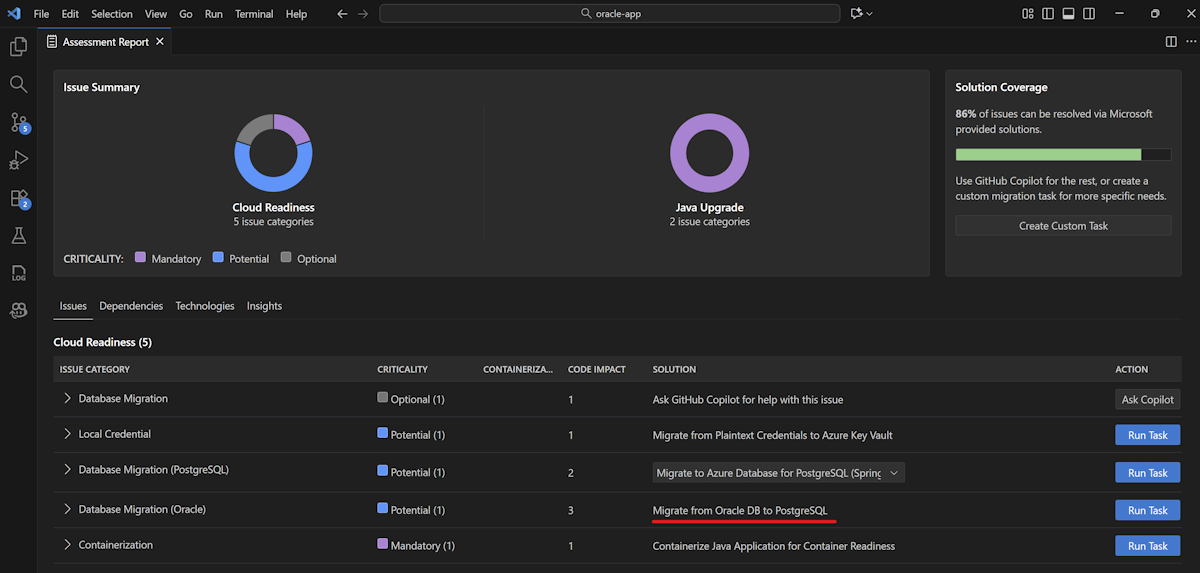
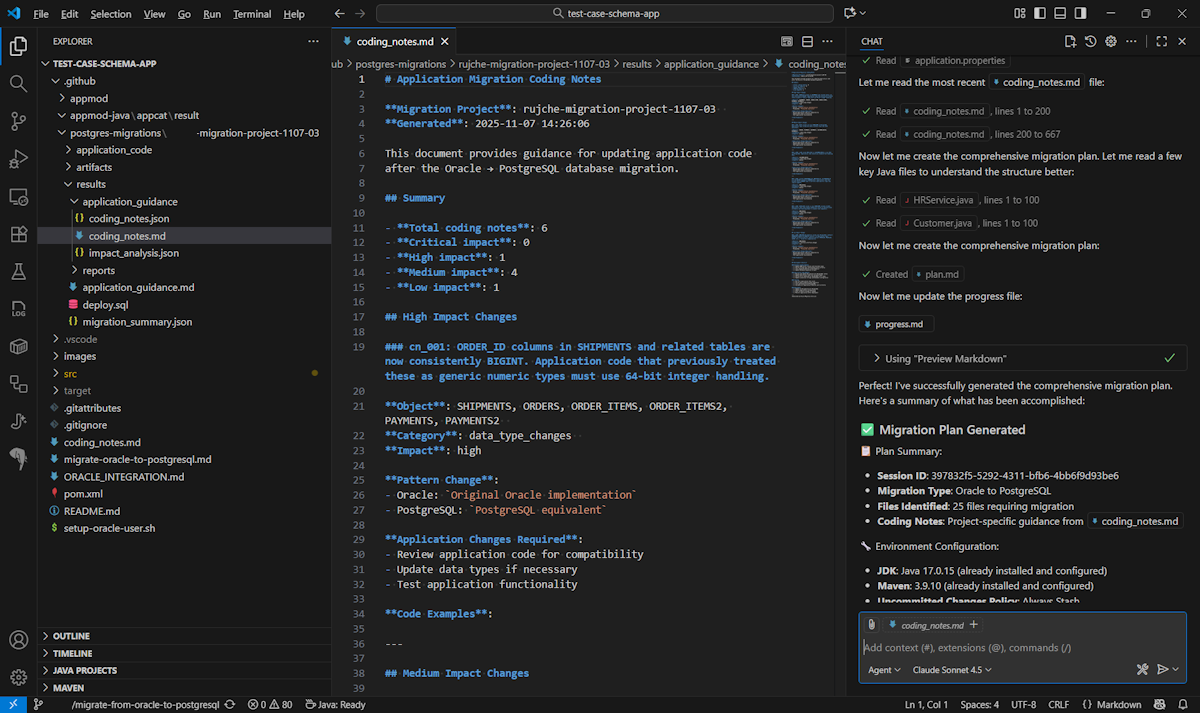
Optionally, you can get the coding notes placed properly in your app code folder. Check whether
coding_notes.mdis present in the.github\postgre-migrations\*\results\application_guidance\folder. If it isn't present, go to the database team responsible for your Oracle to PostgreSQL migration to get it, and put it into the same folder structure.Next, select Run Task to execute the migration. If coding notes are properly placed, app modernization references these notes to produce a higher quality SQL conversion as well as the database client update using Managed Identity authentication. Otherwise, the conversion applies general Oracle-to-PostgreSQL syntax adjustments to propose changes.
See also
To learn more about GitHub Copilot app modernization, see GitHub Copilot app modernization documentation.