Exchange | Exchange Server | Development
The process of building custom applications and tools that interact with Microsoft Exchange Server
This browser is no longer supported.
Upgrade to Microsoft Edge to take advantage of the latest features, security updates, and technical support.
' cx='32' cy='32' r='32' /%3E%3Ctext x='50%25' y='55%25' dominant-baseline='middle' text-anchor='middle' fill='%23FFF' %3EVS%3C/text%3E%3C/svg%3E)
Hi all,
I tried following the document: https://learn.microsoft.com/en-us/exchange/client-developer/legacy-protocols/how-to-authenticate-an-imap-pop-smtp-application-by-using-oauth but unable to get through this step: https://learn.microsoft.com/en-us/exchange/client-developer/legacy-protocols/how-to-authenticate-an-imap-pop-smtp-application-by-using-oauth#register-service-principals-in-exchange.
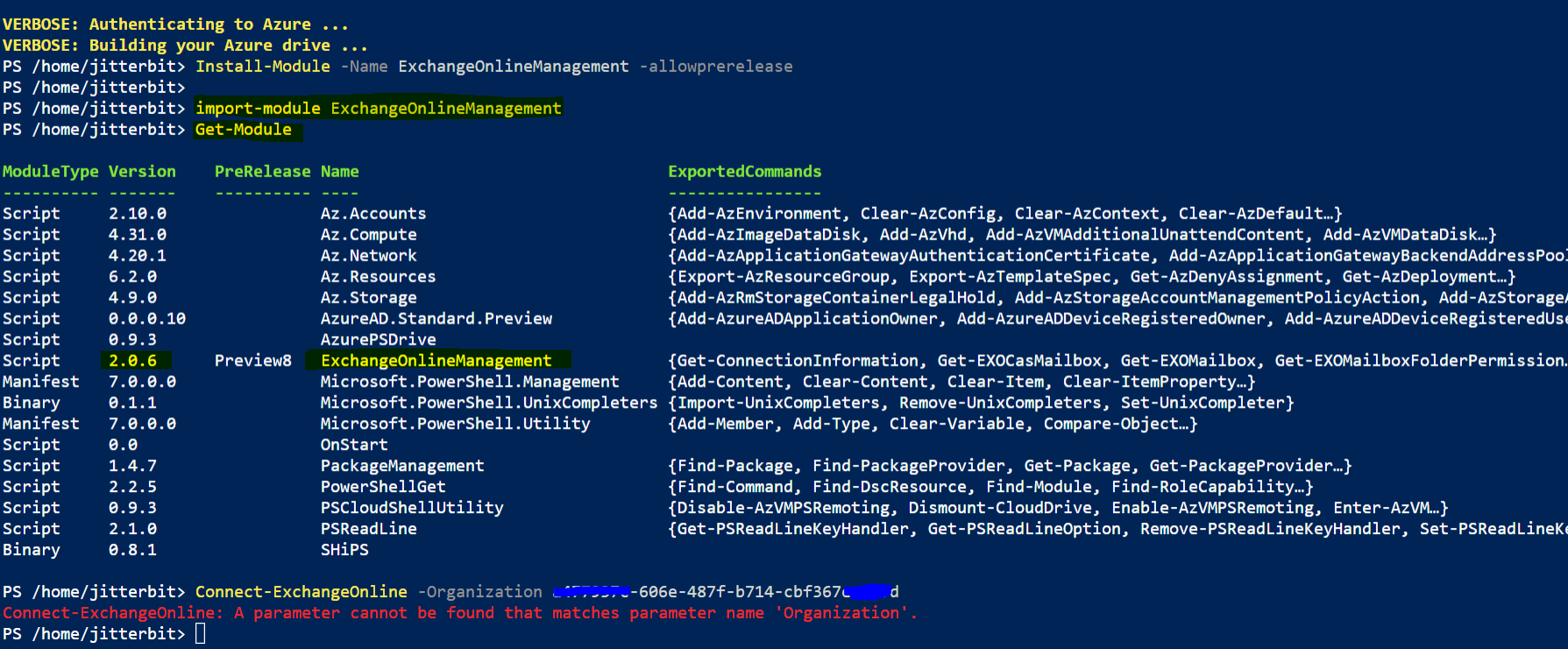
I am facing Connect-ExchangeOnline: A parameter cannot be found that matches parameter name 'Organization'. while running the command (Connect-ExchangeOnline -Organization <mytenantId>) in Powershell as described in above OAuth documentation.
Below is the screenshot.
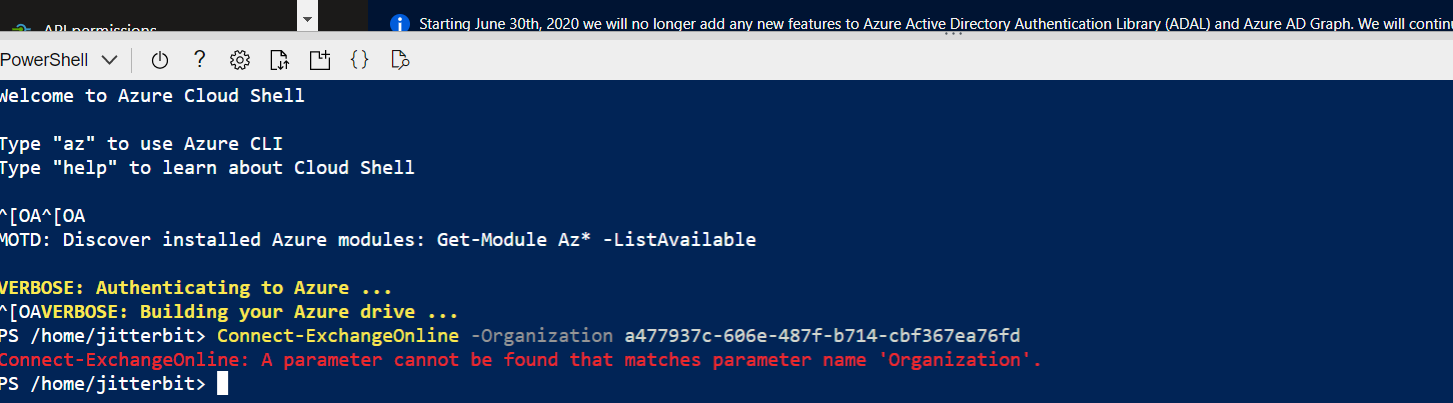
If anyone in your known has knowledge about it, please guide me through.

@Vinay Sharma
I am writing here to confirm with you any update about this thread now?
If the suggestion below helps, please be free to accept it as an answer for helping more people.
Hi @KyleXu-MSFT , No below suggestion didn't work. I raised a support ticket for resolving this issue. Now I am able to execute the command, to resolve the issue you can follow
Exchange classic admin center(https://outlook.office365.com/ecp) > hybrid > configure Exchange PowerShell module.
@Vinay Sharma
I suggested you to use Windows PowerShell with Exchange online module module in the first post. So, I guess it may be useful to you.

https://learn.microsoft.com/en-us/powershell/module/exchange/connect-exchangeonline?view=exchange-ps
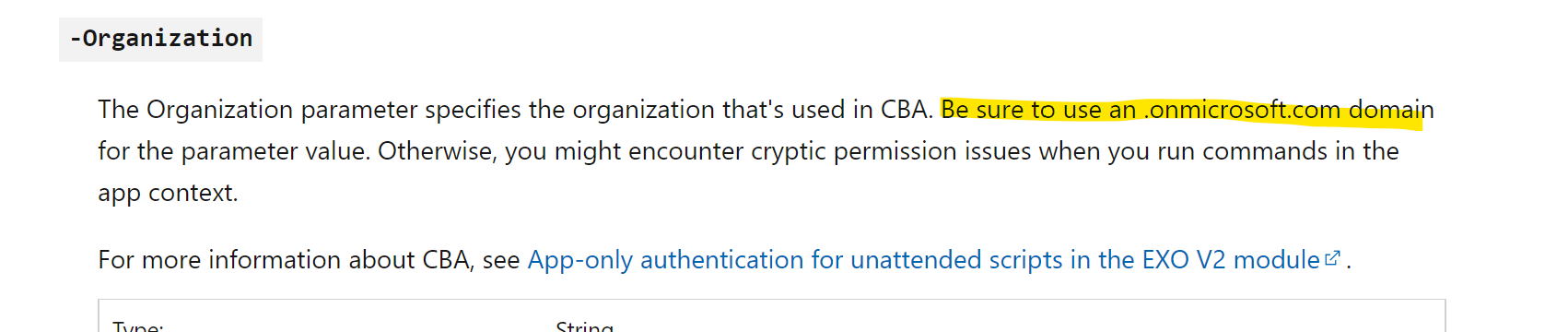
that switch is only used for CBA and requires the onmicrosoft.com domain name, not the TenantID:
' cx='32' cy='32' r='32' /%3E%3Ctext x='50%25' y='55%25' dominant-baseline='middle' text-anchor='middle' fill='%23FFF' %3ERM%3C/text%3E%3C/svg%3E)
Wouldn't it be more likely that he's just prevented from using that parameter? The error says the parameter cannot be found. Maybe something to do with RBAC (or maybe Azure-RBAC)?
it does right? But I dont know of any RBAC that would apply when connecting. The other thing is could be an older module that didnt support that parameter. But you still cant use the TenantID :)
He's already connected to Azure. Doesn't Azure have its own RBAC?
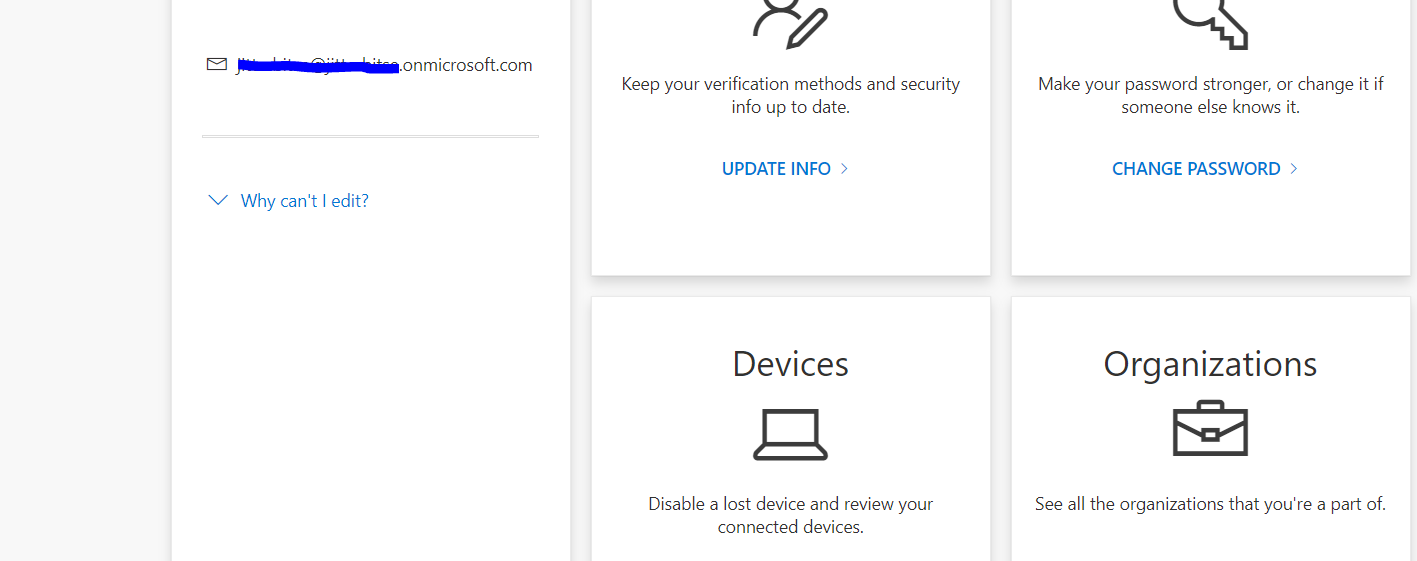
@Andy David - MVP Hi, thank you for the response but i already went through the same documentation and I am using a onmicrosoft.com domain, below is the screenshot.
Could be yea. I see what you are saying.
App only auth is ver 2.03 and above. Not sure if that is when that switch was introduced.
https://learn.microsoft.com/en-us/powershell/exchange/app-only-auth-powershell-v2?view=exchange-ps
First, find you tenant ID follow this article: Find tenant ID through the Azure portal
Install Exchange online Module and connect to Exchange online from Windows PowerShell:
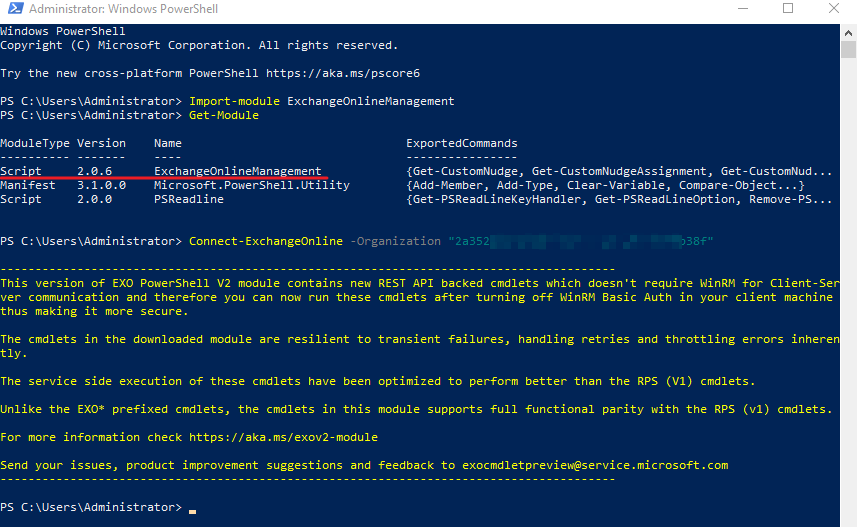
I am using V2 module 2.0.6, there doesn't exist any issue with it.
If the answer is helpful, please click "Accept Answer" and kindly upvote it. If you have extra questions about this answer, please click "Comment".
Note: Please follow the steps in our documentation to enable e-mail notifications if you want to receive the related email notification for this thread.
@KyleXu-MSFT Hi, thank you for the guidance but I am still facing the same. I already has ExchangeOnline installed. After that I followed the commands from you screenshot.
Let me know what I am doing wrong.
@Vinay Sharma
I would suggest you try with Window PowerShell rather than Azure PowerShell.
I you still cannot connect to Exchange online with tenant ID, you could use "Connect-ExchangeOnline" command without "organization" to connect to Exchange online directly.
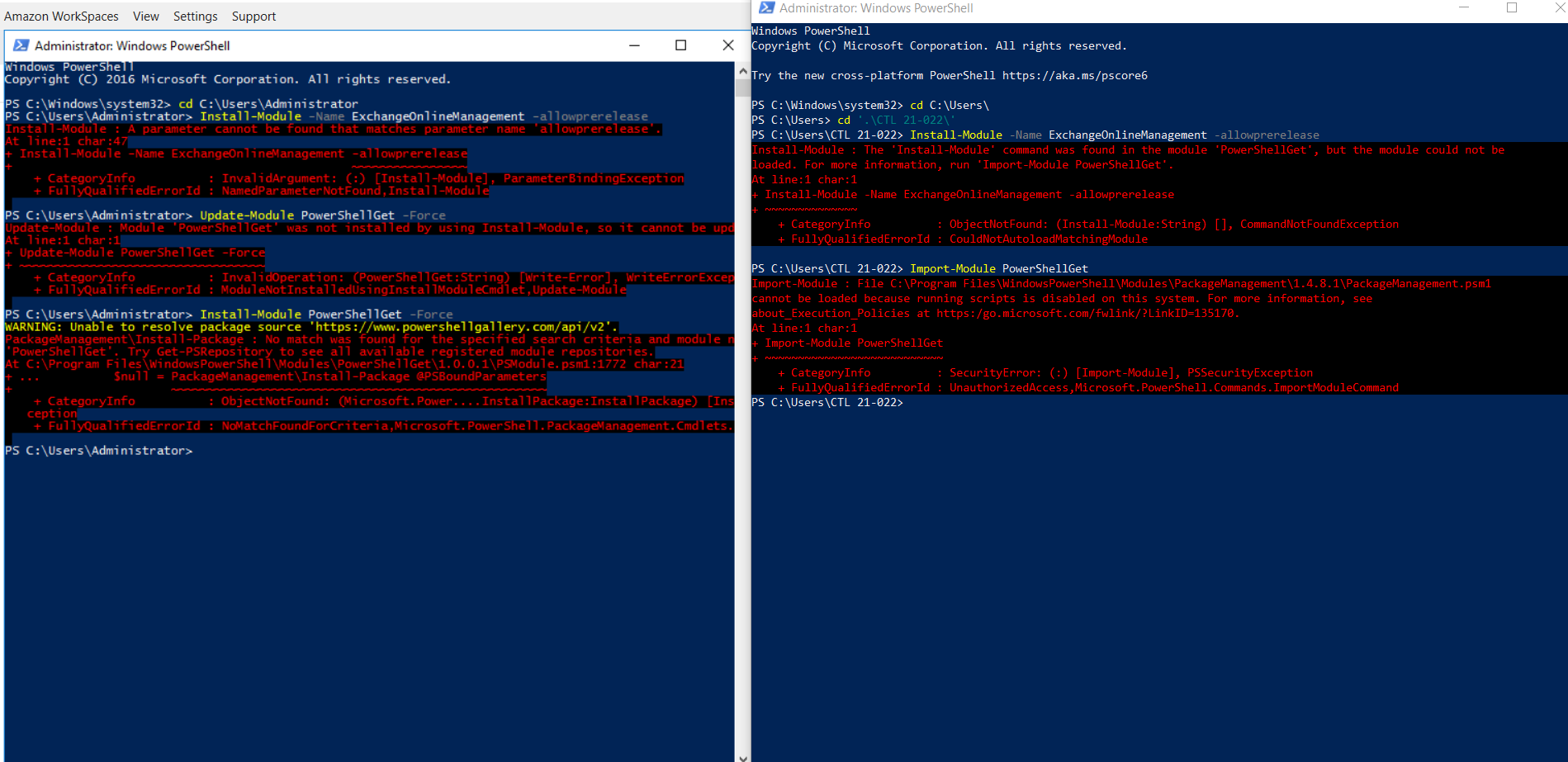
@KyleXu-MSFT Sorry, I tried using Windows PowerShell With Administrator on 2 different machines. One is on the left-hand side of my AWS and another one is my local machine. I was unable to execute the commands.
Only this much Connect-ExchangeOnline is working fine with Azure PowerShell.
If you could connect with “Connect-ExchangeOnline”, you could continue the next step in the article that you provided.
About the error that in Windows PowerShell, it is an issue with install Exchange online management module, you could follow this article to install it (You could also ignore this one).
@KyleXu-MSFT Yes I tried with Connect-ExchangeOnline command but now facing this issue while using New-ServicePrincipal. I am stuck on this now, it is really hard following only this document. https://learn.microsoft.com/en-us/exchange/client-developer/legacy-protocols/how-to-authenticate-an-imap-pop-smtp-application-by-using-oauth. Could you please guide me, what needs to be done now.
Thank you

It looks like a license issue. Are you using an Global admin account to do this one?
@KyleXu-MSFT No, I am not.
I am getting other exception also with another account. I am simultaneously using that account to configure OAuth. On that account I am facing:
New-ServicePrincipal: The term 'New-ServicePrincipal' is not recognized as a name of a cmdlet, function, script file, or executable program. Check the spelling of the name, or if a path was included, verify that the path is correct and try again.

About the "is not recognized as a name of a cmdlet, function, script file, or executable program." issue is most related with lack of permission. So, I would suggest you try to run this command with a global admin account.
' cx='32' cy='32' r='32' /%3E%3Ctext x='50%25' y='55%25' dominant-baseline='middle' text-anchor='middle' fill='%23FFF' %3ETA%3C/text%3E%3C/svg%3E)
I was having the exact same issue and New-ServicePrincipal worked with the corresponding Object ID from Enterprise applications but not from App Registrations
