Azure Virtual Machines
An Azure service that is used to provision Windows and Linux virtual machines.
This browser is no longer supported.
Upgrade to Microsoft Edge to take advantage of the latest features, security updates, and technical support.
' cx='32' cy='32' r='32' /%3E%3Ctext x='50%25' y='55%25' dominant-baseline='middle' text-anchor='middle' fill='%23FFF' %3EMA%3C/text%3E%3C/svg%3E)
Hello All,
I am running into a bizarre problem when creating a Kali Linux Virtual Machine in Azure. Whenever I create a Kali VM it is always barren, with none of the tools or software needed to perform pentesting. I've tried deleting the VM and creating a new one but they always seem to have the same issue.
The only thing I've done on these VMs is upgrade the distros and install xrdp + xfce4. Any possible clues as to what is happening?
Best Regards,

Hi,
Just created an Azure virtual machine with the "Kali Linux" image in my Azure environment, I do have a lot of pentest applications:
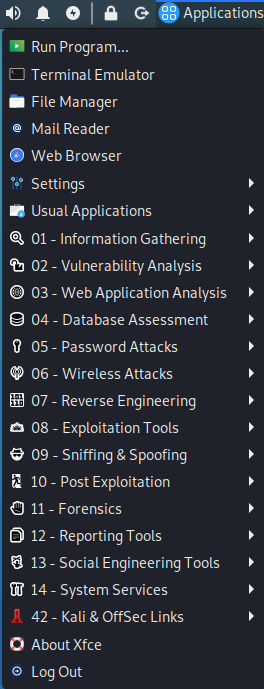
What I did:
You can follow this guide as well:
https://cloudyhappypeople.com/2018/12/23/setting-up-a-kali-linux-machine-in-azure
Best regards,
Leon