Turned in and made changes through quick edits (clarification)

Anonymous
2024-12-10T13:19:20+00:00

I submitted the assignment one week ago, but after reviewing it now, I realized that I had missed answering the last part. I discovered that I can edit the assignment using the quick edit feature without needing to unsubmit it. My question is that, can the teacher see that I added answers or made changes to my assignment, Can they access old version. Please answer me

Microsoft Teams | Microsoft Teams for education | Assignments | Edit assignments

Locked Question. This question was migrated from the Microsoft Support Community. You can vote on whether it's helpful, but you can't add comments or replies or follow the question.

0 comments No comments
{count} votes

5 answers

Sort by: Most helpful
  1. Anonymous
    2024-12-10T15:39:22+00:00

    Dear MARIA_186

    Good day and thanks for posting in Microsoft forum community, pleasure to work with you.

    If you use the "Undo Turn-in" feature to make edits and then resubmit, your teacher will see the updated version with the new submission timestamp. They won't have access to the previous versions unless they specifically saved them before you made the changes.

    In case any further query, we will be on standby to further answer your query.

    Have a great day.

    0 comments No comments
  2. Anonymous
    2024-12-11T19:21:02+00:00

    Hello! Thanks for the reply. The problem is, I do not need to click the "Undo turn in" because upon clicking on my submitted file, there was this option to make quick edits.

    This one. I can make changes to my submitted assignment, I was just wondering if the teacher can see that I made changes to my assignment. Please help

    0 comments No comments
  3. Anonymous
    2024-12-12T11:08:19+00:00

    Hi MARIA_186,

    Greetings. Thank you for your further reply and the updates for your query.

    Based on your description and as far as I know, if you Edit your assignment after you’ve turned in, your teacher will not be able to see those changes unless you resubmit the assignment, teacher will only be able to see the version of the assignment that you submitted before the due date. To let your teacher views your Edited document, you need to click the “Undo turn in” button first and then resubmit after your edit your assignment.

    Here is a similar thread: Can you see edited changes made to an assignment after its handed in - Microsoft Community and the official support article as reference for you: View and navigate your assignments (student) - Microsoft Support.

    Image

    If there’s any further questions or anything else I can do for you, Please be free to contact and send feedback to me. I’m glad to help.

    Hope you having a nice day.

    Sincerely,

    Harry | Microsoft Community Moderator

    0 comments No comments
  4. Anonymous
    2024-12-12T19:57:04+00:00

    As long as the submitted assignment is a Word document file, I can make quick edits without needing to click "undo Turn in", and the teacher will only see the updated version not the old one. Is that correct? Just to be xtra sureee

    0 comments No comments
  5. Anonymous
    2024-12-15T08:38:46+00:00

    Hi MARIA_186,

    Thank you for your further reply. I’m glad to help you further.

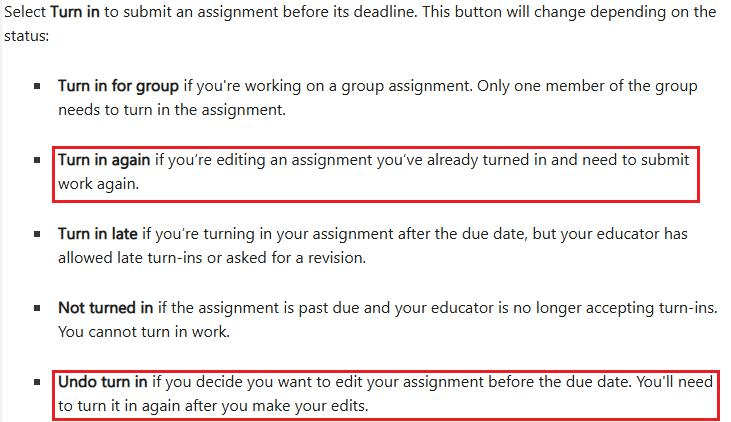
    Based on your description, I’m afraid and sorry to say it isn’t correct as the Teacher will only see the old one as you need to Undo turn in first, then click Turn in again to trigger the resubmit of your Word document, otherwise your teacher will not see your new edits in this Word document. For your reference: Turn in an assignment in Microsoft Teams - Microsoft Support [6440-ab76-e53-505d].
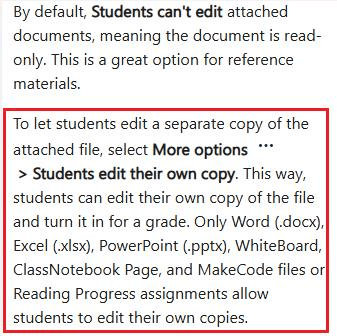
    The reason why you can edit the Word document by clicking the Edit button is because your teacher set the assignment into Students edit their own copy. For your reference: Create an assignment in Microsoft Teams - Microsoft Support [ff99-fb4b-9d1-bfa2].
    However, your new edits won’t be viewed for your teacher unless you follow the steps above to trigger the resubmit as it doesn’t have synchronization between your edits and your submitted assignment.

    If you think this by design scenario is inconvenient, Personally, I’m also totally understanding the convenience of simply editing the assignment without resubmitting to let teacher view the modification. Due to this situation, I also suggest you can go to this link: Microsoft Teams · Community to go to our Feedback community and send your feedback and requirements. Our product team is in charge of the site, and they constantly check customer reviews and feedback, and a lot of the features are developed and improved based on customer feedback.

    Appreciate again for your patience and understanding.

    I wish you keep safe and having a great day as well.

    Sincerely,

    Harry | Microsoft Community Moderator

    0 comments No comments