Outlook Web App (Office 365) Unread Mail Folder in Favorites

BigJay2100 21 Reputation points
2021-08-19T20:17:48.553+00:00

I have been searching all over but not finding what I am looking for and am assuming it doesn't exist but I am willing to ask still.

I am using the Outlook Web Access for my work email through Office365. I am NOT using the Outlook client app. I am looking for a way to create a folder in my favorites that is only unread messages and that folder needs to see all unread messages from all folders including subfolders. Is this possible? Either the ability to set a folder up that exists and I am not seeing it or a way to use the search "isread:no" as what populates the folder.

Reason for this is I have rules I want to use that filter email I don't need in my inbox to subfolders but I still need to see these messages at some point. I know I can go folder by folder and change the filter to unread but that takes a lot of time that I don't have.

Any ideas on if this is a function that I am just missing?

Outlook | Windows | Classic Outlook for Windows | For business
Microsoft 365 and Office | Development | Microsoft 365 Publishing

Locked Question. You can vote on whether it's helpful, but you can't add comments or replies or follow the question.

0 comments No comments
{count} votes

2 answers

Sort by: Most helpful
  1. Shay Ceasary 5 Reputation points
    2025-09-30T08:35:52.9233333+00:00

    I think there is an option to have "Unread mail" as a search folder:
    Step 1: create a new search folder
    User's image

    Step 2: select the type as Unread mail and name your folder

    User's image

    Step 3: add the folder to your favorites

    click on the 3 dots next to the folder, and select "add to favorites"
    User's image

    1 person found this answer helpful.
  2. Jade Liang-MSFT 9,986 Reputation points Microsoft Employee
    2021-08-20T04:58:22.99+00:00

    Hi @BigJay2100 ,

    Please first understand under Outlook tag, we mainly focus on general issues about Outlook desktop client, I have researched and tested a lot about your issue. As I know, the search folder function is available to outlook desktop client but not for owa, here is a relevant thread, for your reference:
    Full Unread Folder for Outlook OWA : Where is it?

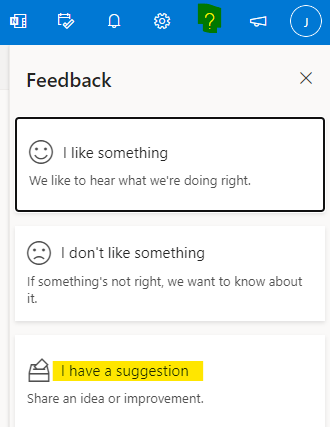
    In this case, I'm afraid we could only search all folder via "isread:no" or filter the folder manually via "Unread" to meet it in owa now. If you still need this feature in owa, it's recommended to submit a feedback in owa like below (click the "?" icon>feedback>I have a suggestion), your time and effort would be highly appreciated and would benefit Microsoft improve the product in the future.
    124870-image.png


    If the response is helpful, please click "Accept Answer" and upvote it.
    Note: Please follow the steps in our documentation to enable e-mail notifications if you want to receive the related email notification for this thread.