Hi @Colin Teo,
Thank you for posting your question in the Microsoft Q&A forum.
Regarding to your question about the error message "Microsoft 365 has been configured to prevent individual acquisition and execution of office store add-ins", it's usually points to an organization-level policy that restricts users from installing or running add-ins outside of what’s deployed centrally.
To help move things forward, we kindly recommend that your Microsoft 365 administrator review the following areas, as they have access to the necessary settings and tools to address billing and subscription-related concerns.
1/ Check Intergrated apps settings:
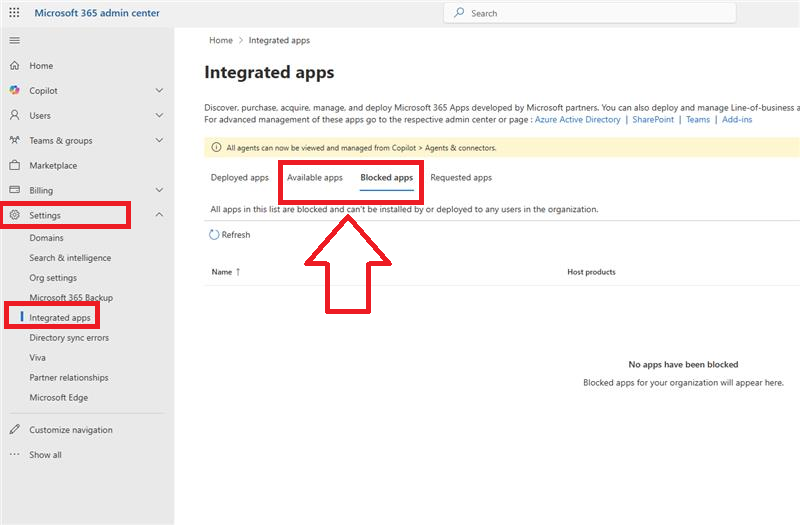
In the Microsoft 365 admin center > Settings > Integrated apps.
Ensure the policy allows users to acquire and run Office Store add-ins. If the app is set to Blocked apps, the affected user will see this error even if the add-in is assigned.
2/ License and Service plan:
Confirm the user has an Office 365 license that includes PowerPoint and supports add-ins. Missing service plans (like Office Store) can cause this issue.
3/ Group membership sync:
Verify the user is correctly synced in the AD group and that the assignment has propagated. Sometimes there’s a delay or sync issue.
4/ Office client settings:
- Check if the user’s Office client is up to date and signed in with the correct account.
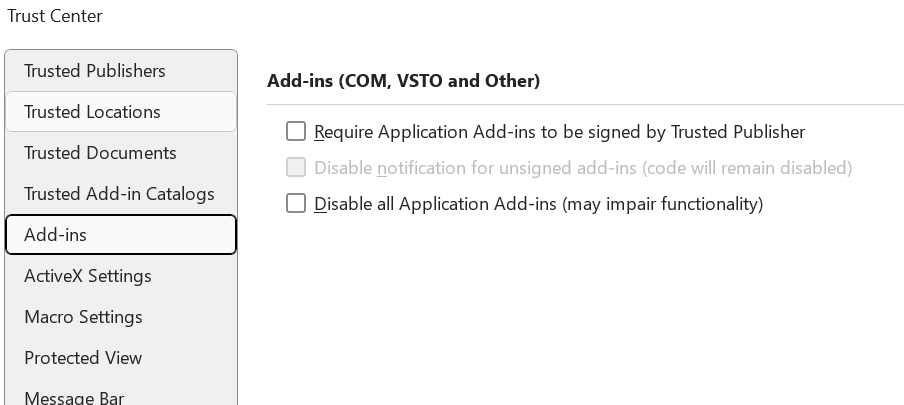
- In PowerPoint, choose File > Options > Trust Center > Trust Center Settings > Add-ins, confirm no local restrictions are applied.
5/ Submit Support ticket:
If the issue continues after reviewing the steps above, we recommend contacting Microsoft Support directly through the Microsoft 365 Admin Center. This will allow the support team to securely access your environment and provide more targeted assistance.
Please understand that our initial response does not always resolve the issue immediately. However, with your help and more detailed information, we can work together to find a solution.
I hope this information is helpful. Please follow these steps and let me know if it works for you. If not, we can work together to resolve this.
Thank you for your patience and your understanding. If you have any questions, please feel free to reach out.
I'm looking forward to your reply.
As other users will also be looking for information in this community, please click on "Accept Answer" and feel free to vote for this answer. Your valuable vote will definitely help other users with similar questions to find the right channel and useful information more easily.
Thank you for your kind words.
Note: Please follow the steps in our documentation to enable email notifications if you want to receive notifications related to this thread.
' cx='32' cy='32' r='32' /%3E%3Ctext x='50%25' y='55%25' dominant-baseline='middle' text-anchor='middle' fill='%23FFF' %3ECT%3C/text%3E%3C/svg%3E)

' cx='32' cy='32' r='32' /%3E%3Ctext x='50%25' y='55%25' dominant-baseline='middle' text-anchor='middle' fill='%23FFF' %3EKN%3C/text%3E%3C/svg%3E)
' cx='32' cy='32' r='32' /%3E%3Ctext x='50%25' y='55%25' dominant-baseline='middle' text-anchor='middle' fill='%23FFF' %3EDV%3C/text%3E%3C/svg%3E)