Dear AnnaBroek,
Welcome to Microsoft Q&A.
I’m really sorry you’ve run into this issue.
Based on what I’ve found (and from testing this myself), your observation is correct: PowerPoint for the web does not currently support in/out animations for videos. Image animations work fine, but video animations are skipped because the web version uses a simplified rendering engine. This isn’t a problem with your file, it’s a limitation of the online environment.
While Microsoft is actively improving PowerPoint for the web, here are a few workarounds you can try:
Run the slideshow in the desktop app
If animations are critical, download the file and present from the full desktop version. That’s the only way to keep all video effects intact.
Export your presentation as a video
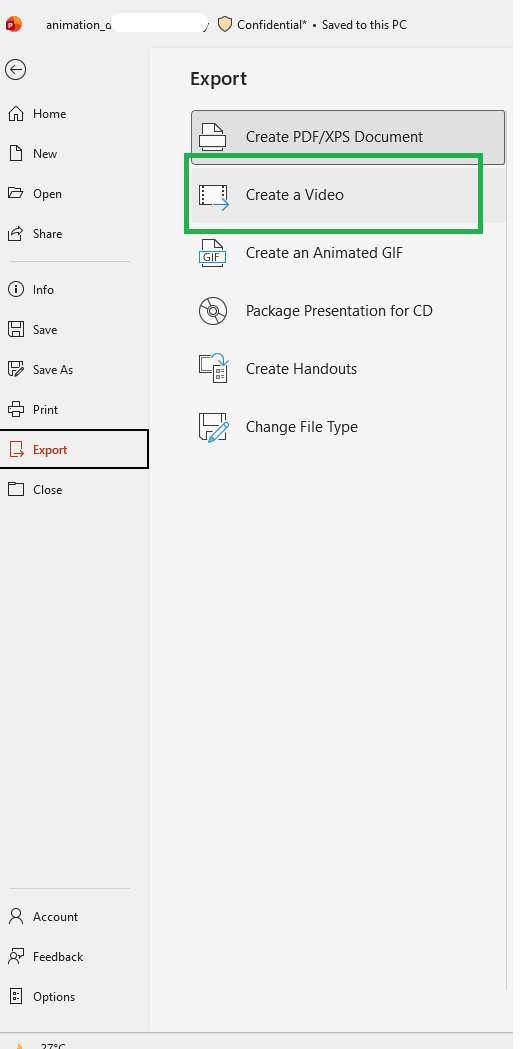
In the desktop app, go to File > Export > Create a Video. This preserves all animations and transitions, so you can share the video instead of the PPT file.
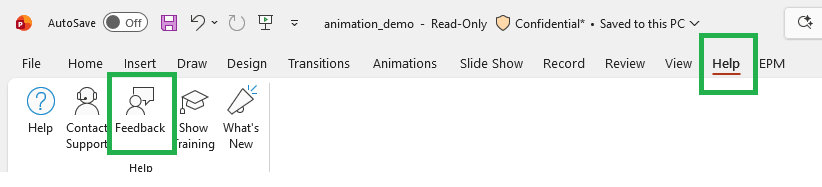
I know these aren’t perfect solutions, and your expectation for a direct fix from Microsoft is completely reasonable. The best next step is to give feedback directly in PowerPoint Online (Help > Feedback > Suggest a feature) and mention why video animations are important for your presentations. Microsoft actively reviews this feedback when planning updates.
 This is a sample, you can use or edit for your feedback
Subject: Support for Video Animations in PowerPoint for the Web
I often create presentations with animated videos in the desktop version of PowerPoint. When I upload these presentations to PowerPoint for the web, the video animations do not work, even though image animations are preserved.
This feature is important for delivering professional and engaging presentations online. Please consider adding full support for video animations in PowerPoint for the web to ensure consistency across platforms.
Thank you for reviewing this suggestion.
Thank you again for sharing your experience and for taking the time to troubleshoot.
If the answer is helpful, please click "Accept Answer" and kindly upvote it. If you have extra questions about this answer, please click "Comment".
Note: Please follow the steps in our documentation to enable e-mail notifications if you want to receive the related email notification for this thread.
' cx='32' cy='32' r='32' /%3E%3Ctext x='50%25' y='55%25' dominant-baseline='middle' text-anchor='middle' fill='%23FFF' %3EA%3C/text%3E%3C/svg%3E)

' cx='32' cy='32' r='32' /%3E%3Ctext x='50%25' y='55%25' dominant-baseline='middle' text-anchor='middle' fill='%23FFF' %3ELD%3C/text%3E%3C/svg%3E)
