Dear @Jennifer Noguera,
Thank you for reaching out to Microsoft Q&A forum.
I understand you are referring to the daily schedule side panel that used to appear when you selected a date in the Month View of the New Outlook calendar.
The functionality you are describing is crucial for productivity, as it allowed users to quickly review a day's events without having to change the main calendar view.
I believe this image may depict the feature you are requesting:
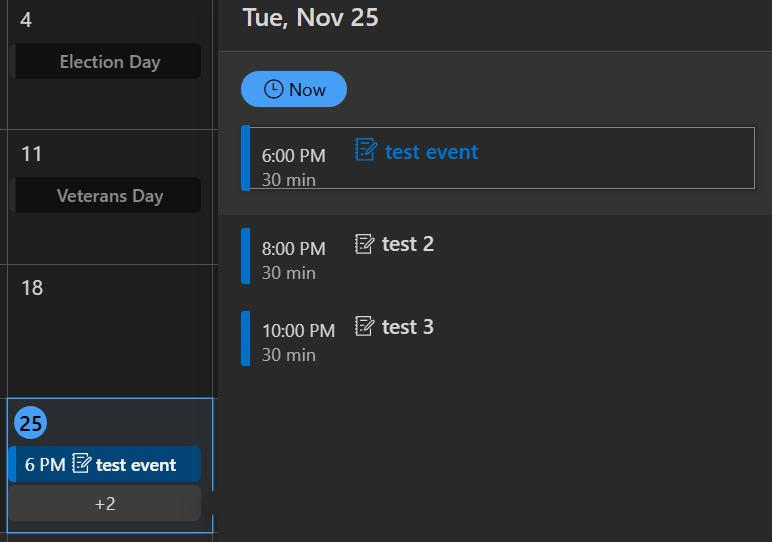
Correct me if I'm wrong, is this what you're looking for?
I am using New Outlook for Windows version 1.2025.1111.100. Knowing your version can help determine if this is a feature rollback or a rendering issue.
In the meantime, you can try clearing your local Outlook cache to see if it resolves a potential rendering issue:
- Close the Outlook app.
- Press the Windows + R keys simultaneously to open the Run dialog box.
- Type the following path into the Run box and press Enter: %localappdata%\Microsoft\Outlook\RoamCache
- This will open the RoamCache folder containing the cache files associated with your Outlook profile.
- Click anywhere within the folder, press Ctrl + A to select all files, and then press the Delete key to remove them. Alternatively, you can right-click the selection and choose the Delete option from the context menu.
- After clearing the cache, restart Outlook again. It will rebuild the necessary cache files from scratch.
If the image above is not what you are looking for, please clarify what the daily schedule side panel in the Month View looked like.
If possible, kindly share a screenshot of your current view.
IMPORTANT: When capturing the screenshot, please ensure you mask or obscure any sensitive personal information, such as full names, email addresses, or specific subjects, before posting it on this public forum.
I hope this information is helpful. Please follow these steps and let me know if it works for you. If not, we can work together to resolve this. Thank you for your patience and understanding. If you have any questions or need further assistance, please feel free to share them in the comments so I can continue to support you. I'm looking forward to your reply.
If the answer is helpful, please click "Accept Answer" and kindly upvote it. If you have extra questions about this answer, please click "Comment".
Note: Please follow the steps in our documentation to enable e-mail notifications if you want to receive the related email notification for this thread.
' cx='32' cy='32' r='32' /%3E%3Ctext x='50%25' y='55%25' dominant-baseline='middle' text-anchor='middle' fill='%23FFF' %3EJN%3C/text%3E%3C/svg%3E)

' cx='32' cy='32' r='32' /%3E%3Ctext x='50%25' y='55%25' dominant-baseline='middle' text-anchor='middle' fill='%23FFF' %3EDW%3C/text%3E%3C/svg%3E)
' cx='32' cy='32' r='32' /%3E%3Ctext x='50%25' y='55%25' dominant-baseline='middle' text-anchor='middle' fill='%23FFF' %3ECB%3C/text%3E%3C/svg%3E)


' cx='32' cy='32' r='32' /%3E%3Ctext x='50%25' y='55%25' dominant-baseline='middle' text-anchor='middle' fill='%23FFF' %3EKL%3C/text%3E%3C/svg%3E)
' cx='32' cy='32' r='32' /%3E%3Ctext x='50%25' y='55%25' dominant-baseline='middle' text-anchor='middle' fill='%23FFF' %3EJS%3C/text%3E%3C/svg%3E)