Hello @Sanne Roemen,
Thank you for posting your valuable question on Microsoft Q&A forum.
Based on your description, the autocomplete feature in Outlook on the web (accessed via Microsoft Edge on macOS) is not functioning as expected when entering addresses in the To, CC, or BCC fields, and also when adding contacts to a list. Please let me know if I misunderstood any part of your situation.
To troubleshoot, here are a few steps you may want to try:
Clear Browser Cache and Cookies
- In Microsoft Edge, go to Settings > Privacy, search, and services > Clear browsing data Select Cookies and other site data and Cached images and files, then click Clear now.
Test in an Alternate Browser
Outlook on the web relies on browser rendering and scripts. If autocomplete works in Safari or Chrome but fails in Edge, the issue is likely related to:
- Edge-specific settings (extensions, cache, cookies)
- Compatibility or rendering differences
- Corrupted browser profile
Test on Other Platforms or Devices
If autocomplete works in the New Outlook app on Mac or another device, then:
- The problem is not with your account or Outlook service.
- It’s likely a local issue (browser, system configuration, or network settings).
If the feature works on another device:
- Your account is fine.
- The issue is isolated to your original device/browser setup.
If the issue still persists after testing in alternate browsers and devices, then this issue may require a deeper investigation on the backend. We recommend reaching out to the Microsoft Technical Support Team for further assistance.
Their specialists can perform deeper diagnostics and, if needed, escalate the case to the appropriate internal team for further analysis. This ensures the issue is formally tracked and may contribute to a future fix.
If you have a work or school account (link to your organization domain):
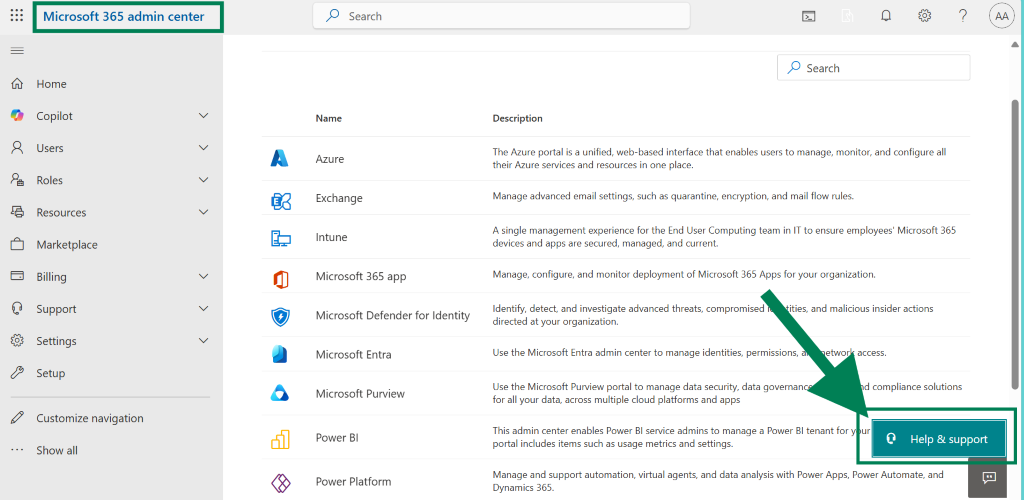
If your organization's Office 365 Business/Education subscription is from a partner or reseller, and the global administrator is unable to open a service request on your end, contact the reseller's support provider to help open a service request on behalf of you instead.
If you have a personal account (Gmail, Hotmail, Yahoo, Outlook.com,…):
- Go to https://support.microsoft.com/contactus
- Choose Office > Get home support
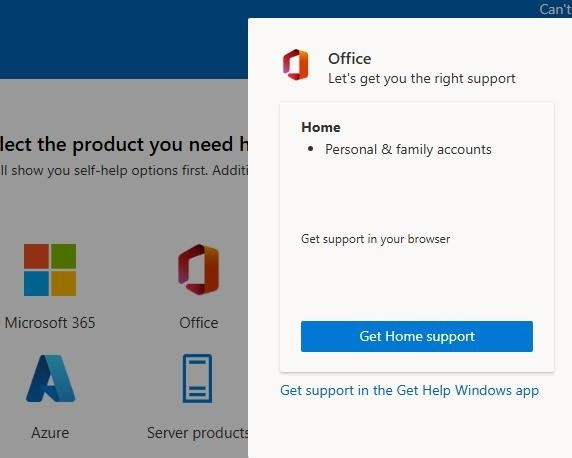
- Enter Office or your issue in general in the box below "We're here for you" then click "Get Help
- Scroll down and click on Contact Support then log in to your personal Microsoft account If the account cannot be logged in, you can use another account or create a new account to execute
- Select "Microsoft 365 and Office" in Products & Services, select "Technical Support" as a category, and click Confirm
- Select "Chat in a web browser and support specialist" to enter the chat window
If you discover any solutions or have additional insights, please consider replying to this thread to help others in this forum.
I sincerely apologize for redirecting you to the Microsoft Technical Support Team. While we strive to assist as much as possible here in the forum, our resources are limited when it comes to backend-level diagnostics and advanced troubleshooting. Some issues require deeper technical analysis and access to internal tools that only the official support team can provide.
If you need further assistance, feel free to reply. I'm here and happy to help!
If the answer is helpful, please click "Accept Answer" and kindly upvote it. If you have extra questions about this answer, please click "Comment".
Note: Please follow the steps in our documentation to enable e-mail notifications if you want to receive the related email notification for this thread.
' cx='32' cy='32' r='32' /%3E%3Ctext x='50%25' y='55%25' dominant-baseline='middle' text-anchor='middle' fill='%23FFF' %3ESR%3C/text%3E%3C/svg%3E)


' cx='32' cy='32' r='32' /%3E%3Ctext x='50%25' y='55%25' dominant-baseline='middle' text-anchor='middle' fill='%23FFF' %3ETH%3C/text%3E%3C/svg%3E)