How Do I Retarget a C++ Application?

Larry 20 Reputation points
2025-12-02T16:49:16.36+00:00

Hello Folks:

Developing on Windows 10 Pro on the Extended Security Update program, VS 2019 Community Version 16.11.53, all C++.

I'm getting the following error.

error MSB8020: The build tools for v143 (Platform Toolset = 'v143') cannot be found.
To build using the v143 build tools, please install v143 build tools.
Alternatively, you may upgrade to the current Visual Studio tools by selecting the Project menu or
right-click the solution, and then selecting "Retarget solution".

I've used "Retarget Solution" in the Project's menu a few times.

Here the Project tab's menu:
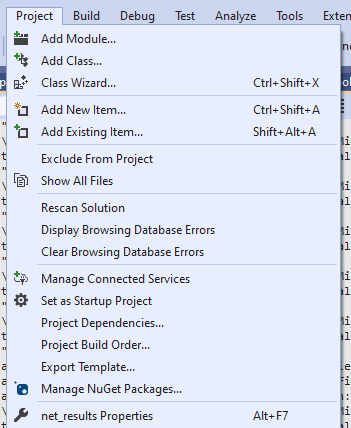
3_project_drop_down

Here is the menu from selecting on the main project in the Solution explorer:
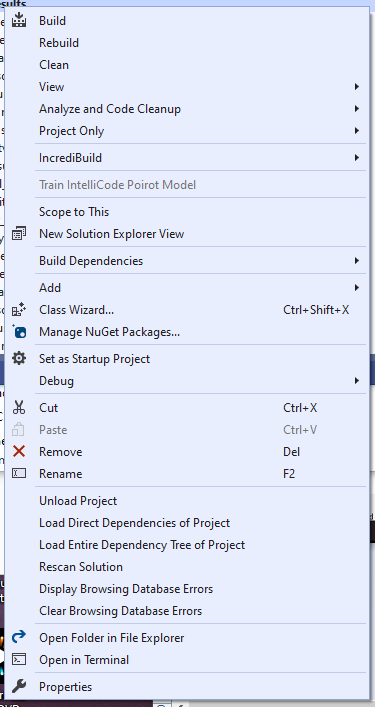
4_solution_explorer_drop_down

Is anybody seeing "Retarget solution"in either of these menus? I'm not.

Rescan solution doesn't seem to do much.

Suggestions?

Thanks
Larry

Windows development | Windows API - Win32
{count} votes

2 answers

Sort by: Most helpful
  1. RLWA32 51,361 Reputation points
    2025-12-02T17:36:06.3866667+00:00

    In solution explorer select the project node. Right click and select properties. When the project property page opens make sure that all configurations/all platforms is selected. Then you can set the Configuration->General->Platform Toolset to v142 for VS2019. This is where you make the change -

    Retarget

    1 person found this answer helpful.
    0 comments No comments

  2. Jay Pham (WICLOUD CORPORATION) 3,060 Reputation points Microsoft External Staff Moderator
    2025-12-03T06:44:43.87+00:00

    Hi @Larry ,

    The error occurs because your project is set to Platform Toolset v143 (VS2022), but you're using VS2019 which requires v142.

    User's image

    Quick Fix:

    1. Right-click your projectProperties

    User's image

    1. Set Configuration: All Configurations | Platform: All Platforms
    2. Go to: Configuration PropertiesGeneralPlatform Toolset
    3. Change to: Visual Studio 2019 (v142)

    User's image

    1. Click OK, then right-click project → Clean and Rebuild

    About "Retarget Solution": This option appears when you right-click the Solution node (top level in Solution Explorer), not the project node.

    Reference: How to Modify Platform Toolset

    Please let me know if this resolves the MSB8020 error!  If my answer was helpful - kindly follow the instructions here so others with the same problem can benefit as well. 


Your answer

Answers can be marked as 'Accepted' by the question author and 'Recommended' by moderators, which helps users know the answer solved the author's problem.


