Hi @JM FONTANALS,
Welcome to the Microsoft Q&A forum.
Thank you for sharing the details. I can understand how annoying it is to hit “unable to create mailbox/data file” on a brand‑new machine, even after you’ve already tried turning off Avast antivirus and pausing OneDrive.
Outlook errors often stem from where its data files are stored. Exchange and Microsoft 365 accounts use OST files, not PST, and Outlook fails if it can’t access the file location. Common issues include OneDrive‑synced folders (where “Outlook Files” ends up in Documents > OneDrive), Windows Controlled Folder Access blocking writes to protected folders unless Outlook.exe is allowed, and organizational policies like DisablePST or PSTDisableGrow that prevent creating or expanding PSTs.
To help us understand the situation better, could you please clarify:
1/ Which account type are you adding (POP, IMAP, or Microsoft 365/Exchange)?
2/ What exact path does the error reference (e.g., OneDrive\Documents\Outlook Files or %localappdata%\Microsoft\Outlook)?
3/ Is Controlled Folder Access enabled on the PC?
4/ Is this device managed by your IT (Group Policy/Intune) and do they enforce PST restrictions?
Here are a few steps that you could try on the time:
Please try these steps one after another.
1/ Use a local, non‑synced folder for Outlook data files:
- Create: C:\Users<you>\AppData\Local\Microsoft\Outlook (or C:\Local Outlook Data).
- When adding the account, ensure Outlook writes the OST/PST there.
- Avoid OneDrive\Documents\Outlook Files.
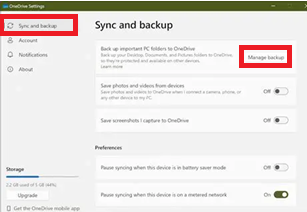
2/ Check if OneDrive redirected “Documents”:
- OneDrive often pins “Documents” to the cloud. In OneDrive settings > Sync and Backup > Manage Backup, turn off Documents (temporarily) or simply choose a different local path for Outlook files.
3/ Review Windows “Controlled Folder Access”:
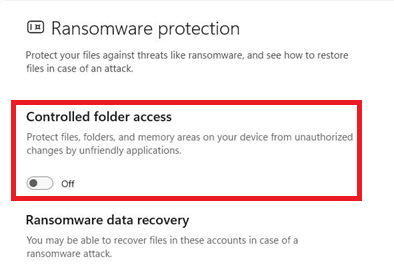
- Go to Windows Security > Virus & threat protection > Ransomware protection > Manage ransomware protection > Controlled folder access.
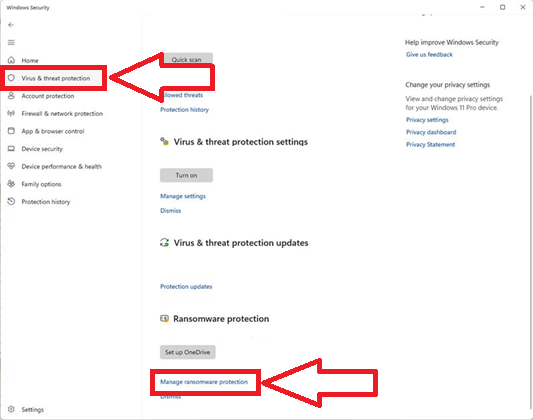
- If it's On, allow an app and add Outlook.exe or have IT whitelist Outlook via Defender/Intune.
4/ If a PST is truly required (POP or local archive), verify org policies:
Ask your IT admin to check:
- HKCU\Software\Policies\Microsoft\Office\16.0\Outlook\DisablePST
- HKCU\Software\Policies\Microsoft\Office\16.0\Outlook\PST\PSTDisableGrow
If set to 1, PST creation/growth is blocked.
Reference: Use a policy to control PST files in Outlook
5/ Outlook check:
- Try Outlook Safe Mode: press Win+R, type outlook /safe. If setup works here, an add‑in may be interfering.
- Run Office Repair: you can follow the instructions here Repair an Office application
6/ Antivirus reality check:
- Even “disabled,” some shields keep intercepting writes. If the steps above don’t help, fully uninstall Avast temporarily to test. If that fixes it, add Outlook.exe and your data folder to Avast exclusions and reinstall.
7/ Permissions & quotas check:
- Confirm you have write permissions on the chosen folder and that no disk quota/DLP policy is restricting writes (common on corporate builds).
I hope this information is helpful. Please follow these steps and let me know if it works for you. If not, please share the information I've asked above and we can work together to resolve this.
Thank you for your patience and your understanding. If you have any questions or need further assistance, please feel free to share them in the comments on this post so I can continue to support you.
I look forward to continuing the conversation.
If the answer is helpful, please click "Accept Answer" and kindly upvote it. If you have extra questions about this answer, please click "Comment".
Note: Please follow the steps in our documentation to enable e-mail notifications if you want to receive the related email notification for this thread.
' cx='32' cy='32' r='32' /%3E%3Ctext x='50%25' y='55%25' dominant-baseline='middle' text-anchor='middle' fill='%23FFF' %3EJF%3C/text%3E%3C/svg%3E)


' cx='32' cy='32' r='32' /%3E%3Ctext x='50%25' y='55%25' dominant-baseline='middle' text-anchor='middle' fill='%23FFF' %3EKN%3C/text%3E%3C/svg%3E)