Hi @Ann Brennan,
Welcome to Microsoft Q&A forum.
Thank you for reaching out and sharing your experience with us.
I understand the importance of having uninterrupted access to your Outlook subscription. The issue could be due to the renewal process still being in progress or the account not being correctly signed in with the subscription credentials.
To resolve the issue, please try the following steps:
- Wait for the subscription to apply to your account
Subscriptions take a short period to fully apply to the account.
- Sign in with the correct account
Ensure you are using the account associated with the subscription.
- Clear the Classic Outlook cache
- Close the Outlook app.
- Press the Windows + R keys simultaneously to open the Run dialog box.
- Type the following path into the Run box and press Enter: %localappdata%\Microsoft\Outlook\RoamCache
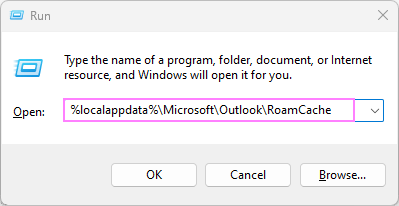
- This will open the RoamCache folder containing the cache files associated with your Outlook profile. Usually, it's located at: C:\Users{User name}\AppData\Local\Microsoft\Outlook\RoamCache
- Click anywhere within the folder, press Ctrl + A to select all files, and then press the Delete key to remove them. Alternatively, you can right-click the selection and choose the Delete option from the context menu.
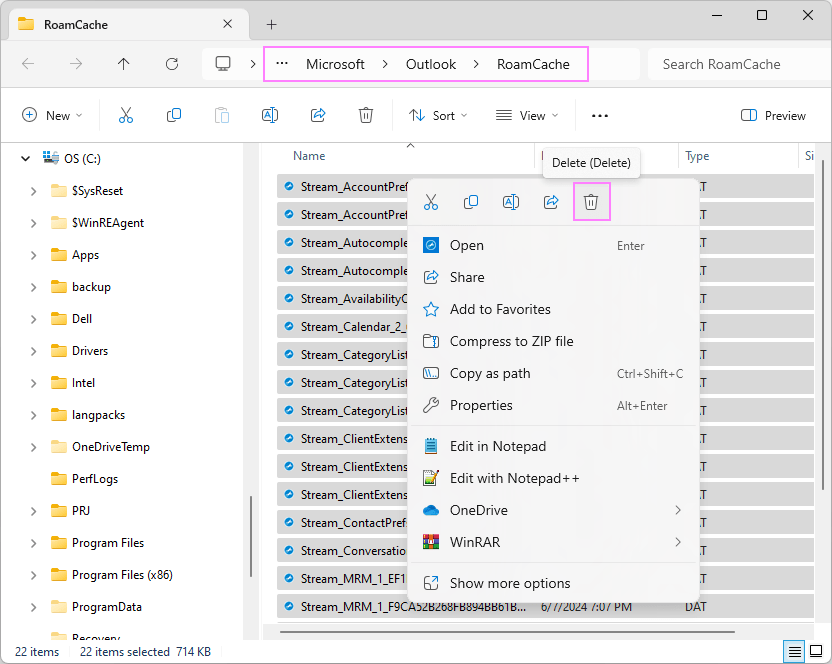
- After clearing the cache, restart Outlook again. It will rebuild the necessary cache files from scratch.
This way, you can delete the excessive cache that may be hindering Outlook's functionality and restore its syncing capabilities.
If the issue persists after trying these steps, please share a screenshot of what you see so we can troubleshoot effectively.
Note: Please understand that our initial response does not always resolve the issue immediately. However, with your help and more detailed information, we can work together to find a solution.
I hope this information is helpful. Please follow these steps and let me know if it works for you. If not, we can work together to resolve this.
Thank you for your patience and your understanding. If you have any questions or need further assistance, please feel free to share them in the comments on this post so I can continue to support you.
I look forward to continuing the conversation.
If the answer is helpful, please click "Accept Answer" and kindly upvote it. If you have extra questions about this answer, please click "Comment".
Note: Please follow the steps in our documentation to enable e-mail notifications if you want to receive the related email notification for this thread.
' cx='32' cy='32' r='32' /%3E%3Ctext x='50%25' y='55%25' dominant-baseline='middle' text-anchor='middle' fill='%23FFF' %3EAB%3C/text%3E%3C/svg%3E)

' cx='32' cy='32' r='32' /%3E%3Ctext x='50%25' y='55%25' dominant-baseline='middle' text-anchor='middle' fill='%23FFF' %3EJT%3C/text%3E%3C/svg%3E)
