Note
Access to this page requires authorization. You can try signing in or changing directories.
Access to this page requires authorization. You can try changing directories.
The key word in the title of this post is "really" - this isn't about how to look in the AOT or how to open the security forms in the browser - this is about how to check what an AOS is picking up as security permissions for a given role under the hood.
Why would I want to do that I hear you ask? It's useful for me when I'm developing new security elements - because the AOS doesn't see them until I do a full build and database synchronize(sometimes just a synch if everything is already built), and I can't always remember when I last did a build and database synchronize - so it gives me a simple way that I can check what the AOS actually see's for a security role. Also if you're troubleshooting something wrong with security in a deployment environment it gives a way to see what the AOS is seeing.
How can I do it?
Earlier, I created a new privilege, which granted a form control permission to a control called "GroupFinancialDimensionLine" on Forms\SalesTable, then I created a role extension on the Accounts Receivable Clerk role, and granted it my new privilege.
What I want to do now, is see if my AOS knows about it or not - or if I need to run a full build/synch.
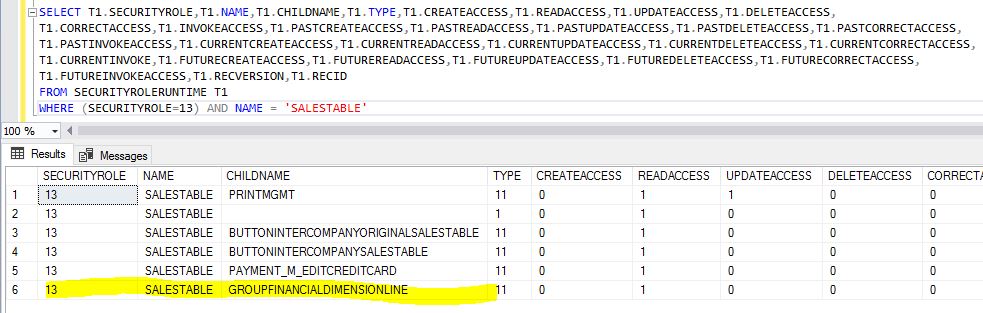
Querying my AXDB, first I'm looking up the RecId for the role I modified, then I'm using that RecId to check what permissions are set for SalesTable for that Role - looking in the SecurityRoleRuntime table.
select recId, * from SECURITYROLE where name = 'Accounts receivable clerk' --query returned recId=13 for that record SELECT T1.SECURITYROLE,T1.NAME,T1.CHILDNAME,T1.TYPE,T1.CREATEACCESS,T1.READACCESS,T1.UPDATEACCESS,T1.DELETEACCESS, T1.CORRECTACCESS,T1.INVOKEACCESS,T1.PASTCREATEACCESS,T1.PASTREADACCESS,T1.PASTUPDATEACCESS,T1.PASTDELETEACCESS,T1.PASTCORRECTACCESS, T1.PASTINVOKEACCESS,T1.CURRENTCREATEACCESS,T1.CURRENTREADACCESS,T1.CURRENTUPDATEACCESS,T1.CURRENTDELETEACCESS,T1.CURRENTCORRECTACCESS, T1.CURRENTINVOKE,T1.FUTURECREATEACCESS,T1.FUTUREREADACCESS,T1.FUTUREUPDATEACCESS,T1.FUTUREDELETEACCESS,T1.FUTURECORRECTACCESS, T1.FUTUREINVOKEACCESS,T1.RECVERSION,T1.RECID FROM SECURITYROLERUNTIME T1 WHERE (SECURITYROLE=13) AND NAME = 'SALESTABLE'
A couple of things to note:
- It's database synchronize that's populating SECURITYROLERUNTIME.
- AOS is using SECURITYROLERUNTIME as it's definition of the detail of each role - this is how it knows what to allow a user to see/do and what not to.
- AOS only reads from the table on startup**, and then it's cached.
- When you're deploying a package to an environment - no further action should be needed - the will be populated if package deployment completes successfully.
In my example, after a database synchronize, I can see my new permission is there, and then when I log in with a user with that permission it works:
**I said that an AOS only reads the table on startup - that's not strictly true, it just made a nicer bullet point. There is a cache synchronizing mechanism between AOS - so that if someone modifies a role/permission in the UI, the other AOSes will pick up the change by re-reading the table:
- Each running AOS has in it's memory a global user role version ID
- It's getting this from a special record in Tables\SysLastValue
- Periodically (every few minutes) it checks the SysLastValue record to see if the ID has changed - meaning has another AOS made a role change, and notified the others by incrementing the global user role version ID stored in this table.
- If it's changed it flushes it's cache and re-reads all the role information from SecurityRoleRuntime
It's a similar type of mechanism that we use for AOS to check their server configuration, batch configuration and EntireTable cache settings/values.