Note
Access to this page requires authorization. You can try signing in or changing directories.
Access to this page requires authorization. You can try changing directories.
When selecting option for Reports within the SCOM Reporting Console - it returns the error: Login failed for user ' <Account name>'.
Solution:
Open the SCOM Console - Administration - Security - Run-As Accounts
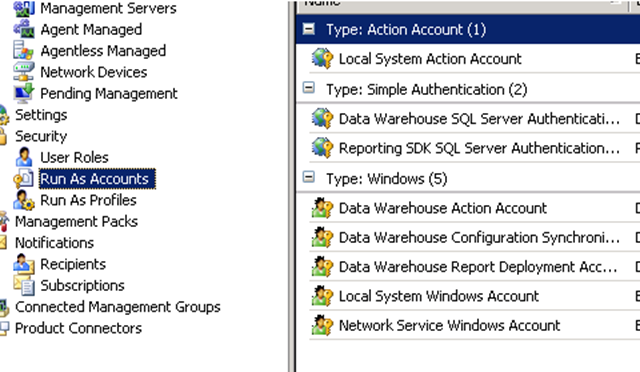
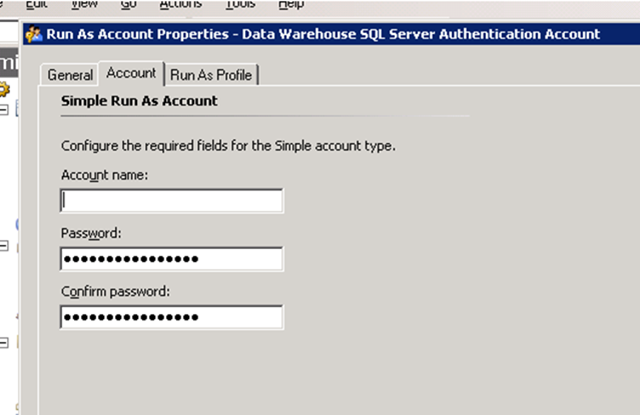
Data Warehouse SQL Server Authentication Account - Account tab
The Account name: Should be blank - You will see "......................" in both password fields - this is normal
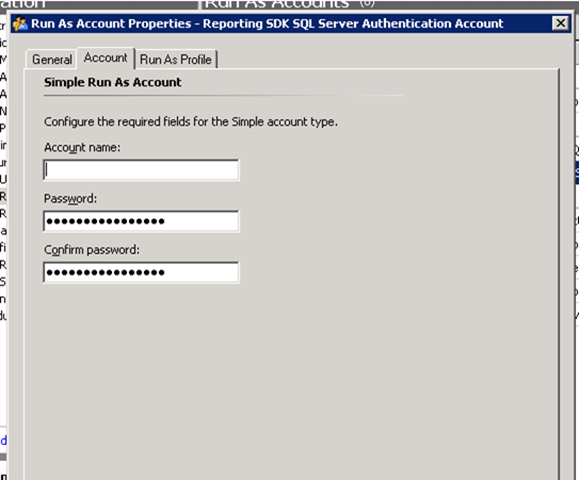
Reporting SDK SQL Server Authentication Account - Account tab
The Account name: Should be blank - You will see "......................" in both password fields - this is normal
If the account the error is referencing is in either of these Account fields - it will need to be reset
How do I reset the account?
1. Next to Account name - Remove the name - the place the cursor in the first space of the Account Name - hit the space-bar once.
2. Clear the "Password" box - Place the cursor in the first space of the "Password:" field and hit the space-bar once.
3. Clear the "Confirm Password" box - Place the cursor in the first space of the "Confirm Password:" field and hit the space-bar once.
4. The Account name is now blank, and each of the password fields has a single "."
5. Hit apply - then ok
When you place an account in either the Data Warehouse SQL Server Authentication Account or Reporting SDK SQL Server Authentication Account you are telling SCOM that you have a SQL account already in place that you would like to use to access the database. By leaving these accounts blank SCOM then rolls to accounts listed under "Type: Windows" which is directly below the accounts listed above.
>edwalt
Comments
Anonymous
January 01, 2003
Papastef - Thanx, worked great!Anonymous
October 16, 2007
Thanx to your post i have stopped searching everywhere :-) my reporting had stopped working - because my coleague had noticed that the account was not keyed inn - so he needed to correct this "error" - and then things stopped working :-)Anonymous
January 24, 2008
Thanks a ton for this post, it solved the issue we were having.Anonymous
February 29, 2008
OpYPQN r u crazzy? I told u! I can't read!Anonymous
March 01, 2008
EKEDyl r u crazzy? I told u! I can't read!Anonymous
March 06, 2008
hlRljo r u crazzy? I told u! I can't read, man!Anonymous
March 06, 2008
R5amIr r u crazzy? I told u! I can't read!Anonymous
March 07, 2008
wvw4dm r u crazzy? I told u! I can't read!Anonymous
March 07, 2008
hzwCzS r u crazzy? I told u! I can't read!Anonymous
March 07, 2008
oZ4N69 r u crazzy? I told u! I can't read!Anonymous
March 08, 2008
tztb8A r u crazzy? I told u! I can't read!Anonymous
March 08, 2008
mS5J7M r u crazzy? I told u! I can't read!Anonymous
March 08, 2008
FUKRdW r u crazzy? I told u! I can't read!Anonymous
March 20, 2008
1oeSBy Cool, bro! http://groups.google.com/group/clock-screensaver/web/1 [url=http://groups.google.com/group/clock-screensaver/web/1]clock screensaver[/url], <a href="http://groups.google.com/group/clock-screensaver/web/1">clock screensaver</a>Anonymous
March 20, 2008
wJLOgK Cool, bro! http://groups.google.com/group/clock-screensaver/web/1 [url=http://groups.google.com/group/clock-screensaver/web/1]clock screensaver[/url], <a href="http://groups.google.com/group/clock-screensaver/web/1">clock screensaver</a>Anonymous
March 20, 2008
m6sf0r Cool, bro! http://groups.google.com/group/clock-screensaver/web/1 [url=http://groups.google.com/group/clock-screensaver/web/1]clock screensaver[/url], <a href="http://groups.google.com/group/clock-screensaver/web/1">clock screensaver</a>Anonymous
March 20, 2008
ESgfu8 Cool, bro! http://groups.google.com/group/clock-screensaver/web/1 [url=http://groups.google.com/group/clock-screensaver/web/1]clock screensaver[/url], <a href="http://groups.google.com/group/clock-screensaver/web/1">clock screensaver</a>Anonymous
March 20, 2008
dXnyWL Cool, bro! http://groups.google.com/group/clock-screensaver/web/1 [url=http://groups.google.com/group/clock-screensaver/web/1]clock screensaver[/url], <a href="http://groups.google.com/group/clock-screensaver/web/1">clock screensaver</a>Anonymous
May 14, 2012
Thanks for the post. It solved my problem!