Note
Access to this page requires authorization. You can try signing in or changing directories.
Access to this page requires authorization. You can try changing directories.
If your CRM Online organization has been transitioned from the CRM Legacy Platform to the Microsoft online services environment, it may happen that a CRM user with a Non-Interactive access mode starts consuming a CRM user license.
This behavior is currently by design. As a none-interactive user can access the system but only through the Web service and thus doesn’t require a CRM user license, you can free up the license from such users following the below steps:
1. Log in with an CRM Admin user account to the CRM Online organization and make sure that the affected user is indeed a Non-Interactive user in CRM by the following steps: Go to Settings> Administration> Users | Select the affected user | Go to Administration > check if Client Access License(CAL) Information “Access Mode” is set to “None-interactive” )

2. Log in with an Admin user account to Microsoft online services environment at https://portal.microsoftonline.com and remove the CRM license from that user by the following steps: go to Users and Groups | select the affected user | select Licenses | uncheck the assigned CRM Online license
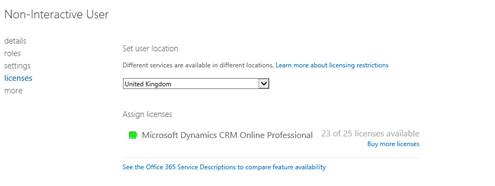
3. Wait a few minutes for the change to be synchronized with CRM. Log in to the CRM Online org one more time and confirm that the affected non-interactive user is still enabled by the following steps : Go to Settings> Administration > Users | check if the affected user occurs under Enabled Users view user even though it is not consuming a license.

Best Regards
Dynamics CRM Support Team
Share this Blog Article on Twitter
Follow Us on Twitter
Comments
- Anonymous
July 01, 2014
Great website with informative info. I found this site the other day which although not related to yours but is still very interesting. <a href="http://www.8thgradeformaldresses.com">8thGradeFormalDresses.com</a>