Note
Access to this page requires authorization. You can try signing in or changing directories.
Access to this page requires authorization. You can try changing directories.
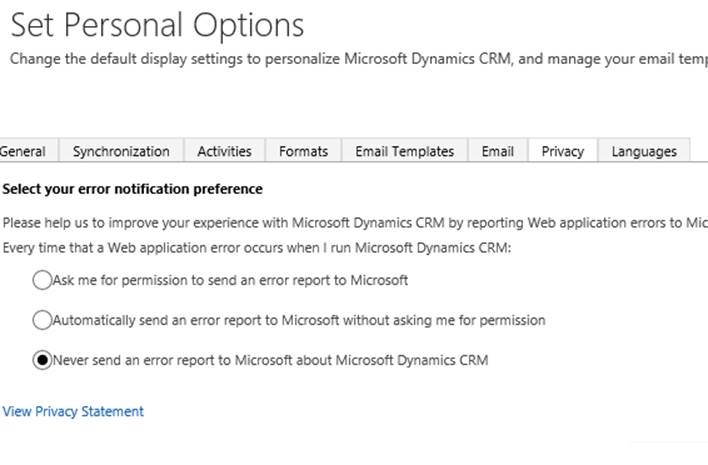
Currently in CRM 2016 On Premise the Privacy settings does not include the disable/enable functionality of sending of reports to Microsoft.
This information is stored in the Organization table, within the ReportScriptErrors column.
There is a simple workaround via SDK for this.
To change this, using POSTMAN and the new WEB API for CRM 2016:
1. Download Google Chrome and install it. Afterwards you can install POSTMAN
2. Open POSTMAN
3. In the URL area type http(s)://<CRMServer>:<PORT>/<ORGNAME>/api/data/v8.0/organizations(<OrganizationID>)
Replace the values between <> with the ones from your CRM Deployment
4. Select for the VERB : “PATCH”:

5. Click on Headers and add following
Content-Type application/json
OData-Version 4.0
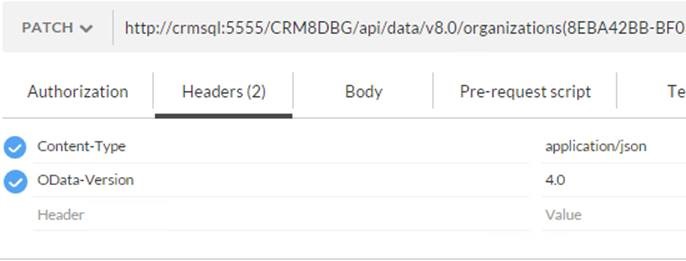
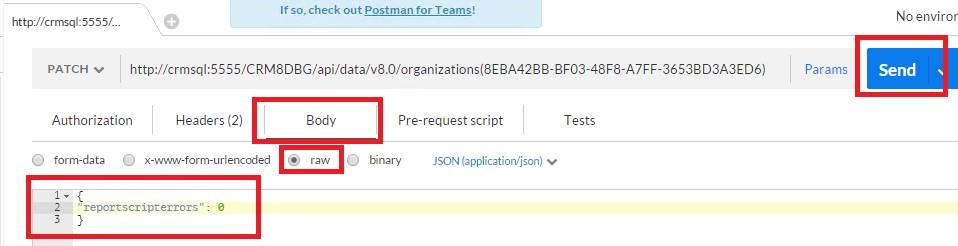
6. Click on Body and select raw and then paste there following content
{
"reportscripterrors": 0
}
Note: You can toggle with this and set it to other values (example “reportscripterrors”: 1 )
7. Press SEND
8. Now you get the Privacy Tab in the personal options
Best Regards
EMEA Dynamics CRM Support Team
Share this Blog Article on Twitter
Follow Us on Twitter