Note
Access to this page requires authorization. You can try signing in or changing directories.
Access to this page requires authorization. You can try changing directories.
You may experience that in Dynamics CRM 2016 when a user tries to create a new case for a customer with an associated contract, the save fails with a pop up window and a generic error and the case is not created.
Error seen in trace:
Unhandled Exception: System.ServiceModel.FaultException`1[[Microsoft.Xrm.Sdk.OrganizationServiceFault, Microsoft.Xrm.Sdk, Version=8.0.0.0, Culture=neutral, PublicKeyToken=31bf3856ad364e35]]: An unexpected error occurred.Detail:
<OrganizationServiceFault xmlns:i="https://www.w3.org/2001/XMLSchema-instance" xmlns="https://schemas.microsoft.com/xrm/2011/Contracts">
<ErrorCode>-2147220970</ErrorCode>
<ErrorDetails xmlns:d2p1="https://schemas.datacontract.org/2004/07/System.Collections.Generic" />
<Message>An unexpected error occurred.</Message>
<Timestamp>2016-03-02T12:02:38.0452788Z</Timestamp>
<InnerFault i:nil="true" />
<TraceText>
[Microsoft.Crm.Service.ObjectModel: Microsoft.Crm.Service.ObjectModel.CasePreCreatePlugin]
[599729e0-4ccd-472b-8133-ddec4eb1452d: CasePreCreatePlugin]
</TraceText>
</OrganizationServiceFault>
Solution:
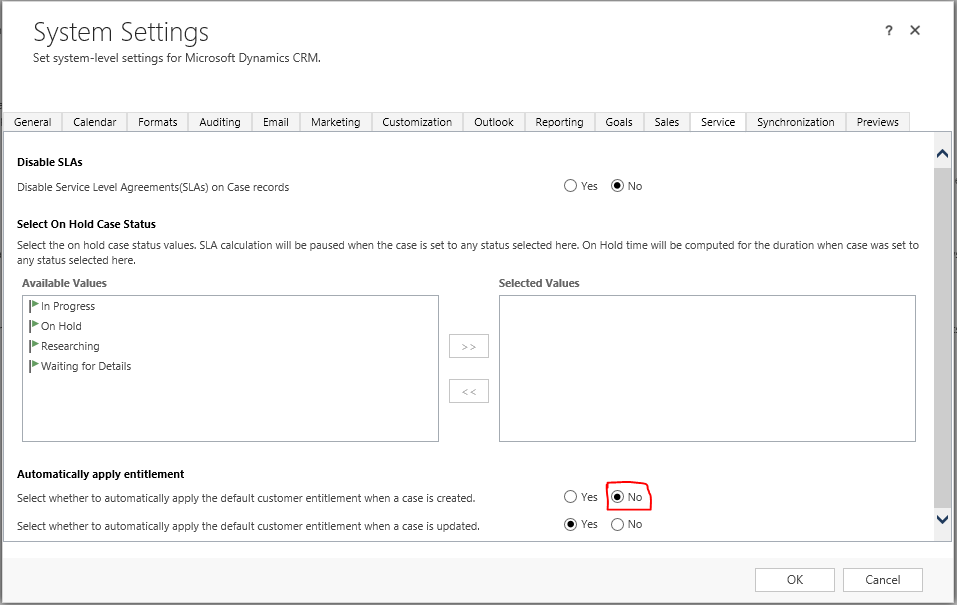
Go to Settings –> Administration –> System Settings –> Service tab
Select "No" on the option "Select whether to automatically apply the default customer entitlement when a case is created"
Additional Information:
The below article has more detail regarding entitlements:
Best Regards
EMEA Dynamics CRM Support Team
Share this Blog Article on Twitter
Follow Us on Twitter