Note
Access to this page requires authorization. You can try signing in or changing directories.
Access to this page requires authorization. You can try changing directories.
少々時間も立っているのですが、ようやくお話できるようになりました。
Open XML Format SDK 2.0(Aplil 2009 CTP)https://www.microsoft.com/downloads/details.aspx?FamilyID=c6e744e5-36e9-45f5-8d8c-331df206e0d0&DisplayLang=en
SDK1.0との違いを中心に書きたいと思います。
まずはコレです。
Strongly Typed Classes and Objects
まず1.0のコーディングスタイルを見てみましょう。
| const string wordmlNamespace = "https://schemas.openxmlformats.org/wordprocessingml/2006/main"; XNamespace w = wordmlNamespace; WordprocessingDocument wordDoc = WordprocessingDocument.Open(@"C:\aaa.docx", true); MainDocumentPart mainPart = wordDoc.MainDocumentPart; XDocument doc = XDocument.Load(new System.IO.StreamReader(mainPart.GetStream())); var query = from para in doc .Root .Element(w + "body") .Descendants(w + "p") from t in para.Descendants(w + "t") select t; foreach (var q in query) { Console.WriteLine(q.Value); } wordDoc.Close(); |
特にLINQ to XMLの部分に注目してください。
var query = from para in doc
.Root
.Element(w + "body")
.Descendants(w + "p")
from t in para.Descendants(w + "t")
select t;
XParh軸としてDescendants(子孫要素を返す)が使用されているのが分かるとおり、あくまでも汎用的なXMLを扱うコードと全く変わりありません。
コレが2.0になると以下のようなスタイルが可能です。
WordprocessingDocument wordDoc = WordprocessingDocument.Open(@"C:\aaa.docx", false); var query = from para in wordDoc .MainDocumentPart .Document .Body .Elements<Paragraph>() from t in para.Elements() select t; foreach (var q in query) { Console.WriteLine(q.InnerText); } wordDoc.Close(); |
まず、「みじかっ」が初めの印象ですよね。
XML名前空間の指定をしていないためなんですが、その根本を確認するために、LINQ to XML部分を見てみると・・・
var query = from para in wordDoc
.MainDocumentPart
.Document
.Body
.Elements<Paragraph>()
from t in para.Elements()
select t;
おぉ、型付けされたクラスが使用されてるのが分かります。
このDOMと仲良しになったのが、大きな変更点です。コードは短くなるし、intellisenceは使えるし、ますますLINQに馴染んだとも言い換えることが出来るでしょう。
さて次に、Validationを見てみましょう。
Wordのdocxを作成してテーブルを追加します。
その中に文字列を入れ込みますが、果たしてこのコードで正しいXMLになってるでしょうか?
WordprocessingDocument wordDoc = WordprocessingDocument.Create(@"c:\bbb.docx", WordprocessingDocumentType.Document); MainDocumentPart mainPart = wordDoc.AddMainDocumentPart(); mainPart.Document = new Document(); Body body = new Body(); mainPart.Document.Body = body; Table table = new Table(); table.Append(new TableProperties()); //table.Append(new TableGrid()); //ここが実行されないと、このXMLはInValidになるはず table.Append(new TableRow(new TableCell(new Paragraph(new Run(new Text("こんにちは")))))); body.Append(table); wordDoc.MainDocumentPart.Document.Save(); OpenXmlValidator validator = new OpenXmlValidator(); var errors = validator.Validate((wordDoc)); foreach (ValidationErrorInfo error in errors) { Console.WriteLine(error.Description); } wordDoc.Close(); |
実行すると、コンソールに以下のようなエラーが表示されます。コメントにした部分が間違っていることが分かります。
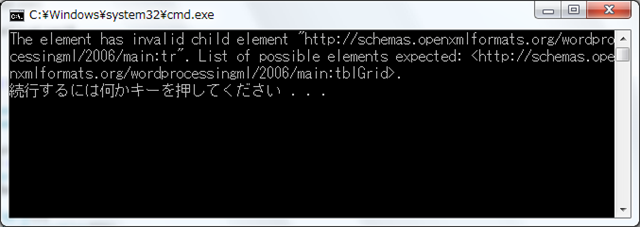
OpenXMLはコードで生成することも可能ですから、こうしたチェックを利用するのは一つ手ですよね。
次にツールを紹介したいのですが、長くなってきましたので、次回にしたいと思います。