Note
Access to this page requires authorization. You can try signing in or changing directories.
Access to this page requires authorization. You can try changing directories.
Microsoft Foundry Agent Service enables response generation and persistent conversations, which are key for interacting with users and maintaining conversation states.
Agent components
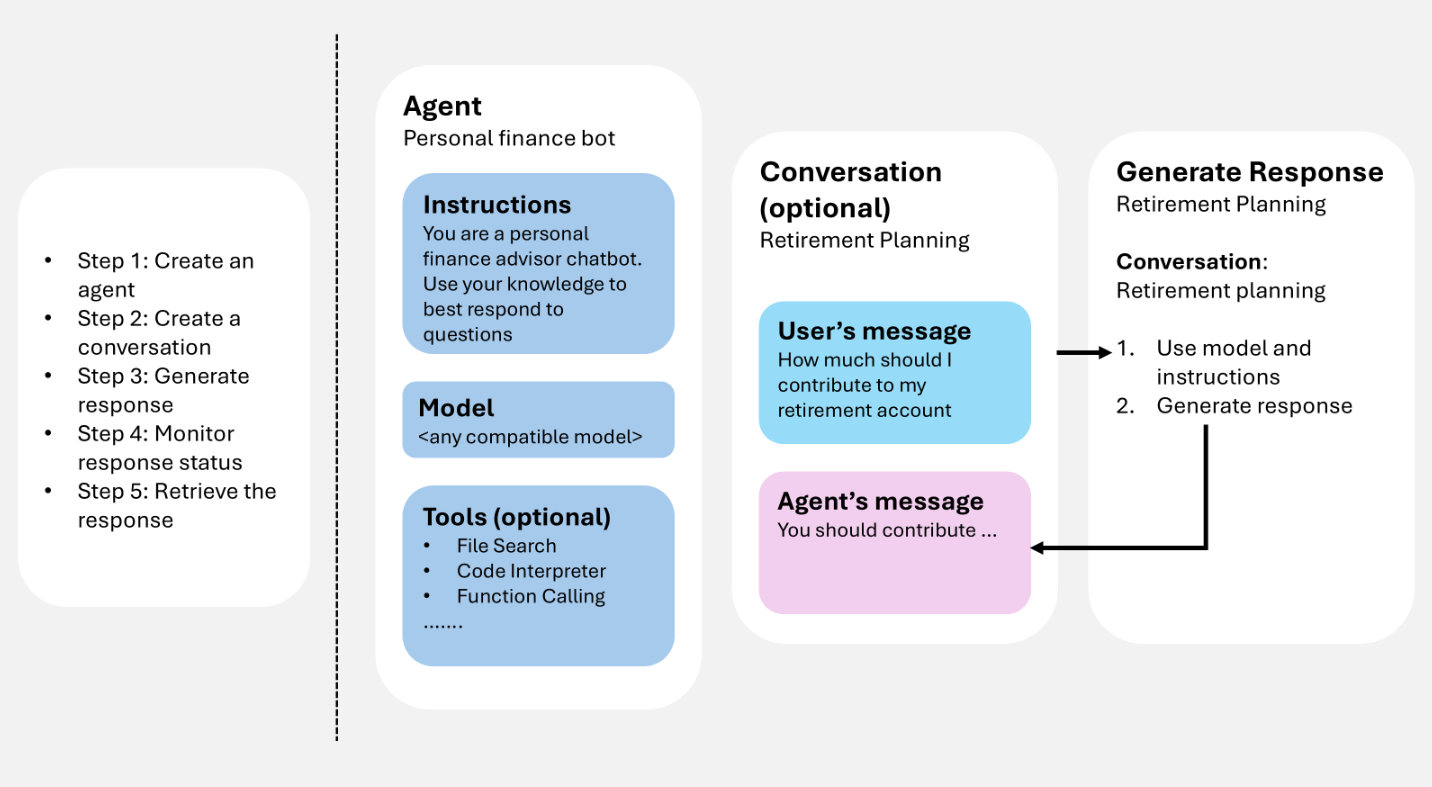
When you work with an agent, these steps are involved:
Create an agent: Define an agent to start sending messages and receiving responses.
Create a conversation (optional): Use a conversation to maintain history across turns. If you don't create one, the state is stored automatically with each response.
Generate a response: The agent processes input items in the conversation and any instructions provided in the request. Items might be appended to the conversation.
Check response status: Monitor the response until it finishes (especially in streaming or background mode).
Retrieve the response: Display the generated response to the user.
Agent
An agent is a persisted orchestration definition that combines AI models, instructions, code, tools, parameters, and optional safety or governance controls.
Agents are stored as named, versioned assets in Microsoft Foundry. During response generation, the agent definition works with interaction history (conversation or previous response) to process and respond to user input.
Conversation
A conversation manages states automatically, so you don't need to pass inputs manually for each turn.
Conversations are durable objects with unique identifiers. After creation, you can reuse them across sessions.
Conversations store items, which can include messages, tool calls, tool outputs, and other data.
Response
Response generation invokes the agent. The agent uses its configuration and any provided history (conversation or previous response) to perform tasks by calling models and tools. As part of response generation, items are appended to the conversation.
You can also generate a response without defining an agent. In this case, all configurations are provided directly in the request and used only for that response. This approach is useful for simple scenarios with minimal tools.