Note
Access to this page requires authorization. You can try signing in or changing directories.
Access to this page requires authorization. You can try changing directories.
Note
This document refers to the Microsoft Foundry (classic) portal.
🔄 Switch to the Microsoft Foundry (new) documentation if you're using the new portal.
Note
This document refers to the Microsoft Foundry (new) portal.
In this tutorial, you learn how to deploy and use a DeepSeek reasoning model in Microsoft Foundry. This tutorial uses DeepSeek-R1 for illustration. However, the content also applies to the newer DeepSeek-R1-0528 reasoning model.
What you'll accomplish:
In this tutorial, you'll deploy the DeepSeek-R1 reasoning model, send inference requests programmatically using code, and parse the reasoning output to understand how the model arrives at its answers.
The steps you perform in this tutorial are:
- Create and configure the Azure resources to use DeepSeek-R1 in Foundry Models.
- Configure the model deployment.
- Use DeepSeek-R1 with the next generation v1 Azure OpenAI APIs to consume the model in code.
Prerequisites
To complete this article, you need:
An Azure subscription with a valid payment method. If you don't have an Azure subscription, create a paid Azure account to begin. If you're using GitHub Models, you can upgrade from GitHub Models to Microsoft Foundry Models and create an Azure subscription in the process.
Access to Microsoft Foundry with appropriate permissions to create and manage resources. Typically requires Contributor or Owner role on the resource group for creating resources and deploying models.
Install the Azure OpenAI SDK for your programming language:
- Python:
pip install openai azure-identity - .NET:
dotnet add package Azure.Identityand install the OpenAI package - JavaScript:
npm install openai @azure/identity - Java: Add the Azure Identity package (see code examples for details)
- Python:
DeepSeek-R1 is a reasoning model that generates explanations alongside answers—see About reasoning models for details.
Create the resources
To create a Foundry project that supports deployment for DeepSeek-R1, follow these steps. You can also create the resources using Azure CLI or infrastructure as code, with Bicep.
Tip
Because you can customize the left pane in the Microsoft Foundry portal, you might see different items than shown in these steps. If you don't see what you're looking for, select ... More at the bottom of the left pane.
Sign in to Microsoft Foundry. Make sure the New Foundry toggle is off. These steps refer to Foundry (classic).

Sign in to Microsoft Foundry. Make sure the New Foundry toggle is on. These steps refer to Foundry (new).

On the landing page, go to the "Explore models and capabilities" section.
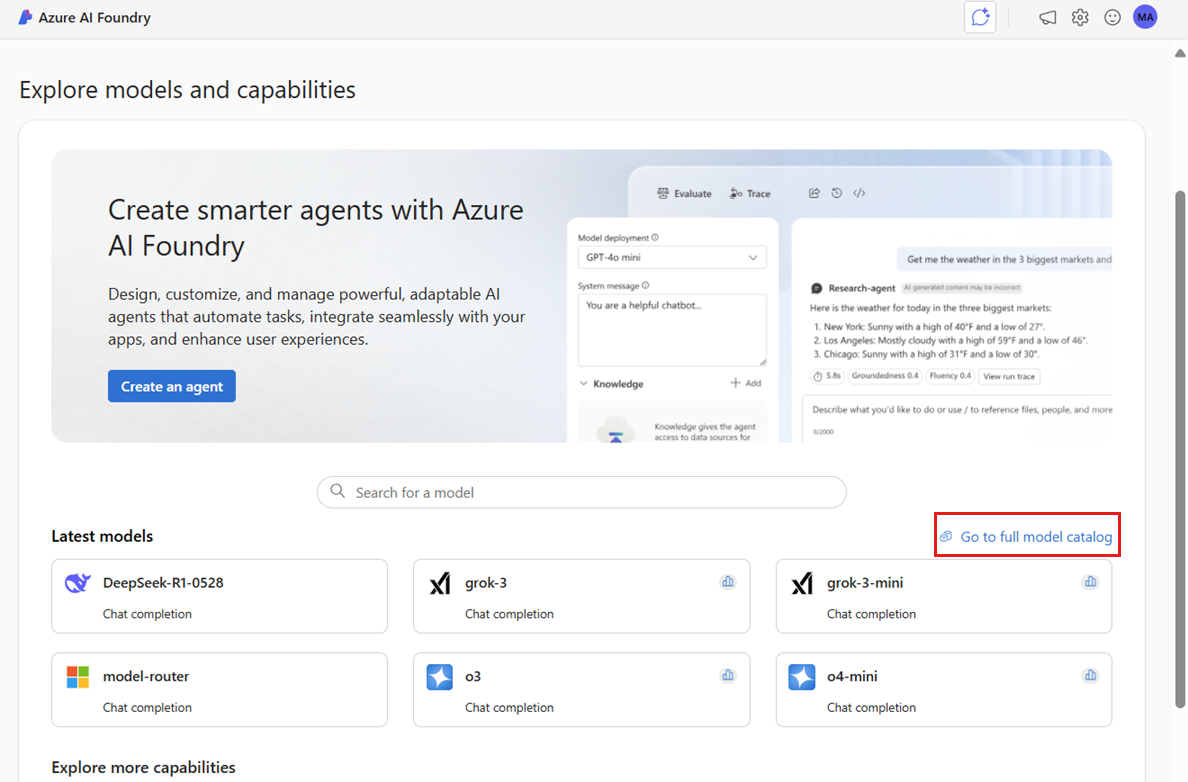
Use the search box on the screen to search for the DeepSeek-R1 model and open its model card.
Select Use this model. This action opens a wizard to create a Foundry project and resources for you to work in. You can keep the default name for the project or change it.
Tip
Are you using Azure OpenAI in Foundry Models? When you're connected to the Foundry portal using an Azure OpenAI resource, only Azure OpenAI models show up in the catalog. To view the full list of models, including DeepSeek-R1, use the top Announcements section and locate the card with the option Explore more models.
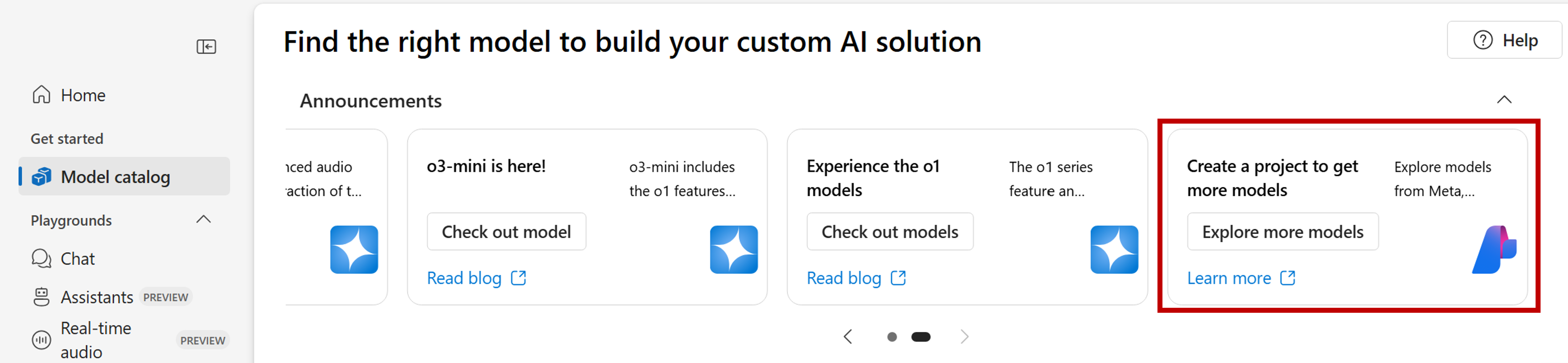
A new window opens with the full list of models. Select DeepSeek-R1 from the list and select Deploy. The wizard asks to create a new project.
Select the dropdown in the "Advanced options" section of the wizard to see details about settings and other defaults created alongside the project. These defaults are selected for optimal functionality and include:
Property Description Resource group The main container for all the resources in Azure. This container helps you organize resources that work together. It also helps you have a scope for the costs associated with the entire project. Region The region of the resources that you're creating. Foundry resource The resource enabling access to the flagship models in the Foundry model catalog. In this tutorial, a new account is created, but Foundry resources (formerly known as Azure AI Services resource) can be shared across multiple hubs and projects. Hubs use a connection to the resource to have access to the model deployments available there. To learn how you can create connections to Foundry resources to consume models, see Connect your AI project. Select Create to create the Foundry project alongside the other defaults. Wait until the project creation is complete. This process takes a few minutes.
- Sign in to Microsoft Foundry. Make sure the New Foundry toggle is off. These steps refer to Foundry (classic).
Sign in to Microsoft Foundry. Make sure the New Foundry toggle is on. These steps refer to Foundry (new).
- The project you're working on appears in the upper-left corner.
- To create a new project, select the project name, then Create new project.
- Give your project a name and select Create project.
Deploy the model
When you create the project and resources, a deployment wizard opens. DeepSeek-R1 is available as a Foundry Model sold directly by Azure. You can review the pricing details for the model by selecting the DeepSeek tab on the Foundry Models pricing page.
Configure the deployment settings. By default, the deployment receives the name of the model you're deploying. The deployment name is used in the
modelparameter for requests to route to this particular model deployment. This setup lets you configure specific names for your models when you attach specific configurations.Foundry automatically selects the Foundry resource you created earlier with your project. Use the Customize option to change the connection based on your needs. DeepSeek-R1 is currently available under the Global Standard deployment type, which provides higher throughput and performance.
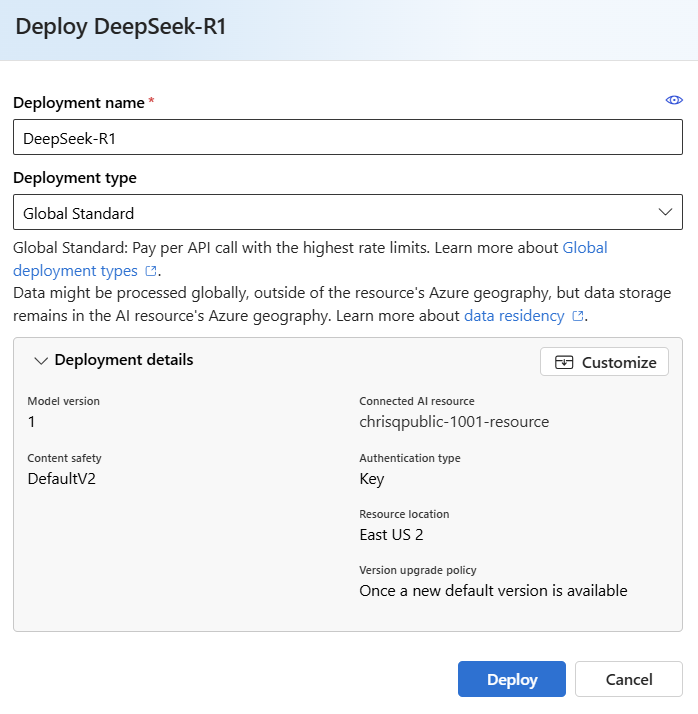
Select Deploy.
When the deployment finishes, the deployment Details page opens. Now the new model is ready for use.
- Add a model to your project. Select Build in the middle of the page, then Model.
- Select Deploy base model to open the model catalog.
- Find and select the DeepSeek-R1 model tile to open its model card and select Deploy. You can select Quick deploy to use the defaults, or select Customize deployment to see and change the deployment settings.
When the deployment finishes, you land on its playground, where you can start to interact with the deployment.
If you prefer to explore the model interactively first, skip to Use the model in the playground.
Use the model in code
Use the Foundry Models endpoint and credentials to connect to the model.

- Select the Details pane from the upper pane of the Playgrounds to see the deployment's details. Here, you can find the deployment's URI and API key.
- Get your resource name from the deployment's URI to use for inferencing the model via code.
Use the next generation v1 Azure OpenAI APIs to consume the model in your code. These code examples use a secure, keyless authentication approach, Microsoft Entra ID, via the Azure Identity library.
The following code examples demonstrate how to:
Authenticate with Microsoft Entra ID using
DefaultAzureCredential, which automatically attempts multiple authentication methods in sequence:- Environment variables - Checks for service principal credentials in environment variables
- Managed identity - Uses managed identity if running in Azure (App Service, Functions, VM, etc.)
- Azure CLI - Falls back to Azure CLI credentials if you're authenticated locally
- Other methods - Continues through additional authentication methods as needed
Tip
For local development, ensure you're authenticated with Azure CLI by running
az login. For production deployments in Azure, configure managed identity for your application.Create a chat completion client connected to your model deployment
Send a basic prompt to the DeepSeek-R1 model
Receive and display the response
Expected output: A JSON response containing the model's answer, reasoning process (within <think> tags), token usage statistics (prompt tokens, completion tokens, total tokens), and model information.
Install the package openai using your package manager, like pip:
pip install --upgrade openai
The following example shows how to create a client to consume chat completions and then generate and print out the response:
from openai import OpenAI
from azure.identity import DefaultAzureCredential, get_bearer_token_provider

token_provider = get_bearer_token_provider(
    DefaultAzureCredential(), "https://cognitiveservices.azure.com/.default"
)

client = OpenAI(
  base_url = "https://YOUR-RESOURCE-NAME.openai.azure.com/openai/v1/",
  api_key=token_provider,
)
response = client.chat.completions.create(
  model="DeepSeek-R1", # Replace with your model deployment name.
  messages=[
    {"role": "system", "content": "You are a helpful assistant."},
    {"role": "user", "content": "How many languages are in the world?"}
  ]
)

#print(response.choices[0].message)
print(response.model_dump_json(indent=2))
API Reference:
- OpenAI Python client
- OpenAI JavaScript client
- OpenAI .NET client
- DefaultAzureCredential class
- Chat completions API reference
- Azure Identity library overview
Reasoning might generate longer responses and consume a larger number of tokens. See the rate limits that apply to DeepSeek-R1 models. Consider having a retry strategy to handle rate limits. You can also request increases to the default limits.
About reasoning models
Reasoning models can reach higher levels of performance in domains like math, coding, science, strategy, and logistics. The way these models produce outputs is by explicitly using chain of thought to explore all possible paths before generating an answer. They verify their answers as they produce them, which helps to arrive at more accurate conclusions. As a result, reasoning models might require less context prompts in order to produce effective results.
Reasoning models produce two types of content as outputs:
- Reasoning completions
- Output completions
Both of these completions count towards content generated from the model. Therefore, they contribute to the token limits and costs associated with the model. Some models, like DeepSeek-R1, might respond with the reasoning content. Others, like o1, output only the completions.
Reasoning content
Some reasoning models, like DeepSeek-R1, generate completions and include the reasoning behind them. The reasoning associated with the completion is included in the response's content within the tags <think> and </think>. The model can select the scenarios for which to generate reasoning content. The following example shows how to generate the reasoning content, using Python:
import re

match = re.match(r"<think>(.*?)</think>(.*)", response.choices[0].message.content, re.DOTALL)

print("Response:", )
if match:
    print("\tThinking:", match.group(1))
    print("\tAnswer:", match.group(2))
else:
    print("\tAnswer:", response.choices[0].message.content)
print("Model:", response.model)
print("Usage:")
print("\tPrompt tokens:", response.usage.prompt_tokens)
print("\tTotal tokens:", response.usage.total_tokens)
print("\tCompletion tokens:", response.usage.completion_tokens)
Thinking: Okay, the user is asking how many languages exist in the world. I need to provide a clear and accurate answer. Let's start by recalling the general consensus from linguistic sources. I remember that the number often cited is around 7,000, but maybe I should check some reputable organizations.\n\nEthnologue is a well-known resource for language data, and I think they list about 7,000 languages. But wait, do they update their numbers? It might be around 7,100 or so. Also, the exact count can vary because some sources might categorize dialects differently or have more recent data. \n\nAnother thing to consider is language endangerment. Many languages are endangered, with some having only a few speakers left. Organizations like UNESCO track endangered languages, so mentioning that adds context. Also, the distribution isn't even. Some countries have hundreds of languages, like Papua New Guinea with over 800, while others have just a few. \n\nA user might also wonder why the exact number is hard to pin down. It's because the distinction between a language and a dialect can be political or cultural. For example, Mandarin and Cantonese are considered dialects of Chinese by some, but they're mutually unintelligible, so others classify them as separate languages. Also, some regions are under-researched, making it hard to document all languages. \n\nI should also touch on language families. The 7,000 languages are grouped into families like Indo-European, Sino-Tibetan, Niger-Congo, etc. Maybe mention a few of the largest families. But wait, the question is just about the count, not the families. Still, it's good to provide a bit more context. \n\nI need to make sure the information is up-to-date. Let me think – recent estimates still hover around 7,000. However, languages are dying out rapidly, so the number decreases over time. Including that note about endangerment and language extinction rates could be helpful. For instance, it's often stated that a language dies every few weeks. \n\nAnother point is sign languages. Does the count include them? Ethnologue includes some, but not all sources might. If the user is including sign languages, that adds more to the count, but I think the 7,000 figure typically refers to spoken languages. For thoroughness, maybe mention that there are also over 300 sign languages. \n\nSummarizing, the answer should state around 7,000, mention Ethnologue's figure, explain why the exact number varies, touch on endangerment, and possibly note sign languages as a separate category. Also, a brief mention of Papua New Guinea as the most linguistically diverse country. \n\nWait, let me verify Ethnologue's current number. As of their latest edition (25th, 2022), they list 7,168 living languages. But I should check if that's the case. Some sources might round to 7,000. Also, SIL International publishes Ethnologue, so citing them as reference makes sense. \n\nOther sources, like Glottolog, might have a different count because they use different criteria. Glottolog might list around 7,000 as well, but exact numbers vary. It's important to highlight that the count isn't exact because of differing definitions and ongoing research. \n\nIn conclusion, the approximate number is 7,000, with Ethnologue being a key source, considerations of endangerment, and the challenges in counting due to dialect vs. language distinctions. I should make sure the answer is clear, acknowledges the variability, and provides key points succinctly.

Answer: The exact number of languages in the world is challenging to determine due to differences in definitions (e.g., distinguishing languages from dialects) and ongoing documentation efforts. However, widely cited estimates suggest there are approximately **7,000 languages** globally.
Model: DeepSeek-R1
Usage:
  Prompt tokens: 11
  Total tokens: 897
  Completion tokens: 886
API Reference:
Prompt reasoning models
When building prompts for reasoning models, take the following into consideration:
- Use simple instructions and avoid using chain-of-thought techniques.
- Built-in reasoning capabilities make simple zero-shot prompts as effective as more complex methods.
- When providing additional context or documents, like in RAG scenarios, including only the most relevant information might help prevent the model from over-complicating its response.
- Reasoning models may support the use of system messages. However, they might not follow them as strictly as other non-reasoning models.
- When creating multi-turn applications, consider appending only the final answer from the model, without it's reasoning content, as explained in the Reasoning content section.
Notice that reasoning models can take longer times to generate responses. They use long reasoning chains of thought that enable deeper and more structured problem-solving. They also perform self-verification to cross-check their answers and correct their mistakes, thereby showcasing emergent self-reflective behaviors.
Parameters
Reasoning models support a subset of the standard chat completion parameters to maintain the integrity of their reasoning process.
Supported parameters:
max_tokens- Maximum number of tokens to generate in the responsestop- Sequences where the API stops generating tokensstream- Enable streaming responsesn- Number of completions to generatefrequency_penalty- Reduces repetition of token sequences
Unsupported parameters (reasoning models don't support these):
temperature- Fixed to optimize reasoning qualitytop_p- Not configurable for reasoning modelspresence_penalty- Not availablerepetition_penalty- Usefrequency_penaltyinstead
Example using max_tokens:
response = client.chat.completions.create(
    model="DeepSeek-R1",
    messages=[
        {"role": "user", "content": "Explain quantum computing"}
    ],
    max_tokens=1000  # Limit response length
)
For the complete list of supported parameters, see the Chat completions API reference.
Use the model in the playground
Use the model in the playground to get an idea of the model's capabilities.
On the deployment details page, select Open in playground in the top bar. This action opens the chat playground.
In the Deployment drop down of the chat playground, the deployment you created is already automatically selected.
Configure the system prompt as needed.
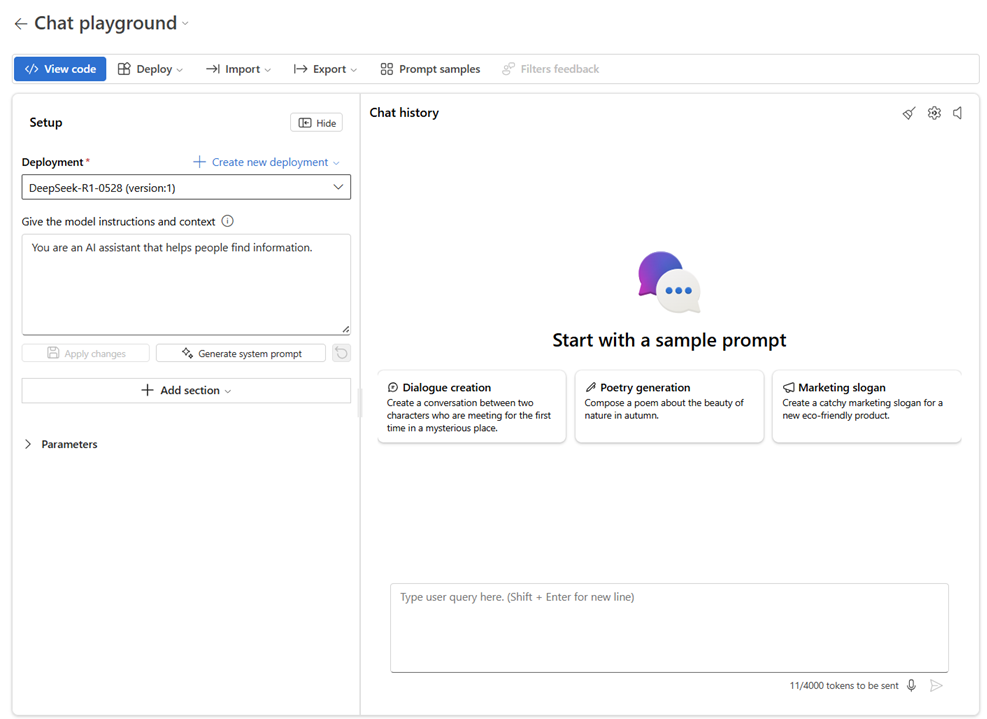
Enter your prompt and see the outputs.
Select View code to see details about how to access the model deployment programmatically.
As stated previously, immediately a model deployment is complete, you land on the model's playground, where you can start to interact with the deployment. For example, you can enter your prompts, such as "How many languages are in the world?" in the playground.
What you learned
In this tutorial, you accomplished the following:
- Created Foundry resources for hosting AI models
- Deployed the DeepSeek-R1 reasoning model
- Made authenticated API calls using Microsoft Entra ID
- Sent inference requests and received reasoning outputs
- Parsed reasoning content from model responses to understand the model's thought process