Note
Access to this page requires authorization. You can try signing in or changing directories.
Access to this page requires authorization. You can try changing directories.
Note
This document refers to the Microsoft Foundry (classic) portal.
🔍 View the Microsoft Foundry (new) documentation to learn about the new portal.
Important
Items marked (preview) in this article are currently in public preview. This preview is provided without a service-level agreement, and we don't recommend it for production workloads. Certain features might not be supported or might have constrained capabilities. For more information, see Supplemental Terms of Use for Microsoft Azure Previews.
This GitHub Action enables offline evaluation of AI models and agents within your CI/CD pipelines. It's designed to streamline the evaluation process, allowing you to assess model performance and make informed decisions before deploying to production.
Offline evaluation involves testing AI models and agents using test datasets to measure their performance on various quality and safety metrics such as fluency, coherence, and appropriateness. After you select a model in the Foundry model catalog or GitHub Model marketplace, offline pre-production evaluation is crucial for AI application validation during integration testing. This process allows developers to identify potential issues and make improvements before deploying the model or application to production, such as when creating and updating agents.
Features
Automated Evaluation: Integrate offline evaluation into your CI/CD workflows to automate the pre-production assessment of AI models.
Built-in Evaluators: Leverage existing evaluators provided by the Azure AI Evaluation SDK.
The following evaluators are supported:
Category Evaluator class/Metrics AI Agent evaluations GenAI evaluations General purpose (AI-assisted) QAEvaluator Not Supported Supported General purpose (AI-assisted) CoherenceEvaluator Supported Supported General purpose (AI-assisted) FluencyEvaluator Supported Supported Textual similarity SimilarityEvaluator Not Supported Supported Textual similarity F1ScoreEvaluator Not Supported Supported Textual similarity RougeScoreEvaluator Not Supported Not Supported Textual similarity GleuScoreEvaluator Not Supported Supported Textual similarity BleuScoreEvaluator Not Supported Supported Textual similarity MeteorScoreEvaluator Not Supported Supported Retrieval-augmented Generation (RAG) (AI-assisted) GroundednessEvaluator Supported Supported Retrieval-augmented Generation (RAG) (AI-assisted) GroundednessProEvaluator Not Supported Supported Retrieval-augmented Generation (RAG) (AI-assisted) RetrievalEvaluator Not Supported Supported Retrieval-augmented Generation (RAG) (AI-assisted) RelevanceEvaluator Supported Supported Retrieval-augmented Generation (RAG) (AI-assisted) ResponseCompletenessEvaluator Not Supported Supported Retrieval-augmented Generation (RAG) (AI-assisted) DocumentRetrievalEvaluator Not Supported Not Supported Risk and safety (AI-assisted) ViolenceEvaluator Supported Supported Risk and safety (AI-assisted) SexualEvaluator Supported Supported Risk and safety (AI-assisted) SelfHarmEvaluator Supported Supported Risk and safety (AI-assisted) HateUnfairnessEvaluator Supported Supported Risk and safety (AI-assisted) IndirectAttackEvaluator Supported Supported Risk and safety (AI-assisted) ProtectedMaterialEvaluator Supported Supported Risk and safety (AI-assisted) CodeVulnerabilityEvaluator Supported Supported Risk and safety (AI-assisted) UngroundedAttributesEvaluator Not Supported Supported Risk and safety (AI-assisted) ContentSafetyEvaluator Supported Supported Agent (AI-assisted) IntentResolutionEvaluator Supported Supported Agent (AI-assisted) TaskAdherenceEvaluator Supported Supported Agent (AI-assisted) ToolCallAccuracyEvaluator Supported Supported Composite AgentOverallEvaluatorNot Supported Not Supported Operational metrics Client run duration Supported Not Supported Operational metrics Server run duration Supported Not Supported Operational metrics Completion tokens Supported Not Supported Operational metrics Prompt tokens Supported Not Supported Custom evaluators Not Supported Not Supported
- Seamless Integration: Easily integrate with existing GitHub workflows to run evaluation based on rules that you specify in your workflows (for examples, when changes are committed to agent versions, prompt templates, or feature flag configuration).
- Statistical Analysis: Evaluation results include confidence intervals and test for statistical significance to determine if changes are meaningful and not due to random variation.
- Out-of-box operation metrics: Automatically generates operational metrics for each evaluation run (client run duration, server run duration, completion tokens, and prompt tokens).
Prerequisites
Foundry project or Hubs based project. To learn more, see Create a project.
Two GitHub Actions are available for evaluating AI applications: ai-agent-evals and genai-evals.
- If your application is already using Foundry agents, ai-agent-evals is well-suited as it offers a simplified setup process and direct integration with agent-based workflows.
- genai-evals is intended for evaluating generative AI models outside of the agent framework.
Note
The ai-agent-evals interface is more straightforward to configure. In contrast, genai-evals requires you to prepare structured evaluation input data. Code samples are provided to help with setup.
How to set up AI agent evaluations
AI agent evaluations input
The input of ai-agent-evals includes:
Required:
azure-ai-project-endpoint: The endpoint of the Foundry project. This is used to connect to your AI project to simulate conversations with each agent, and to connect to the Azure AI evaluation SDK to perform the evaluation.
deployment-name: the deployed model name for evaluation judgement.data-path: Path to the input data file containing the conversation starters. Each conversation starter is sent to each agent for a pairwise comparison of evaluation results.evaluators: built-in evaluator names.data: a set of conversation starters/queries.- Only single agent turn is supported.
agent-ids: a unique identifier for the agent and comma-separated list of agent IDs to evaluate.- When only one
agent-idis specified, the evaluation results include the absolute values for each metric along with the corresponding confidence intervals. - When multiple
agent-idsare specified, the results include absolute values for each agent and a statistical comparison against the designated baseline agent ID.
- When only one
Optional:
api-version: the API version of deployed model.baseline-agent-id: Agent ID of the baseline agent to compare against. By default, the first agent is used.evaluation-result-view: Specifies the format of evaluation results. Defaults to "default" (boolean scores such as passing and defect rates) if omitted. Options are "default", "all-scores" (includes all evaluation scores), and "raw-scores-only" (non-boolean scores only).
Here's a sample of the dataset:
{
  "name": "MyTestData",
  "evaluators": [
    "RelevanceEvaluator",
    "ViolenceEvaluator",
    "HateUnfairnessEvaluator",
  ],
  "data": [
    {
      "query": "Tell me about Tokyo?",
    },
    {
      "query": "Where is Italy?",
    }
  ]
}
AI agent evaluations workflow
To use the GitHub Action, add the GitHub Action to your CI/CD workflows and specify the trigger criteria (for example, on commit) and file paths to trigger your automated workflows.
Tip
To minimize costs, you should avoid running evaluation on every commit.
This example illustrates how Azure Agent AI Evaluation can be run when comparing different agents with agent IDs.
name: "AI Agent Evaluation"

on:
  workflow_dispatch:
  push:
    branches:
      - main

permissions:
  id-token: write
  contents: read

jobs:
  run-action:
    runs-on: ubuntu-latest
    steps:
      - name: Checkout
        uses: actions/checkout@v4

      - name: Azure login using Federated Credentials
        uses: azure/login@v2
        with:
          client-id: ${{ vars.AZURE_CLIENT_ID }}
          tenant-id: ${{ vars.AZURE_TENANT_ID }}
          subscription-id: ${{ vars.AZURE_SUBSCRIPTION_ID }}

      - name: Run Evaluation
        uses: microsoft/ai-agent-evals@v2-beta
        with:
          # Replace placeholders with values for your Azure AI Project
          azure-ai-project-endpoint: "<your-ai-project-endpoint>"
          deployment-name: "<your-deployment-name>"
          agent-ids: "<your-ai-agent-ids>"
          data-path: ${{ github.workspace }}/path/to/your/data-file
AI agent evaluations output
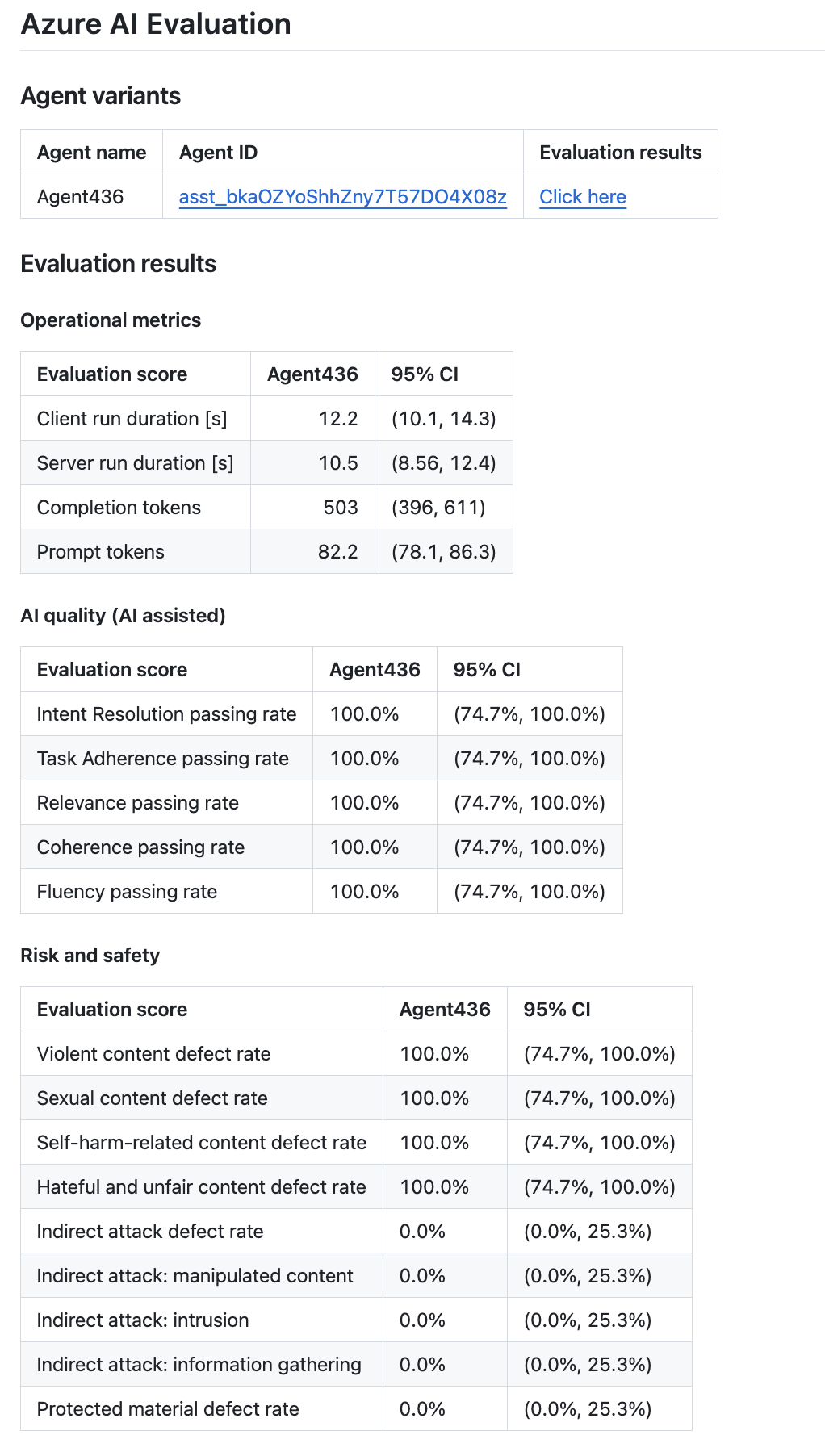
Evaluation results are outputted to the summary section for each AI evaluation GitHub Action run under Actions in GitHub.com.
The result includes two main parts:
The top section summarizes the overview of your AI agent variants. You can select it on the agent ID link, and it directs you to the agent setting page in Foundry portal. You can also select the link for Evaluation Results, and it directs you to Foundry portal to view individual result in detail.
The second section includes evaluation scores and comparison between different variants on statistical significance (for multiple agents) and confidence intervals (for single agent).
Multi agent evaluation result:

Single agent evaluation result:
How to set up genAI evaluations
GenAI evaluations input
The input of genai-evals includes (some of them are optional depending on the evaluator used):
Evaluation configuration file:
data: a set of queries and ground truth. Ground-truth is optional and only required for a subset of evaluators. (See which evaluator requires ground-truth).Here's a sample of the dataset:
[ { "query": "Tell me about Tokyo?", "ground-truth": "Tokyo is the capital of Japan and the largest city in the country. It is located on the eastern coast of Honshu, the largest of Japan's four main islands. Tokyo is the political, economic, and cultural center of Japan and is one of the world's most populous cities. It is also one of the world's most important financial centers and is home to the Tokyo Stock Exchange." }, { "query": "Where is Italy?", "ground-truth": "Italy is a country in southern Europe, located on the Italian Peninsula and the two largest islands in the Mediterranean Sea, Sicily and Sardinia. It is a unitary parliamentary republic with its capital in Rome, the largest city in Italy. Other major cities include Milan, Naples, Turin, and Palermo." }, { "query": "Where is Papua New Guinea?", "ground-truth": "Papua New Guinea is an island country that lies in the south-western Pacific. It includes the eastern half of New Guinea and many small offshore islands. Its neighbours include Indonesia to the west, Australia to the south and Solomon Islands to the south-east." } ]evaluators: built-in evaluator names.ai_model_configuration: including type,azure_endpoint,azure_deploymentandapi_version.
GenAI evaluations workflow
This example illustrates how Azure AI Evaluation can be run when changes are committed to specific files in your repo.
Note
Update GENAI_EVALS_DATA_PATH to point to the correct directory in your repo.
name: Sample Evaluate Action
on:
  workflow_call:
  workflow_dispatch:

permissions:
  id-token: write
  contents: read

jobs:
  evaluate:
    runs-on: ubuntu-latest
    env:
      GENAI_EVALS_CONFIG_PATH: ${{ github.workspace }}/evaluate-config.json
      GENAI_EVALS_DATA_PATH: ${{ github.workspace }}/.github/.test_files/eval-input.jsonl
    steps:
      - uses: actions/checkout@v4
      - uses: azure/login@v2
        with:
          client-id: ${{ secrets.OIDC_AZURE_CLIENT_ID }}
          tenant-id: ${{ secrets.OIDC_AZURE_TENANT_ID }}
          subscription-id: ${{ secrets.OIDC_AZURE_SUBSCRIPTION_ID }}
      - name: Write evaluate config
        run: |
          cat > ${{ env.GENAI_EVALS_CONFIG_PATH }} <<EOF
          {
            "data": "${{ env.GENAI_EVALS_DATA_PATH }}",
            "evaluators": {
              "coherence": "CoherenceEvaluator",
              "fluency": "FluencyEvaluator"
            },
            "ai_model_configuration": {
              "type": "azure_openai",
              "azure_endpoint": "${{ secrets.AZURE_OPENAI_ENDPOINT }}",
              "azure_deployment": "${{ secrets.AZURE_OPENAI_CHAT_DEPLOYMENT }}",
              "api_key": "${{ secrets.AZURE_OPENAI_API_KEY }}",
              "api_version": "${{ secrets.AZURE_OPENAI_API_VERSION }}"
            }
          }
          EOF
      - name: Run AI Evaluation
        id: run-ai-evaluation
        uses: microsoft/genai-evals@main
        with:
          evaluate-configuration: ${{ env.GENAI_EVALS_CONFIG_PATH }}
GenAI evaluations output
Evaluation results are outputted to the summary section for each AI evaluation GitHub Action run under Actions in GitHub.com.
The results include three parts:
- Test Variants: a summary of variant names and system prompts.
- Average scores: the average score of each evaluator for each variant.
- Individual test scores: detailed result for each individual test case.
