Note
Access to this page requires authorization. You can try signing in or changing directories.
Access to this page requires authorization. You can try changing directories.
Part of the AKS cluster lifecycle involves performing periodic upgrades to the latest Kubernetes version. It's important you apply the latest security releases or upgrade to get the latest features. Before you learn about automatic upgrades, make sure you understand the AKS cluster upgrade fundamentals.
Note
Any upgrade operation, whether performed manually or automatically, upgrades the node image version if it's not already on the latest version. The latest version is contingent on a full AKS release and can be determined by visiting the AKS release tracker.
Autoupgrade first upgrades the control plane, and then upgrades agent pools one by one.
Why use cluster autoupgrade
Cluster autoupgrade provides a set once and forget mechanism that yields tangible time and operational cost benefits. You don't need to stop your workloads, redeploy your workloads, or create a new AKS cluster. By enabling autoupgrade, you can ensure your clusters are up to date and don't miss the latest features or patches from AKS and upstream Kubernetes.
AKS follows a strict supportability versioning window. With properly selected autoupgrade channels, you can avoid clusters falling into an unsupported version. For more on the AKS support window, see Alias minor versions.
Customer versus AKS-initiated autoupgrades
You can specify cluster autoupgrade specifics using the following guidance. The upgrades occur based on your specified cadence and are recommended to remain on supported Kubernetes versions.
AKS also initiates autoupgrades for unsupported clusters. When a cluster in an n-3 version (where n is the latest supported AKS GA minor version) is about to drop to n-4, AKS automatically upgrades the cluster to n-2 to remain in an AKS support policy. Automatically upgrading a platform supported cluster to a supported version is enabled by default. Stopped node pools are upgraded during an autoupgrade operation. The upgrade applies to nodes when the node pool is started. To minimize disruptions, set up maintenance windows.
Cluster autoupgrade limitations
If you're using cluster autoupgrade, you can no longer upgrade the control plane first, and then upgrade the individual node pools. Cluster autoupgrade always upgrades the control plane and the node pools together. You can't upgrade the control plane only. Running the az aks upgrade --control-plane-only command raises the following error:
NotAllAgentPoolOrchestratorVersionSpecifiedAndUnchanged: Using managed cluster api, all Agent pools' OrchestratorVersion must be all specified or all unspecified. If all specified, they must be stay unchanged or the same with control plane.
If using the node-image (legacy and not to be used) cluster autoupgrade channel or the NodeImage node image autoupgrade channel, Linux unattended upgrades are disabled by default.
Cluster autoupgrade channels
Automatically completed upgrades are functionally the same as manual upgrades. The selected autoupgrade channel determines the timing of upgrades. When making changes to autoupgrade, allow 24 hours for the changes to take effect. Automatically upgrading a cluster follows the same process as manually upgrading a cluster. For more information, see Upgrade an AKS cluster.
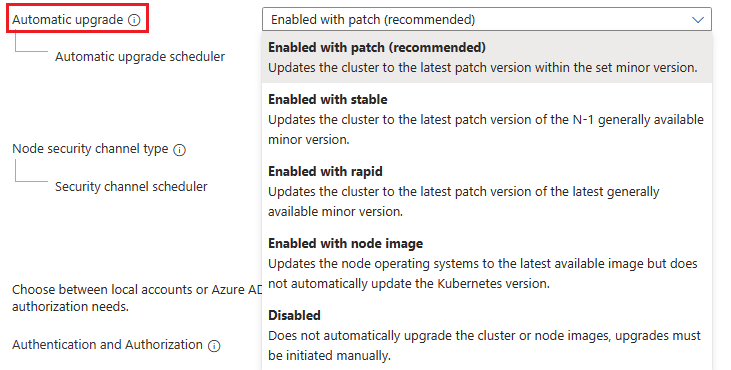
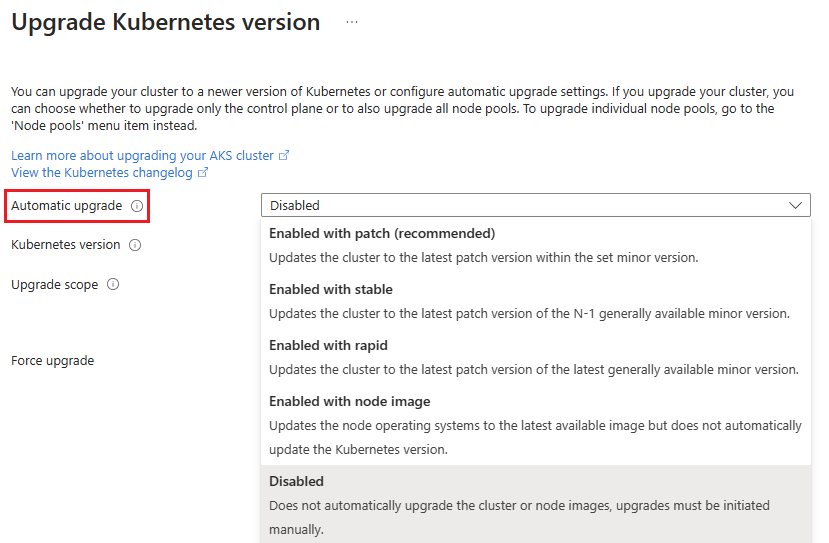
The following upgrade channels are available:
| Channel | Action | Example |
|---|---|---|
none |
disables autoupgrades and keeps the cluster at its current version of Kubernetes. | Default setting if left unchanged. |
patch |
automatically upgrades the cluster to the latest supported patch version when it becomes available while keeping the minor version the same. | For example, if a cluster runs version 1.17.7, and versions 1.17.9, 1.18.4, 1.18.6, and 1.19.1 are available, the cluster upgrades to 1.17.9. |
stable |
automatically upgrades the cluster to the latest supported patch release on minor version N-1, where N is the latest supported minor version. | For example, if a cluster runs version 1.17.7 and versions 1.17.9, 1.18.4, 1.18.6, and 1.19.1 are available, the cluster upgrades to 1.18.6. |
rapid |
automatically upgrades the cluster to the latest supported patch release on the latest supported minor version. | In cases where the cluster's Kubernetes version is an N-2 minor version, where N is the latest supported minor version, the cluster first upgrades to the latest supported patch version on N-1 minor version. For example, if a cluster runs version 1.17.7 and versions 1.17.9, 1.18.4, 1.18.6, and 1.19.1 are available, the cluster first upgrades to 1.18.6, then upgrades to 1.19.1. |
node-image(legacy) |
automatically upgrades the node image to the latest version available. | Microsoft provides patches and new images for image nodes frequently (weekly), but your running nodes don't get the new images unless you do a node image upgrade. Turning on the node-image channel automatically updates your node images whenever a new version is available. If you use this channel, Linux [unattended upgrades] are disabled by default. Node image upgrades work on patch versions that are deprecated, so long as the minor Kubernetes version is still supported. This channel is no longer recommended and is planned for deprecation in future. For an option that can automatically upgrade node images, see the NodeImage channel in node image autoupgrade. |
Note
Keep the following information in mind when using cluster autoupgrade:
Cluster autoupgrade only updates to GA versions of Kubernetes and doesn't update to preview versions.
With AKS, you can create a cluster without specifying the exact patch version. When you create a cluster without designating a patch, the cluster runs the minor version's latest GA patch. To learn more, see AKS support window.
Autoupgrade requires the cluster's Kubernetes version to be within the AKS support window, even if using the
node-imagechannel.If you're using the preview API
11-02-previewor later, and you select thenode-imagecluster autoupgrade channel, the node image autoupgrade channel automatically sets toNodeImage.Each cluster can only be associated with a single autoupgrade channel. The reason is because your specified channel determines the Kubernetes version that runs on the cluster.
If your cluster has no autoupgrade channel and you enable it for Long-Term Support (LTS), the cluster defaults to a
patchautoupgrade channel.
Use cluster autoupgrade with a new AKS cluster
Set the autoupgrade channel when creating a new cluster using the az aks create command and the auto-upgrade-channel parameter.
export RANDOM_SUFFIX=$(openssl rand -hex 3)
export RESOURCE_GROUP="myResourceGroup$RANDOM_SUFFIX"
export AKS_CLUSTER_NAME="myAKSCluster"
az aks create --resource-group $RESOURCE_GROUP --name $AKS_CLUSTER_NAME --auto-upgrade-channel stable --generate-ssh-keys
Use cluster autoupgrade with an existing AKS cluster
Set the autoupgrade channel on an existing cluster using the az aks update command with the auto-upgrade-channel parameter.
az aks update --resource-group $RESOURCE_GROUP --name $AKS_CLUSTER_NAME --auto-upgrade-channel stable
Results:
{
  "id": "/subscriptions/aaaa6a6a-bb7b-cc8c-dd9d-eeeeee0e0e0e/resourceGroups/myResourceGroupabc123/providers/Microsoft.ContainerService/managedClusters/myAKSCluster",
  "properties": {
    "autoUpgradeChannel": "stable",
    "provisioningState": "Succeeded"
  }
}

Use autoupgrade with Planned Maintenance
If using Planned Maintenance and cluster autoupgrade, your upgrade starts during your specified maintenance window.
Note
To ensure proper functionality, use a maintenance window of four hours or more.
For more information on how to set a maintenance window with Planned Maintenance, see Use Planned Maintenance to schedule maintenance windows for your Azure Kubernetes Service (AKS) cluster.
Best practices for cluster autoupgrade
Use the following best practices to help maximize your success when using autoupgrade:
- To ensure your cluster is always in a supported version, for example within the N-2 rule, choose either
stableorrapidchannels. - If you're interested in getting the latest patches as soon as possible, use the
patchchannel. Thenode-imagechannel is a good fit if you want your agent pools to always run the most recent node images. - To automatically upgrade node images while using a different cluster upgrade channel, consider using the node image autoupgrade
NodeImagechannel. - Follow Operator best practices.
- Follow PodDisruptionBudget (PDB) best practices.
- For upgrade troubleshooting information, see the AKS troubleshooting documentation.
For a detailed discussion of upgrade best practices and other considerations, see AKS patch and upgrade guidance.