Note
Access to this page requires authorization. You can try signing in or changing directories.
Access to this page requires authorization. You can try changing directories.
Azure Data Factory
Azure Synapse Analytics
In many enterprises, SAP is the most mission-critical application and the primary system of record for a wide range of data. Companies must be able to harness insightful data for analytics from both SAP and its upstream and downstream applications in a cost-effective, scalable, and flexible manner. At the same time, companies also need to keep this data in compliance with myriad regulations.
Architecture
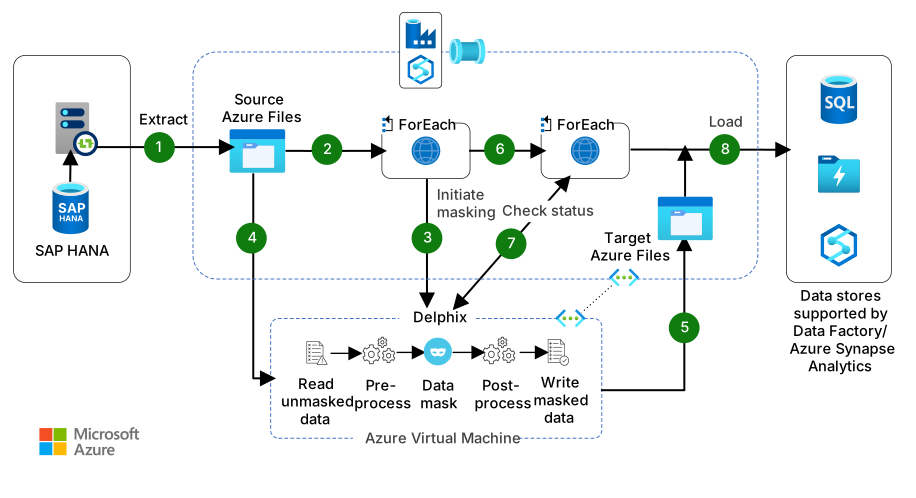
The following architecture outlines the use of Delphix Continuous Compliance (Delphix CC) in an Azure Data Factory or Azure Synapse Analytics pipeline to identify and mask sensitive data.
Download a Visio file of this architecture.
Note
This solution is specific to Azure Data Factory and Azure Synapse Analytics Pipelines. Data Masking with Delphix and Sensitive Data Discovery with Delphix pipeline templates are not yet available for Microsoft Fabric Data Factory. Contact your Perforce Delphix account representative about Microsoft Fabric support.
Dataflow
The following dataflow corresponds to the previous diagram:
Data Factory extracts data from the source datastore (SAP HANA) to a container in Azure Files by using the Copy Data activity. This container is referred to as the source data container. The data is in CSV format. To use the SAP HANA connector, Microsoft recommends deploying a self-hosted integration runtime. For more information, see Copy data from SAP HANA by using Data Factory or Azure Synapse Analytics.
Data Factory initiates an iterator (ForEach activity) that loops through a list of masking jobs configured within Delphix. These preconfigured masking jobs mask sensitive data in the source data container.
For each job in the list, the Initiate Masking activity authenticates and initiates the masking job by calling the REST API endpoints on the Delphix CC engine.
The Delphix CC engine reads data from the source data container and runs through the masking process.
In this masking process, Delphix masks data in memory and writes the resultant masked data back to a target Azure Files container, which is referred to as a target data container.
Data Factory now initiates a second iterator (ForEach activity) that monitors the operations.
For each operation (Masking Job) that starts, the Check Status activity checks the result of masking.
After all masking jobs complete successfully, Data Factory loads the masked data from the target data container to Azure Synapse Analytics.
Components
Data Factory is an extract, transform, load (ETL) service for scale-out serverless data integration and data transformation. It provides a code-free UI for intuitive authoring and unified monitoring and management. In this architecture, Data Factory orchestrates the entire data masking workflow. This workflow includes extracting data from SAP HANA, initiating masking jobs, monitoring operations, and loading masked data into Azure Synapse Analytics.
Azure Storage provides scalable cloud storage for structured and unstructured data. In this architecture, it stores both the raw source data and the masked output data. It serves as the intermediary storage layer between extraction and loading.
A self-hosted integration runtime is a component that enables secure data movement between on-premises and cloud environments. In this architecture, it facilitates data extraction from SAP HANA by using the required Open Database Connectivity (ODBC) driver.
Azure Virtual Network is a private, isolated network environment in Azure. In this architecture, it enables secure communication between services that aren't part of the Azure Synapse Analytics workspace. It helps manage access, security, and routing between resources.
What is Data Factory?
Data Factory is a managed, serverless data integration service. It provides a visual experience for integrating data sources with more than 100 built-in, maintenance-free connectors at no added cost. Easily construct ETL and extract, load, transform (ELT) processes code-free in an intuitive environment, or write your own code. To unlock your data's power through business insights, deliver integrated data to Azure Synapse Analytics.
What is Delphix CC?
Delphix CC identifies sensitive information and automates data masking and scrambling. It offers an automated, API-driven way to provide secure data.
How do Delphix CC and Data Factory solve automating compliant data?
The movement of secure data is a challenge for all organizations. Delphix makes achieving consistent data compliance easy, while Data Factory enables connecting and moving data. Together, Delphix CC and Data Factory combine industry-leading compliance and automation offerings to simplify the delivery of on-demand, compliant data.
This solution uses Data Factory data source connectors to create an ETL pipeline that allows a user to automate the following steps:
Read data from the system of record (SAP HANA), and write it to CSV files on Azure Storage.
Run a Delphix masking job against the files to replace sensitive data elements with similar but fictitious values.
Load the compliant data to Azure Synapse Analytics.
Potential use cases
Move compliant data from SAP applications to Microsoft Synapse automatically to get the necessary data for testing in a cost-sensitive, fast, and scalable manner. This architecture is specific to SAP applications that have a HANA back end. Perform millions of scrambling operations in minutes.
Use the Delphix Algorithm Framework to address regulatory requirements for your data, for example, to comply with California Consumer Privacy Act (CCPA), General Data Protection Law (Lei Geral de Proteção de Dados, LGPD), and Health Insurance Portability and Accountability Act (HIPAA).
Mask and scramble data consistently across data sources, while maintaining referential integrity for integrated application testing. For example, the name George must always be masked to Elliot. Or a given social security number (SSN) must always be masked to the same fictitious SSN, whether George and George's SSN appear in SAP, Oracle, Salesforce, or any other application.
Mask and scramble data without increasing training cycles or affecting model and prediction accuracy.
Configure a solution that works for both on-premises and the cloud by altering the source connectors. For example, you can pull data from an on-premises SAP application, replicate that data to the cloud, and ensure compliance before loading it into Azure Synapse Analytics.
Key benefits
- Realistic, deterministic masking and scrambling that maintains referential integrity
- Preemptive identification of sensitive data for most common SAP tables and modules
- Native cloud implementation
- Template-based deployment
- Scalable
- Low-cost alternative to expensive in-memory HANA hardware
Deploy this scenario
In Data Factory, deploy the Data Masking with Delphix and Sensitive Data Discovery with Delphix templates. These templates work for both Azure Synapse Analytics pipelines and Data Factory pipelines.
Set up a self-hosted integration runtime to extract data from SAP HANA.
In the Copy Data components, configure the desired source as SAP HANA in the Extract step and Synapse as the desired target in the Load step. In the Web Activity components, input the Delphix application IP address or host name and the credentials to authenticate with Delphix CC APIs.
Run the Sensitive Data Discovery with Delphix Data Factory template for initial setup and anytime you want to preidentify sensitive data, such as a schema change. This template provides Delphix CC with the initial configuration that it requires to scan for columns that might contain sensitive data. You can also use this workflow with the Delphix Compliance Accelerator for SAP, preidentified sensitive fields, and masking algorithms to protect data in core SAP tables, such as finance, human resources, and logistics modules. Contact Delphix to apply this option.
Create a rule set that indicates the collection of data that you want to profile. Run a profiling job in the Delphix UI to identify and classify sensitive fields for that rule set and assign appropriate masking algorithms.
Run the template. After completed, Azure Synapse Analytics contains masked data, including fields from key tables and modules that the Delphix Compliance Accelerator for SAP preidentified.
Considerations
These considerations implement the pillars of the Azure Well-Architected Framework, which is a set of guiding tenets that you can use to improve the quality of a workload. For more information, see Well-Architected Framework.
Security
Security provides assurances against deliberate attacks and the misuse of your valuable data and systems. For more information, see Design review checklist for Security.
Delphix CC irreversibly masks data values with realistic data that remains fully functional, which enables the development of higher-quality code. Among the set of algorithms available to transform data to user specifications, Delphix CC has a patented algorithm. The algorithm intentionally produces data collisions and allows you to salt data with specific values needed for potential validation routines on the masked dataset. From a zero trust perspective, operators don't need access to the actual data in order to mask it. The entire delivery of masked data from point A to point B can be automated via APIs.
Cost Optimization
Cost Optimization focuses on ways to reduce unnecessary expenses and improve operational efficiencies. For more information, see Design review checklist for Cost Optimization.
To see how your specific requirements affect cost, adjust values in the Azure pricing calculator.
Azure Synapse Analytics: You can scale compute and storage levels independently. Compute resources are charged per hour, and you can scale or pause these resources on demand. Storage resources are billed per terabyte, so your costs increase as you ingest data.
Data Factory: Costs are based on the number of read and write operations, monitoring operations, and orchestration activities for each workload. Costs increase with each extra data stream and the amount of data that each one processes.
Delphix CC: Unlike other data compliance products, Delphix doesn't require a full physical copy of the environment to perform masking.
Environment redundancy can be expensive because of several reasons:
- The time that it takes to set up and maintain the infrastructure
- The cost of the infrastructure itself
- The time that you spend repeatedly loading physical data into the masking environment
Performance Efficiency
Performance Efficiency refers to your workload's ability to scale to meet user demands efficiently. For more information, see Design review checklist for Performance Efficiency.
Delphix CC is horizontally and vertically scalable. The transformations occur in memory and can be parallelized. The product runs both as a service and as a multi-node appliance, so you can design solution architectures of any size based on the application. Delphix is the market leader in delivering large masked datasets.
Masking streams can be increased to engage multiple CPU cores in a job. For more information about how to alter memory allocation, see Create masking jobs.
For optimal performance of datasets larger than 1 TB in size, Delphix Hyperscale Masking breaks the datasets into numerous modules and then orchestrates the masking jobs across multiple continuous compliance engines.
Contributors
Microsoft maintains this article. The following contributors wrote this article.
Principal authors:
- Tess Maggio | Product Manager 2
- Arun Saju | Senior Staff Engineer
- Mick Shieh | SAP Global Practice Leader
Other contributors:
- Jon Burchel | Senior Content Developer
- Abhishek Narain | Senior Program Manager
- Michael Torok | Senior Director of Digital Customer Experience
To see nonpublic LinkedIn profiles, sign in to LinkedIn.