Note
Access to this page requires authorization. You can try signing in or changing directories.
Access to this page requires authorization. You can try changing directories.
Azure SQL Database
Azure SQL Managed Instance
Azure Synapse Analytics
Azure Databricks
Azure Event Hubs
This article describes how to use Precisely Connect to migrate mainframe and midrange systems to Azure. Precisely Connect provides real-time data replication from legacy systems to Azure by using change data capture (CDC) technology.
This solution provides data consistency between on-premises mainframe environments and Azure cloud services while minimizing the effect on source system performance. The architecture supports various mainframe and midrange data sources and replicates data to Azure targets like Azure SQL Database, Azure Event Hubs, and Microsoft Fabric.
Apache®, Spark, and the flame logo are either registered trademarks or trademarks of the Apache Software Foundation in the United States and/or other countries. No endorsement by The Apache Software Foundation is implied by the use of these marks.
Architecture
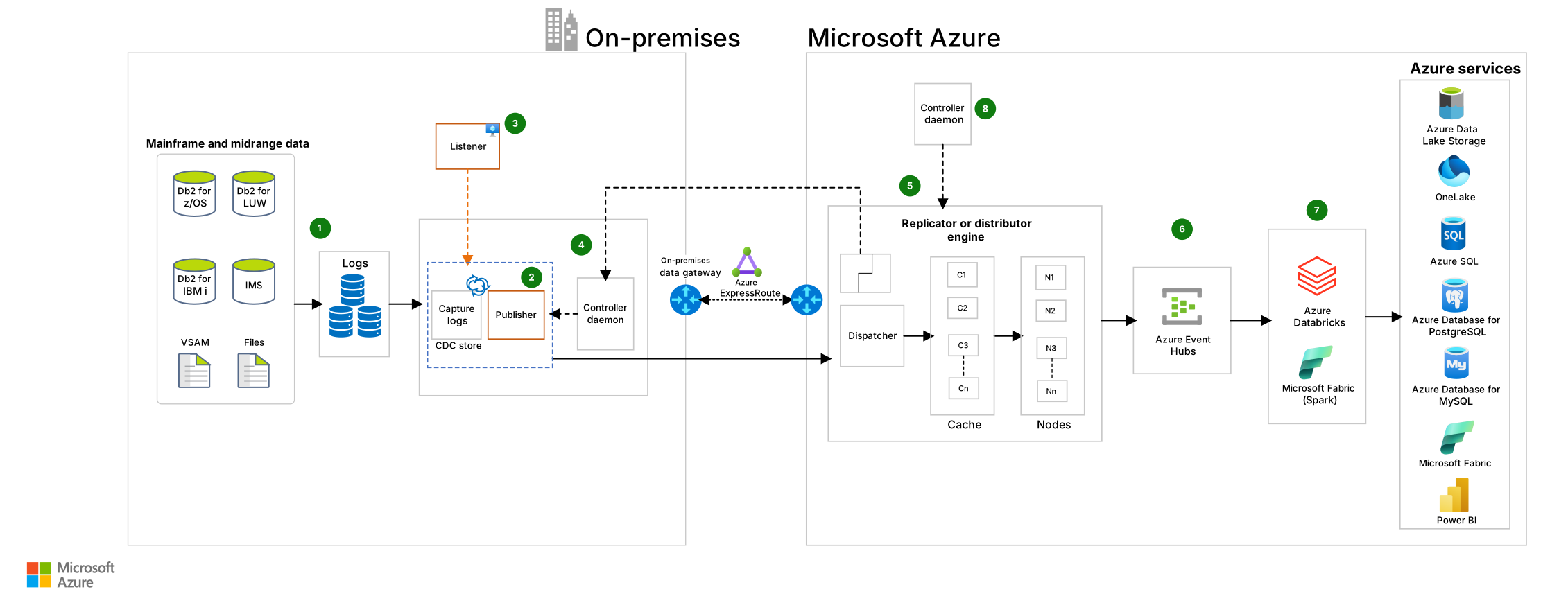
Download a Visio file of this architecture.
Workflow
The following workflow corresponds to the previous diagram:
A Connect agent component captures change logs by using mainframe or midrange native utilities and caches the logs in temporary storage.
For mainframe systems, a publisher component on the mainframe manages data migration.
For midrange systems, a listener component manages data migration instead of a publisher. The listener resides on either a Windows or Linux machine.
The publisher or listener moves the data from on-premises to Azure via an enhanced-security connection. The publisher or listener handles the commit and rollback of transactions for each unit of work, which maintains the integrity of data.
The Connect Replicator Engine captures the data from the publisher or listener and applies it to the target. It distributes data for parallel processing.
Event Hubs ingests real-time data changes from Precisely Connect for immediate processing.
Azure Databricks or Fabric (Apache Spark) process the ingested data and then it's stored in either Azure targets or a Fabric lakehouse or warehouse for downstream analytics and business intelligence (BI).
The Connect Controller Daemon authenticates the request and establishes the socket connection between the publisher or listener and the Replicator Engine.
Components
This architecture uses the following components.
Networking and identity
Azure ExpressRoute is a connectivity service that extends your on-premises networks to the Azure cloud platform over a private connection from a connectivity provider. In this architecture, ExpressRoute provides a secure, high-bandwidth connection for replicating mainframe data to Azure.
Azure VPN Gateway is a virtual network gateway service that enables you to create virtual network gateways that send encrypted traffic between an Azure virtual network and an on-premises location over the public internet. In this architecture, you can use VPN Gateway as an alternative to ExpressRoute to connect mainframe systems to Azure when a private connection isn't available.
Microsoft Entra ID is an identity and access management service that can synchronize with on-premises Active Directory. In this architecture, Microsoft Entra ID manages authentication and access control for Precisely Connect components that access Azure resources.
Storage
Azure Database for MySQL is a managed relational database service that's based on the community edition of the open-source MySQL database engine. In this architecture, Azure Database for MySQL provides a target option for replicated mainframe data.
Azure Database for PostgreSQL is a managed relational database service that's based on the community edition of the open-source PostgreSQL database engine. In this architecture, Azure Database for PostgreSQL can serve as an alternative target database for mainframe data replication.
Azure SQL Database is a platform as a service (PaaS) database engine that's part of the Azure SQL family. It's built for the cloud and provides all the benefits of a managed and evergreen PaaS. SQL Database also provides AI-powered automated features that optimize performance and durability. Serverless compute and Hyperscale storage options automatically scale resources on demand. In this architecture, SQL Database serves as a target database for receiving replicated mainframe data via Open Database Connectivity (ODBC) or native database connections.
Azure SQL Managed Instance is a cloud database service that provides all the benefits of a managed and evergreen PaaS. SQL Managed Instance has near-complete compatibility with the latest SQL Server Enterprise edition database engine. It also provides a native virtual network implementation that addresses common security concerns. In this architecture, SQL Managed Instance can serve as a target for mainframe data that requires SQL Server compatibility.
Azure Storage is a cloud storage solution that includes object, file, disk, queue, and table storage. Services include hybrid storage solutions and tools for transferring, sharing, and backing up data. In this architecture, Storage provides scalable storage for replicated mainframe data and temporary caching.
OneLake is the unified, single data lake for Fabric. In this architecture, OneLake serves as storage for ingesting data from Event Hubs.
Fabric is an analytics platform that unifies data movement, data processing, ingestion, transformation, real-time event routing, and report building. In this architecture, Fabric (lakehouses, warehouses, or SQL Database within Fabric) serves as the relational storage destination for analytics and the BI layer.
Analysis and reporting
- Power BI is a group of business analytics tools that can deliver insights throughout your organization. Power BI can connect to hundreds of data sources, simplify data preparation, and drive unplanned analysis. In this architecture, Power BI provides BI capabilities for analyzing replicated mainframe data. Power BI is natively integrated with Fabric for unified analytics.
Monitoring
- Azure Monitor is a monitoring service that provides a solution for collecting, analyzing, and acting on telemetry from cloud and on-premises environments. Features include Application Insights, Azure Monitor Logs, and Log Analytics. In this architecture, Azure Monitor provides monitoring and observability for the data replication process and Azure resources.
Data integrators
Azure Databricks is a unified analytics platform based on Spark that integrates with open-source libraries. It provides a collaborative workspace for running analytics workloads. You can use Python, Scala, R, and SQL languages to build extract, transform, load (ETL) pipelines and orchestrate jobs. In this architecture, Azure Databricks processes and transforms the replicated mainframe data for consumption by Azure data platform services.
Fabric is an end-to-end AI powered analytics platform that operates on a managed Spark compute platform. In this architecture, Fabric Spark ingests and transforms replicated mainframe data to make it analytics-ready for consumption by downstream Azure data platform and Fabric services.
Event Hubs is a real-time data ingestion service that can process millions of events per second. You can ingest data from multiple sources and use it for real-time analytics. You can scale Event Hubs based on the volume of data. In this architecture, Event Hubs ingests real-time data changes from Precisely Connect for immediate processing and analytics.
Precisely Connect is a data integration platform that can integrate data from multiple sources and provide real-time replication to Azure. You can use it to replicate data without making changes to your application. Precisely Connect can also improve the performance of ETL jobs. In this architecture, Precisely Connect serves as the primary data replication engine that captures and migrates mainframe data to Azure in real time.
Scenario details
You can use various strategies to migrate mainframe and midrange systems to Azure. Data migration plays a key role in this process. In a hybrid cloud architecture, you must replicate data between mainframe or midrange systems and the Azure data platform. To maintain the integrity of the data, you need real-time replication for business-critical applications. Precisely Connect can help you replicate data from mainframe and midrange data sources to the Azure data platform in real time by using CDC or by using batch ingestion.
Precisely Connect supports various mainframe and midrange data sources, including the following sources:
- Db2 z/OS
- Db2 for Linux, UNIX, and Windows (LUW)
- Db2 for i
- IBM Information Management System (IMS)
- IBM Virtual Storage Access Method (VSAM)
- Files and copybooks
Precisely Connect converts the data into consumable format that Event Hubs ingests for immediate processing. Azure Databricks or Fabric processes the ingested data for downstream consumption and storage into Azure targets. These targets include SQL Database, Azure Database for PostgreSQL, Azure Database for MySQL, Azure Data Lake Storage, and Fabric lakehouses or warehouses. Precisely Connect also supports scalability based on data volume and customer requirements. It replicates data without affecting performance or straining the network.
Potential use cases
Data replication from mainframe and midrange data sources to the Azure data platform
In a hybrid cloud architecture, data sync between mainframe or midrange systems and the Azure data platform
Near real-time analytics on Azure, based on operational data from mainframe or midrange systems
Migration of data from mainframe or midrange systems to Azure without affecting applications
Considerations
These considerations implement the pillars of the Azure Well-Architected Framework, which is a set of guiding tenets that you can use to improve the quality of a workload. For more information, see Well-Architected Framework.
Reliability
Reliability helps ensure that your application can meet the commitments that you make to your customers. For more information, see Design review checklist for Reliability.
Use Azure Monitor and Application Insights to monitor your data migration. Set up alerts for proactive management.
Cost Optimization
Cost Optimization focuses on ways to reduce unnecessary expenses and improve operational efficiencies. For more information, see Design review checklist for Cost Optimization.
Data replication to Azure and processing in Azure services can save money compared to maintaining data in a mainframe system.
The cost management tool in the Azure portal provides a cost analysis view that can help you analyze spending.
You can use Azure Databricks to resize your cluster via autoscaling to optimize costs. This approach can save money compared to a fixed configuration.
Azure Advisor provides recommendations to optimize performance and cost management.
Use the Azure pricing calculator to estimate the cost of implementing this solution.
Performance Efficiency
Performance Efficiency refers to your workload's ability to scale to meet user demands efficiently. For more information, see Design review checklist for Performance Efficiency.
Precisely Connect can scale based on the volume of data, and optimize data replication.
The Connect Replicator Engine can distribute data for parallel processing. You can balance distribution based on the ingestion of workloads.
SQL Database serverless can scale automatically based on the volume of workloads.
Event Hubs can scale based on throughput units and the number of partitions.
For more information, see Autoscaling best practices in Azure.
Contributors
Microsoft maintains this article. The following contributors wrote this article.
Principal author:
- Seetharaman Sankaran | Senior Engineering Architect
Other contributor:
- Gyani Sinha | Senior Solution Engineer
To see nonpublic LinkedIn profiles, sign in to LinkedIn.
Next steps
- CDC with Precisely Connect
- What is Azure ExpressRoute?
- What is VPN Gateway?
- What is SQL Database?
- Contact the Mainframe Data Modernization Engineering team at Microsoft.