Note
Access to this page requires authorization. You can try signing in or changing directories.
Access to this page requires authorization. You can try changing directories.
Azure App Service
Azure Application Gateway
Azure Storage
Azure SQL Database
Azure Private Link
Azure Virtual Network
Azure Monitor
This baseline architecture builds on the basic web application architecture and provides detailed guidance for designing a secure, zone-redundant, and highly available web app on Azure. In this architecture, Azure Application Gateway with Azure Web Application Firewall exposes a public endpoint and routes requests to Azure App Service through Azure Private Link. The App Service application uses virtual network integration and Private Link to communicate securely with Azure platform as a service (PaaS) solutions like Azure Key Vault and Azure SQL Database.
Important
 An example implementation demonstrates this baseline App Service implementation on Azure. Use it as a foundation for your production solution.
Architecture
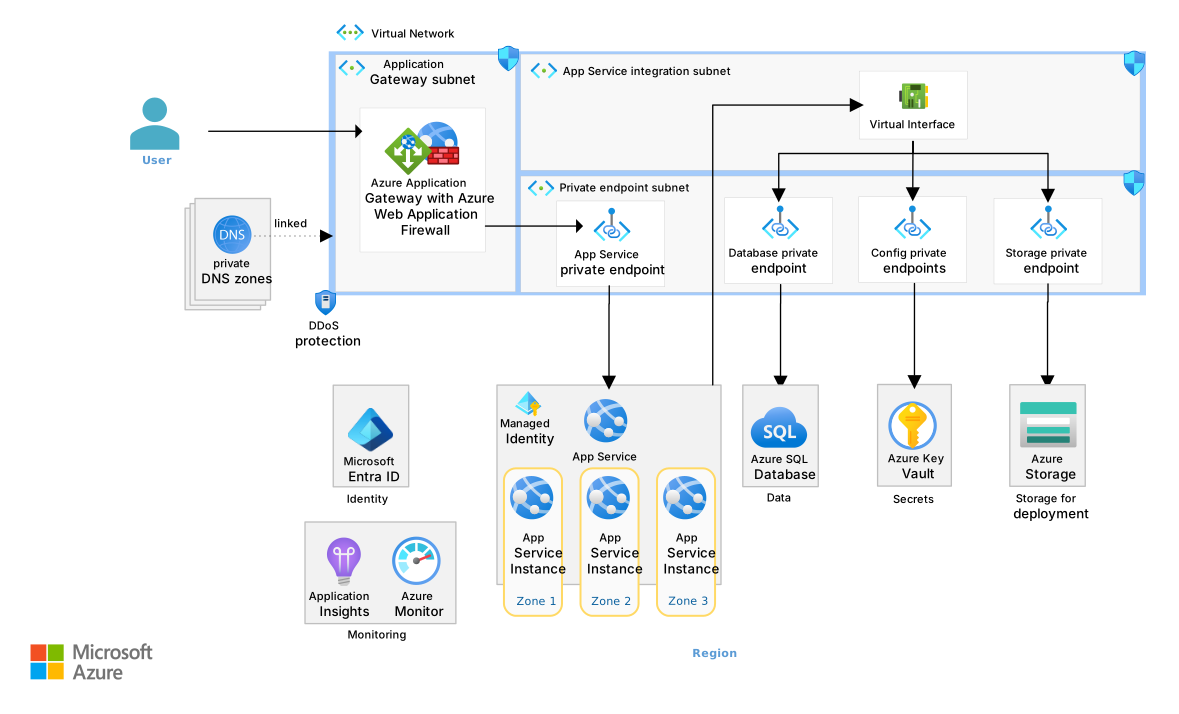
Download a Visio file of this architecture.
Components
This architecture shares many components with the basic web app architecture. The following list describes only the components that differ from or extend the basic architecture:
Application Gateway is a layer-7 HTTP and HTTPS load balancer and web traffic manager. In this architecture, Application Gateway acts as a single public entry point. Application Gateway terminates Transport Layer Security (TLS) and evaluates Azure Web Application Firewall rules. It then forwards approved requests privately to App Service instances across availability zones.
Azure Web Application Firewall is a cloud-native service that protects web apps from common exploits, like SQL injection and cross-site scripting (XSS). In this architecture, Azure Web Application Firewall runs on Application Gateway and blocks malicious requests before they reach App Service. This setup improves security and helps maintain availability.
Key Vault is a service that securely stores and manages secrets, encryption keys, and certificates. In this architecture, it stores the TLS certificate (X.509) that Application Gateway uses, and holds application secrets that App Service accesses privately.
Azure Virtual Network is a service that provides isolated and secure private virtual networks in Azure. In this architecture, the virtual network provides private endpoints, App Service integration, and dedicated subnets for Application Gateway. This setup isolates traffic and lets App Service communicate securely with dependent Azure services through private endpoints.
Private Link is a networking service that provides private access to Azure services over the Microsoft backbone network to eliminate exposure to the public internet. In this architecture, Private Link enables private inbound connections to App Service and private outbound connections from App Service to services like Key Vault, SQL Database, and Azure Storage.
Azure DNS is a hosting service for Domain Name System (DNS) domains. It provides name resolution by using Microsoft Azure infrastructure. Private DNS zones map a service's fully qualified domain name (FQDN) to a private endpoint's IP address. In this architecture, private DNS zones map the App Service default domain and other PaaS service domains to their private endpoint addresses so that all traffic stays on the private network.
Networking
Network security is central to the App Service baseline architecture. At a high level, the network architecture provides the following capabilities:
A single secure entry point for client traffic
Traffic filtering through Azure Web Application Firewall
End-to-end TLS encryption for data in transit
Minimized data exfiltration through Private Link, which keeps traffic within Azure
Logical grouping and isolation of network resources through network segmentation
Network flows
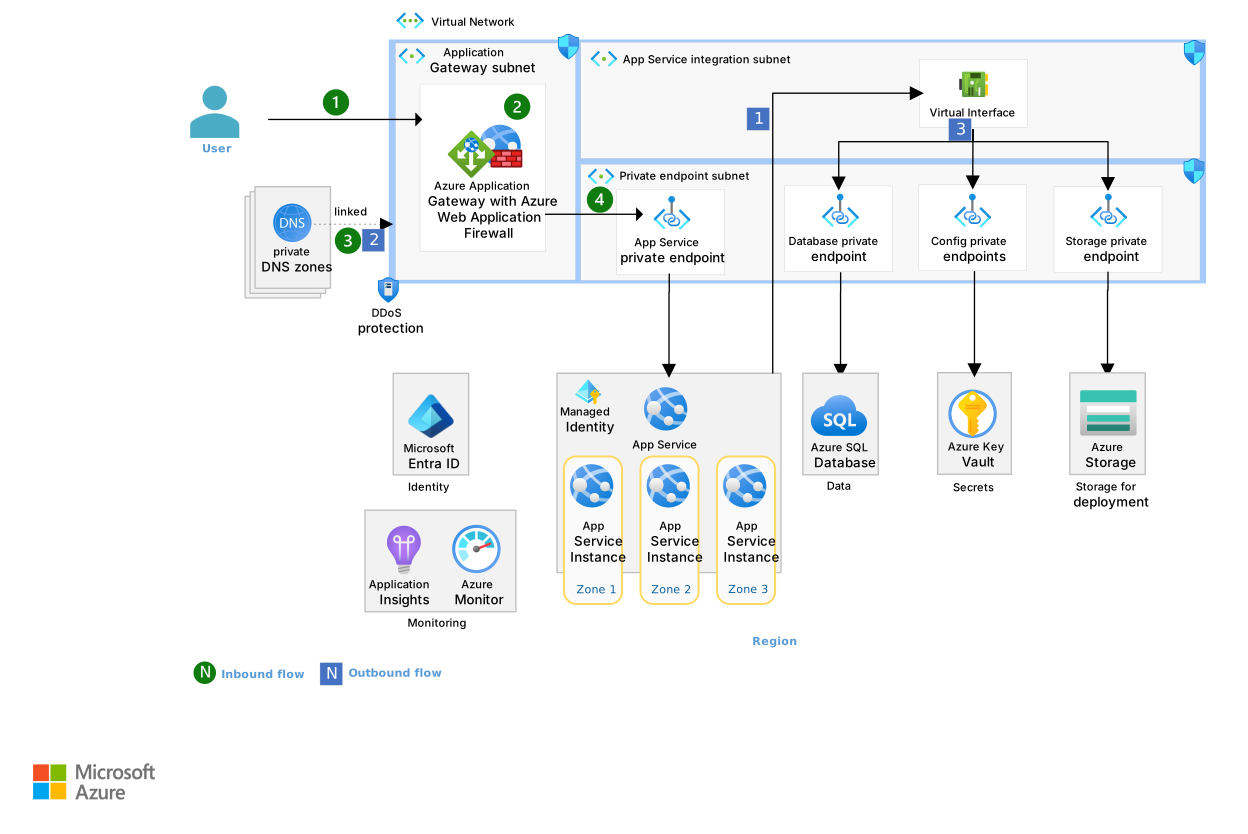
Inbound flow
The following steps describe the inbound flow from the internet to the App Service instance:
The user issues a request to the Application Gateway public IP address.
Application Gateway evaluates the Web Application Firewall rules, which protect against attacks like XSS and SQL injection. If a rule detects a violation, Application Gateway returns an error to the requestor and stops processing. Otherwise, Application Gateway routes the request to the back-end pool, which in this case is the App Service default domain.
The private DNS zone
privatelink.azurewebsites.netlinks to the virtual network. The DNS zone contains an A record that maps the App Service default domain to the private IP address of the App Service private endpoint. Azure DNS uses this record to resolve the default domain to the private endpoint IP address.Application Gateway routes the request to an App Service instance through the private endpoint.
Outbound flow
The following steps describe the outbound flow from App Service to Azure PaaS services:
App Service sends a request to the DNS name of the required Azure service, like Key Vault, Storage, SQL Database, or any other Azure service that supports Private Link. The App Service virtual network integration feature routes the request through the virtual network.
Similar to step 3 in the inbound flow, the linked private DNS zone contains an A record that maps the Azure service's domain to its private endpoint IP address. Azure DNS uses this record to resolve the domain to the service's private endpoint IP address.
The virtual network routes the request to the service through the private endpoint.
Outbound traffic that doesn't go to Azure PaaS services leaves through a public IP address that multiple customers share. For example, a web app might call a public API during an HTTP request. To control this type of egress traffic, route it through a network device like Azure Firewall. For more information, see Control outbound traffic by using Azure Firewall.
Application Gateway implementation
Application Gateway is a scalable, regional, layer-7 load balancer that supports Azure Web Application Firewall and TLS offloading. When you implement Application Gateway for inbound traffic to App Service, consider the following points:
Deploy Application Gateway and configure an Azure Web Application Firewall policy that uses a Microsoft-managed ruleset. Use Prevention mode to block web attacks before they reach an origin service like App Service.
Implement end-to-end TLS encryption.
Use private endpoints to implement inbound private access to App Service.
Implement autoscaling so that Application Gateway adjusts capacity based on traffic demand.
Consider using at least three instances and deploy across all availability zones that your region supports. Application Gateway is highly available, but creating a new instance after a failure can take up to seven minutes, even for a single scale instance. Deploy multiple instances across availability zones to ensure that an instance remains available while a new instance starts.
Block public network access on App Service to ensure network isolation. In Bicep, set
publicNetworkAccesstoDisabledunderproperties.
Flow from App Service to Azure services
This architecture uses virtual network integration to route App Service traffic to private endpoints through the virtual network. The baseline architecture doesn't enable all traffic routing, which would force all outbound traffic through the virtual network. Instead, it routes only internal traffic bound for private endpoints.
For Azure services that don't require public internet access, allow private endpoints and block public endpoints. Private endpoints improve security by letting App Service connect to Private Link services directly from the private virtual network without public IP addressing.
In this architecture, SQL Database, Storage, and Key Vault all have public endpoints blocked. Their service firewalls permit traffic only from other authorized Azure services. Configure other Azure services, like Azure Cosmos DB and Azure Managed Redis, with private endpoints. In this architecture, Azure Monitor doesn't use a private endpoint, but you can implement one by using an Azure Monitor Private Link Scope (AMPLS).
The baseline architecture implements a private DNS zone for each service. Each private DNS zone contains an A record that maps the service's FQDN to the private endpoint's IP address. The zones link to the virtual network. Private DNS zone groups automatically create and update DNS records for private endpoints.
Consider the following points when you implement virtual network integration and private endpoints:
Name private DNS zones based on the Azure services DNS zone configuration guidance.
Configure service firewalls to allow only private connections to storage accounts, key vaults, SQL databases, and other Azure components.
Set the Storage account default network access rule to deny all traffic that originates outside the virtual network.
Virtual network segmentation and security
The network in this architecture has separate subnets for Application Gateway, App Service integration components, and private endpoints. A network security group (NSG) on each subnet allows only the required inbound and outbound traffic. The following table describes a selection of NSG rules that you can add to each subnet.
| Subnet | Inbound | Outbound |
|---|---|---|
GatewaySubnet |
AppGw.In.Allow.ControlPlane: Allow inbound control plane access. AppGw.In.Allow443.Internet: Allow inbound internet HTTPS access. |
AppGw.Out.Allow.PrivateEndpoints: Allow outbound access to PrivateEndpointsSubnet. AppPlan.Out.Allow.AzureMonitor: Allow outbound access to Azure Monitor. |
PrivateEndpointsSubnet |
Default rules: Allow inbound access from virtual network. | Default rules: Allow outbound access to virtual network. |
AppServiceSubnet |
Default rules: Allow inbound access from virtual network. | AppPlan.Out.Allow.PrivateEndpoints: Allow outbound access to PrivateEndpointsSubnet. AppPlan.Out.Allow.AzureMonitor: Allow outbound access to Azure Monitor. |
Consider the following points when you implement virtual network segmentation and security:
Enable DDoS protection for the virtual network that contains an application gateway subnet with a public IP address.
Add an NSG to every subnet where possible. Use the strictest rules that allow full solution functionality.
Use application security groups to group resources logically, which simplifies NSG rule creation in complex environments.
The following table shows an example network schema.
| Type | Name | Address range |
|---|---|---|
| Virtual network | Address prefix | 10.0.0.0/16 |
| Subnet | GatewaySubnet | 10.0.1.0/24 |
| Subnet | AppServiceSubnet | 10.0.0.0/24 |
| Subnet | PrivateEndpointsSubnet | 10.0.2.0/27 |
| Subnet | AgentsSubnet | 10.0.2.32/27 |
Considerations
These considerations implement the pillars of the Azure Well-Architected Framework, which is a set of guiding tenets that you can use to improve the quality of a workload. For more information, see Well-Architected Framework.
Reliability
Reliability helps ensure that your application can meet the commitments that you make to your customers. For more information, see Design review checklist for Reliability.
The baseline App Service architecture focuses on zonal redundancy for key regional services. Availability zones are physically separate locations within a region that provide high availability and fault tolerance. When you deploy two or more instances across availability zones in supported regions, the failure of one zone doesn't affect the others. This approach helps maintain service availability.
The architecture also ensures sufficient instances of Azure services to meet demand. The following sections provide reliability guidance for each key service in the architecture.
Application Gateway
Deploy Application Gateway in a zone-redundant configuration with a minimum scale instance count of three or more. Multiple instances ensure that service remains available during failures without waiting for the six-minute to seven-minute startup time required to set up a new instance.
App Service
Deploy a minimum of two App Service instances that support availability zones. For higher resiliency, deploy at least one instance for each availability zone in your region, plus extra instances within each zone for redundancy.
Implement health check endpoints in your apps and configure the App Service health check feature to reroute requests away from unhealthy instances. For more information, see Monitor App Service instances by using health check and Health checks in ASP.NET Core.
Overprovision capacity to handle zone failures.
Blob Storage
Use zone-redundant storage (ZRS), which replicates data synchronously across three availability zones in the region. Create Standard ZRS or Standard geo-zone-redundant storage (GZRS) storage accounts to ensure data replication across availability zones.
Create separate storage accounts for deployments, web assets, and other data to manage and configure each account independently.
SQL Database
Deploy SQL Database in the General Purpose, Premium, or Business Critical tier with zone redundancy turned on. These tiers support zone redundancy.
Configure SQL Database backups to use ZRS or GZRS.
Security
Security provides assurances against deliberate attacks and the misuse of your valuable data and systems. For more information, see Design review checklist for Security.
The baseline App Service architecture focuses on essential security recommendations for your web app. You must understand how encryption and identity work at every layer to help secure your workload.
App Service
Turn off local authentication methods for File Transfer Protocol (FTP) and Source Control Management (SCM) site deployments.
Turn off remote debugging.
Use the latest TLS version that all your clients support.
Turn on the Microsoft Defender for App Service plan.
Use the latest versions of supported platforms, programming languages, protocols, and frameworks.
Consider App Service Environment if you require higher isolation or secure network access.
Encryption
Production web apps must encrypt data in transit by using HTTPS. HTTPS relies on TLS and uses public and private keys for encryption. Store the TLS certificate (X.509) in Key Vault and grant Application Gateway permission to retrieve the private key. For data at rest, some services automatically encrypt data, and others let you customize settings.
Data in transit
The baseline architecture encrypts data in transit from the user to the web app in App Service.
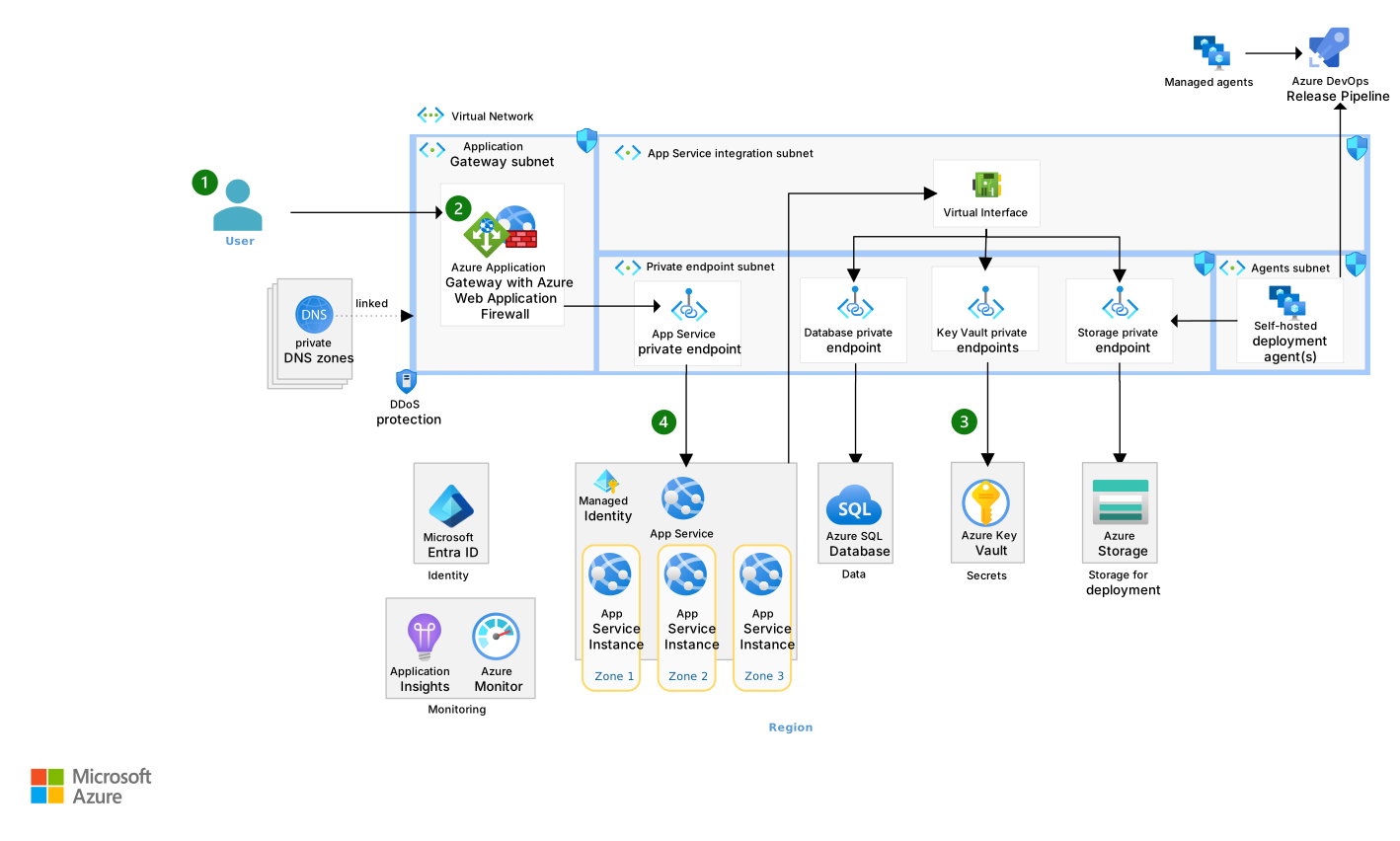
The following workflow describes how encryption works at a high level:
The user sends an HTTPS request to the web app.
The HTTPS request reaches the application gateway.
The application gateway uses a certificate (X.509) in Key Vault to create a secure TLS connection with the user's web browser. The application gateway decrypts the HTTPS request so that the web application firewall can inspect it.
The application gateway creates a TLS connection to App Service to re-encrypt the user request. App Service provides native support for HTTPS, so you don't need to add a certificate to App Service. The application gateway sends the encrypted traffic to App Service. App Service decrypts the traffic, and the web app processes the request.
Consider the following recommendations when you configure data-in-transit encryption:
Create or upload your certificate to Key Vault. HTTPS encryption requires a certificate (X.509). You need a certificate from a trusted certificate authority for your custom domain.
Store the private key to the certificate in Key Vault.
Provide Application Gateway access to the certificate private key. For more information, see Grant permission by using Azure role-based access control (Azure RBAC) and Managed identities for Azure resources. Don't use Key Vault access policies to provide access. Access policies let you grant only broad permissions, not specific values.
Turn on end-to-end encryption. App Service is the back-end pool for the application gateway. When you configure the back-end setting for the back-end pool, use the HTTPS protocol on back-end port 443.
Data at rest
Use transparent data encryption to encrypt sensitive data in SQL Database. Transparent data encryption encrypts the entire database, backups, and transaction log files and doesn't require changes to your web app.
Place sensitive data in its own database and turn on encryption only for that database. This approach minimizes database encryption latency.
Understand built-in encryption support. Azure Storage automatically encrypts data at rest through server-side encryption (256-bit Advanced Encryption Standard (AES)). Azure Monitor automatically encrypts data at rest through Microsoft-managed keys.
Governance
Azure Policy helps enforce architectural and security decisions for web apps. It can prevent noncompliant resources from being deployed (deny mode) or flag them for review (audit mode). This approach helps detect configuration drift from your intended architecture, whether the drift occurs through infrastructure as code (IaC) deployments or manual changes in the Azure portal.
Place all resources in your architecture under Azure Policy governance. Use built-in policies or policy initiatives where possible to enforce essential network topology, service features, security, and monitoring decisions. Consider the following built-in policies:
- App Service should disable public network access.
- App Service should use virtual network integration.
- App Service should use Private Link to connect to PaaS services.
- App Service should have local authentication methods disabled for FTP and SCM site deployments.
- App Service should have remote debugging turned off.
- App Service apps should use the latest TLS version.
- Defender for App Service should be enabled.
- Azure Web Application Firewall should be enabled for Application Gateway.
See more built-in policies for key services like Application Gateway and networking components, App Service, Key Vault, and monitoring components. You can create custom policies or use community policies, like policies from Azure landing zones, if built-in policies don't meet your needs. Prefer built-in policies when possible.
Identity and access management
The App Service baseline architecture configures authentication and authorization for user identities (users) and workload identities (Azure resources). It implements the principle of least privilege.
User identities
Use the integrated authentication mechanism for App Service, also called EasyAuth. EasyAuth simplifies identity provider integration with your web app. It handles authentication outside your web app, so you don't have to make significant code changes.
Configure the reply URL for the custom domain. Set the redirect URL to
https://<application-gateway-endpoint>/.auth/login/<provider>/callback.Replace
<application-gateway-endpoint>with either the public IP address or custom domain name of your application gateway. Replace<provider>with your authentication provider, likeaadfor Microsoft Entra ID.For setup instructions, see Azure Front Door considerations or Set up Application Gateway.
Workload identities
Use managed identities for workload identities. Managed identities eliminate the need for developers to manage authentication credentials.
Use user-assigned managed identities. System-assigned identities can cause IaC deployments to fail based on race conditions and order of operations. User-assigned managed identities avoid some of these deployment error scenarios. For more information, see Managed identities.
Operational Excellence
Operational Excellence covers the operations processes that deploy an application and keep it running in production. For more information, see Design review checklist for Operational Excellence.
The deployment for the baseline App Service application follows the Azure Pipelines architecture guidance. Because the baseline architecture denies public access to App Service and secures the deployment storage account within the virtual network, you can't deploy from outside the virtual network. To address this constraint, the architecture uses self-hosted deployment agents that run within the virtual network. The following deployment guidance focuses on application code deployment, not infrastructure or database changes.
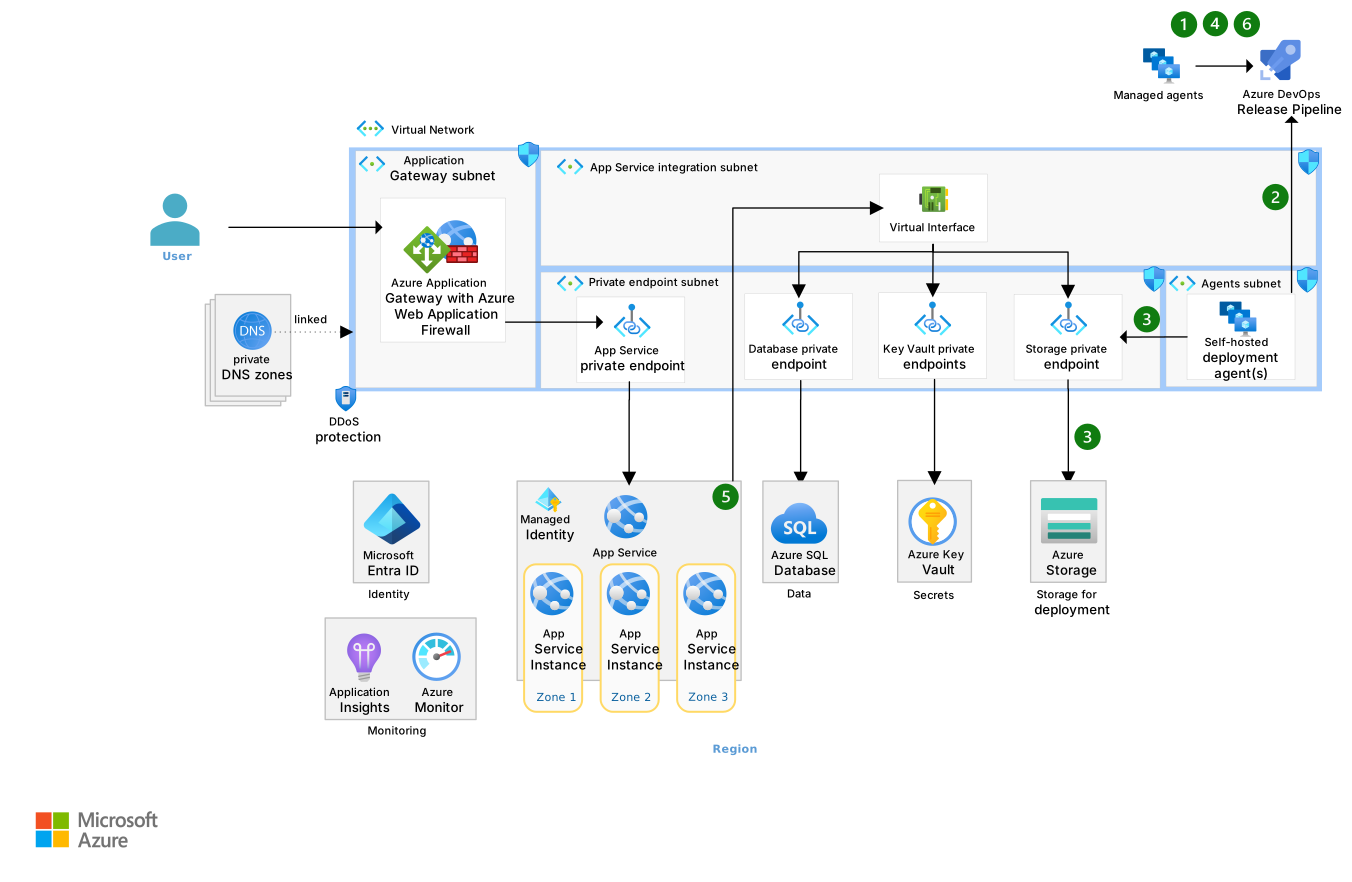
Deployment flow
The release pipeline posts a job request to the job queue for the self-hosted agents. The job instructs the agent to upload the publish zip file build artifact to a Storage account.
A self-hosted deployment agent polls the queue, picks up the job request, and downloads the job and build artifact.
The self-hosted deployment agent uploads the zip file to the storage account through the storage account's private endpoint.
The pipeline continues, and a managed agent picks up a subsequent job. The managed agent makes a command-line interface (CLI) call to update the WEBSITE_RUN_FROM_PACKAGE app setting to reference the new publish zip file for the staging slot.
az webapp config appsettings set -g MyResourceGroupName -n MyUniqueApp --slot staging --settings WEBSITE_RUN_FROM_PACKAGE=UriToNewZipApp Service pulls the new publish zip file from storage via the Storage account private endpoint. It restarts the staging instance with the new package because
WEBSITE_RUN_FROM_PACKAGEwas set to a different file name.The pipeline resumes and runs smoke tests or waits for manual approval. After successful tests or approval, the pipeline swaps the staging and production slots.
Deployment guidance
Apply the following deployment guidance for the baseline architecture:
Run your deployment directly from a package in App Service to avoid deployment conflicts. This approach mounts the ZIP package directly as the read-only wwwroot directory instead of copying files. It eliminates file lock conflicts between deployment and runtime and ensures that only fully deployed apps run.
Include version numbers in deployed package zip file names. When you update the
WEBSITE_RUN_FROM_PACKAGEapp setting to reference the deployment package that has a different file name, App Service automatically pulls the new package and restarts.Use deployment slots for resilient code deployments.
Consider using both managed and self-hosted agents.
Use self-hosted agents to upload package zip files to the storage account over the private endpoint. Agents initiate communication to the pipeline through polling, so you don't need to open the network for inbound calls.
Use managed agents for other pipeline jobs.
Use IaC to automate infrastructure deployments.
Validate workload performance and resilience continuously by using services like Azure Load Testing and Azure Chaos Studio.
Configuration
Applications require both configuration values and secrets. Use the following guidance for configuration and secrets management:
Never store secrets like passwords or access keys in source control. Store secrets in Key Vault.
Store application configuration in App Service configuration. If you need external configuration or feature flag support, use Azure App Configuration.
Use Key Vault references in App Service configuration to securely expose secrets in your application.
Configure slot-specific app settings if your production and staging slots need different values. By default, app settings swap with the slot during deployment.
Use local environment variables or platform-specific features for local development. App Service configuration exposes app settings as environment variables. Development tools like Visual Studio let you set environment variables in launch profiles and provide secure storage for local settings through user secrets.
Monitoring
Monitoring collects and analyzes data from information technology (IT) systems to provide observability. In this architecture, monitoring tracks web app health and security across multiple layers, which helps maintain reliable operations.
Monitor three key layers:
Application code: Track application-specific telemetry and custom metrics.
Infrastructure (runtime): Monitor the App Service runtime environment.
Platform (Azure resources): Collect metrics and logs from Azure services like Application Gateway, SQL Database, and Key Vault.
For more information, see Azure activity log, Azure resource logs, and App Service application logging.
Monitor the platform
Platform monitoring collects data from the Azure services in your architecture.
Add a diagnostic setting for every Azure resource. Each Azure service has a different set of logs and metrics that you can capture. Use the following table to figure out which metrics and logs to collect.
Azure resource Metrics and logs descriptions Application Gateway Application Gateway metrics and logs descriptions Azure Web Application Firewall Azure Web Application Firewall metrics and logs descriptions App Service App Service metrics and logs descriptions SQL Database SQL Database metrics and logs description Azure Cosmos DB Azure Cosmos DB metrics and logs descriptions Key Vault Key Vault metrics and logs descriptions Blob Storage Blob Storage metrics and logs descriptions Application Insights Application Insights metrics and logs descriptions Public IP address Public IP address metrics and logs descriptions Balance observability needs with cost. The more data you collect, the higher the cost. For more information, see Log Analytics cost calculations and options and Pricing for Log Analytics workspace.
Create alerts for all Azure resources in the architecture. Set up automated actions to remediate problems when alerts trigger. Start with common recommended alert rules, then refine them over time. For more information, see the following resources:
Application Gateway
Application Gateway monitors back-end pool health through default health probes. Use Application Gateway access logs to collect information like timestamps, HTTP response codes, and URL paths. For more information, see Back-end health and diagnostic logs.
App Service
App Service provides built-in and integrated monitoring capabilities for improved observability. If your web app already has telemetry and monitoring features, like in-process instrumentation, those features continue to work on App Service.
Turn on automatic instrumentation to extend instrumentation without code changes. This feature provides application performance monitoring (APM) visibility. For more information, see Monitor App Service performance.
Turn on distributed tracing to track requests across multiple services and dependencies. You can monitor distributed cloud systems via distributed tracing and a performance profiler.
Use code-based instrumentation for custom telemetry. Application Insights also supports code-based instrumentation for custom application telemetry. Add the Application Insights SDK to your code and use the Application Insights API.
Turn on App Service logs for platform-level diagnostics. App Service provides four log types for troubleshooting: application logs, web server logs, detailed error messages, and failed request tracing.
Use structured logging. Add a structured logging library to your application code. Update your code to use key-value pairs and turn on application logs in App Service to store them in your Log Analytics workspace.
Turn on the App Service health check feature to maintain availability. Health checks detect unhealthy instances, reroute traffic away from them, and replace them automatically. This feature requires two or more App Service instances.
Database
Turn on database monitoring for SQL Database. Use Database Watcher, which is a managed monitoring solution for database services in the Azure SQL family. For more information, see Monitor SQL Database by using Azure Monitor.
Don't enable or configure anything to use Azure Cosmos DB insights if your architecture includes Azure Cosmos DB.
Performance Efficiency
Performance Efficiency refers to your workload's ability to scale to meet user demands efficiently. For more information, see Design review checklist for Performance Efficiency.
Application Gateway
Implement autoscaling for Application Gateway to scale in or out to meet demand.
Set the maximum instance count to a number higher than your expected need. You pay for only the capacity units that you use.
Set a minimum instance count that can handle small spikes in traffic. You can use average compute unit usage to calculate your minimum instance count.
Follow the guidance about sizing the Application Gateway subnet.
App Service
Use Standard or higher plans that include three or more worker instances for high availability.
Turn on autoscale to ensure that you can scale up and down to meet demand.
Consider opening a support ticket to increase the maximum number of workers to two times the instance count if your App Service consistently uses half the number of maximum instances. The maximum number of instances defaults to up to 30 for a Premium App Service plan and 10 for a Standard plan.
Consider deploying multiple stamps of the application when your App Service starts to reach the upper limits.
Choose the right App Service plan that meets your workload requirements.
Add Azure Content Delivery Network to App Service to cache and deliver static assets like images and JavaScript files from edge locations closer to your users.
Consider using App Service Environment to prevent noisy neighbor problems.
SQL Database
Database scaling involves many considerations beyond the scope of this architecture. For more information about scaling SQL Database, see the following resources:
- Dynamically scale database resources with minimal downtime
- Scale out by using SQL Database
- Use read-only replicas to offload read-only query workloads
Other scalability guidance
Review subscription limits and quotas to ensure that services scale to demand.
Consider caching for the following kinds of data to increase performance and scalability:
- Semistatic transaction data
- Session state
- Complex HTML output