Note
Access to this page requires authorization. You can try signing in or changing directories.
Access to this page requires authorization. You can try changing directories.
Microsoft Entra ID
Azure Application Gateway
Azure Firewall
Azure Virtual Network
Azure App Service
Note
App Service Environment version 3 is the main component of this architecture. Versions 1 and 2 were retired on August 31, 2024.
Availability zones are physically separated collections of datacenters in a specific region. You can deploy resources across zones to ensure that outages limited to a zone don't affect the availability of your applications. This architecture describes how to improve the resiliency of an App Service Environment deployment by deploying it in a zone-redundant architecture. These zones don't relate to proximity. They can map to different physical locations for different subscriptions. The architecture assumes a single-subscription deployment.
Azure services that support availability zones can be zonal, zone redundant, or both. You can deploy zonal services to a specific zone, and you can automatically deploy zone-redundant services across zones. For more information, see Availability zone support. App Service Environment supports zone-redundant deployments.
When you configure an App Service Environment for zone redundancy, the platform automatically deploys instances of the Azure App Service plan in the maximum number of available zones in the selected region. At least two zones must be available in the region to enable zone redundancy. As a result, the minimum App Service plan instance count is always two. The platform determines the number of zones available for an App Service Environment.
Architecture
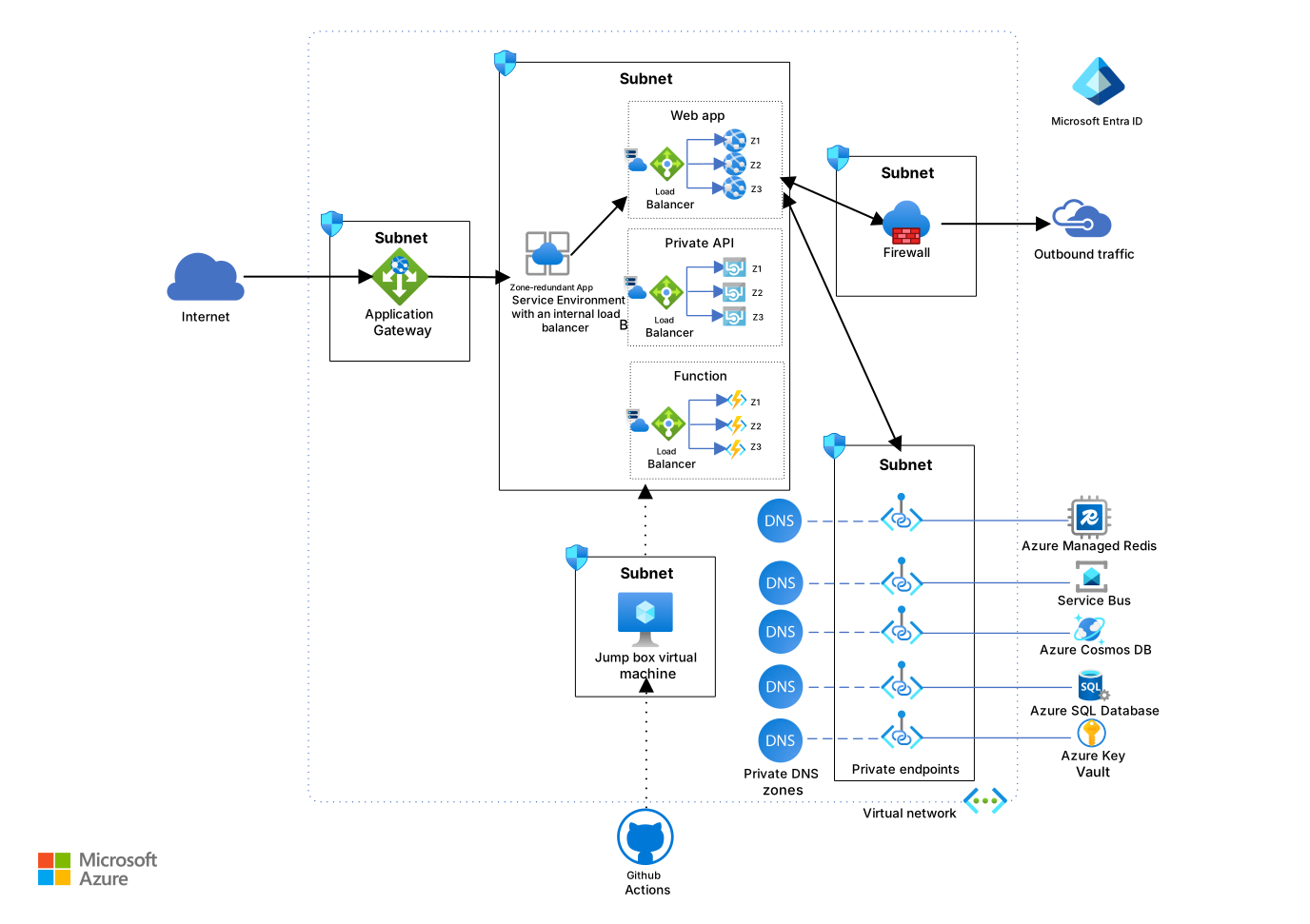
Download a Visio file of this architecture.
 A reference implementation for this architecture is available on GitHub.
The resources in the App Service Environment subnets in this reference implementation match the resources in the standard App Service Environment deployment architecture. This reference implementation uses the zone-redundant capabilities of App Service Environment v3 and Azure Managed Redis to provide higher availability. The scope of this reference architecture is limited to a single region.
Components
App Service Environment v3 is an isolated, high-performance hosting option that supports zone redundancy. In regions that support zone redundancy, you can configure zone redundancy at any time during the life cycle of an App Service Environment. Each App Service plan in a zone-redundant App Service Environment must include at least two instances to ensure deployment across two or more zones. You can combine zone-redundant and non-zone-redundant plans within the same App Service Environment. To configure a plan that has only one instance, first disable zone redundancy for that plan. Zone redundancy doesn't incur extra charges. You pay only for the Isolated v2 instances in use. For more information, see App Service Environment pricing and Reliability in App Service Environment. In this architecture, App Service Environment v3 provides an isolated, high-performance hosting platform for web apps, APIs, and functions.
Azure Virtual Network is a layer-3 IP-based network that spans all availability zones within a single region. The subnets in the virtual network also extend across availability zones. For more information, see Network requirements for App Service Environment and Reliability in Virtual Network. In this architecture, Virtual Network provides secure, isolated networking for all resources.
Azure Application Gateway v2 is a cloud-native web traffic load balancer that supports zone redundancy. In this architecture, it spans multiple availability zones in each region. As a result, a single application gateway provides high availability, as shown in the reference architecture. The reference architecture uses the Web Application Firewall SKU of Application Gateway, which provides increased protection against common threats and vulnerabilities. This protection is based on an implementation of the Core Rule Set (CRS) of the Open Web Application Security Project (OWASP). For more information, see Reliability in Application Gateway v2. Application Gateway v2 serves as a zone-redundant web traffic load balancer.
Azure Firewall is a cloud-native, managed network security service that includes built-in support for high availability. It can use multiple zones without extra configuration. In this architecture, Azure Firewall provides managed, high-availability network security to control and monitor outbound traffic for resources in the virtual network.
You can also configure a specific availability zone when you deploy the firewall. For more information, see Azure Firewall availability zone support. The reference architecture doesn't use this configuration.
Microsoft Entra ID is a highly available, highly redundant global service that spans availability zones and regions. For more information, see Advance Microsoft Entra ID availability. In this architecture, Microsoft Entra ID provides highly available, redundant identity and access management services for authentication and authorization across all components.
GitHub Actions is an automation platform that supports continuous integration and continuous deployment (CI/CD) capabilities. In this architecture, GitHub Actions builds apps outside the virtual network and deploys them into App Service plans hosted in an App Service Environment.
The App Service Environment resides in the virtual network, so a virtual machine (VM) serves a jump box in the virtual network to facilitate deployment. For enhanced security and Remote Desktop Protocol (RDP) and Secure Shell (SSH) connectivity, consider using Azure Bastion for the jump box.
- Azure Managed Redis is a zone-redundant service. A zone-redundant cache runs on VMs deployed across multiple availability zones. In this architecture, Azure Managed Redis provides higher resilience and availability.
Considerations
These considerations implement the pillars of the Azure Well-Architected Framework, which is a set of guiding tenets that you can use to improve the quality of a workload. For more information, see Well-Architected Framework.
Reliability
Reliability helps ensure that your application can meet the commitments that you make to your customers. For more information, see Design review checklist for Reliability.
Jump boxes
This reference implementation uses the same production-level CI/CD pipeline as the standard deployment, with only one jump box VM. But you can use one jump box for each of the three zones. This architecture uses only one jump box because the jump box doesn't affect the availability of the app. The jump box supports deployment and testing.
App Service Environment
You can deploy App Service Environment across availability zones to provide resiliency and reliability for business-critical workloads. This configuration is also known as zone redundancy.
When you implement zone redundancy, the platform automatically deploys the instances of the App Service plan across two or more zones in the selected region. As a result, the minimum App Service plan instance count is always two.
You can configure availability zones when you create your App Service Environment or at any point in the life cycle of the environment.
All App Service plans that you create in that App Service Environment require a minimum of two instances to enable zone redundancy. If the environment is zone redundant, you can selectively enable and disable zone redundancy for the individual App Service plans. To scale in an App Service plan to a single instance, disable zone redundancy for that plan, then proceed with the scale-in operation.
Only a subset of regions support availability zones.
For more information, see Reliability in App Service.
Resiliency
The applications that run in the App Service Environment form the back-end pool for Application Gateway. When a request to the application comes from the public internet, the gateway forwards the request to the application that runs in the App Service Environment. This reference architecture implements health checks within the main web front end known as votingApp. This health probe checks the health status of the web API and the Redis cache.
var uriBuilder = new UriBuilder(Configuration.GetValue<string>("ConnectionEndpoints:VotingDataAPIBaseUri"))
{
    Path = "/health"
};

services.AddHealthChecks()
    .AddUrlGroup(uriBuilder.Uri, timeout: TimeSpan.FromSeconds(15))
    .AddRedis(Configuration.GetValue<string>("ConnectionEndpoints:RedisConnectionEndpoint"));
If any components, including the web front end, the API, or the cache, fail the health probe, Application Gateway routes the request to the other application in the back-end pool. This configuration ensures that the request always routes to the application in a completely available App Service Environment subnet.
The standard reference implementation also uses the health probe. In that implementation, the gateway returns an error if the health probe fails. But the highly available implementation improves the resiliency of the application and the quality of the user experience.
Cost Optimization
Cost Optimization focuses on ways to reduce unnecessary expenses and improve operational efficiencies. For more information, see Design review checklist for Cost Optimization.
The cost considerations for the high availability architecture are similar to the standard deployment.
The following differences can affect the cost:
Availability zone support doesn't incur extra charges. You pay only for the instances that you use. For more information, see App Service Environment pricing.
Azure Managed Redis becomes a zone-redundant service in regions that have multiple availability zones when high availability is enabled. A zone-redundant cache runs on nodes deployed across multiple availability zones within a region to provide higher resilience and availability.
The trade-off for a highly available, resilient, and highly secure system includes increased cost for some Azure services. To evaluate your requirements and estimate costs, use the Azure pricing calculator.
Deploy this scenario
To deploy the reference implementation for this architecture, see the GitHub readme. Use the script for high-availability deployment.
Contributors
Microsoft maintains this article. The following contributors wrote this article.
Principal authors:
- Deep Bhattacharya | Cloud Solution Architect
- Suhas Rao | Cloud Solution Architect
To see nonpublic LinkedIn profiles, sign in to LinkedIn.
Next steps
To modify this architecture, you can horizontally scale your applications within the same region or across several regions, based on the expected peak load capacity. Replicating your applications across multiple regions can help mitigate the risks of wider geographical datacenter failures, such as failures caused by earthquakes or other natural disasters.
- For more information about horizontal scaling, see Geo-distributed scale with App Service Environment.
- For a global and highly available routing solution, consider using Azure Front Door.