Note
Access to this page requires authorization. You can try signing in or changing directories.
Access to this page requires authorization. You can try changing directories.
Applies to: Hyperconverged deployments of Azure Local 2311.2 and later
This article provides an overview of hyperconverged deployments of Azure Local (formerly Azure Stack HCI). The overview details the benefits, key features, use cases, and how to get started with this generally available solution.
Hyperconverged deployments come in different sizes, from a single machine footprint to a maximum of 16 machines that use hyperconverged storage. They offer a unified management control plane and support a wide range of validated hardware from trusted Microsoft partners.
Hyperconverged deployments also accelerate cloud and AI innovation by seamlessly delivering new applications, workloads, and services from the cloud to the edge.
Overview
A hyperconverged deployment of Azure Local consists of a machine or a cluster of machines connected to Azure. You can use the Azure portal to view, monitor, and manage individual Azure Local instances or your entire fleet. You can also manage Azure Local with your existing tools, including Windows Admin Center and PowerShell.
You can Download the operating system software from the Azure portal with a free 60-day trial. To acquire the machines that support Azure Local, you can purchase validated hardware from a Microsoft hardware partner with the operating system preinstalled. See the Azure Local Catalog for hardware options and use the sizing tool to estimate hardware requirements.
Features and architecture
Azure Local is built on proven technologies including Hyper-V, Storage Spaces Direct, Failover Clustering, and core Azure Management service. Each Azure Local instance can have one to 16 physical machines (excluding rack aware cluster where a maximum of eight machines is supported).
Azure Local has the following features and capabilities:
| Features | Description |
|---|---|
| Hardware | Validated hardware procured from a Microsoft hardware partner. Each instance can have one to 16 Azure Local machines. |
| Storage | Storage Spaces Direct-based virtualized storage. External SAN storage is offered in preview for qualified opportunities. |
| Networking | Customer-managed networking that uses physical switches and VLANs in your datacenter with the option of enabling software-defined networking (SDN) services. |
| Azure Local services | Foundational services such as Azure Local virtual machines for general purpose VM workloads and Azure Kubernetes services (AKS) enabled by Azure Arc for containerized workloads. |
| Azure management services | Onboard Azure Arc services such as Azure Policy, Azure Monitor, and Microsoft Defender for Cloud among others to manage, govern, and secure your Azure Local environment. |
| Observability | Metrics and logs are sent from on-premises to Azure Monitor and Log Analytics for both infrastructure and workload resources. |
| Management tools | Cloud management via Azure portal, Azure CLI, and Azure Resource Manager/Bicep/Terraform templates. On-premises management via local tools such as PowerShell, Windows Admin Center, Hyper-V Manager, and Failover Cluster Manager. |
| Disaster Recovery | Can be enabled through Azure Backup, Azure Site Recovery, and non-Microsoft partners. |
| Security | A secure-by-default configuration with more than 300 security settings that provide a consistent security baseline and a drift control mechanism. Once deployed, secure your Azure Local VM workloads by using Trusted launch. Moreover use Microsoft Defender for Cloud to assess and improve the security posture of your Azure Local instance and your Azure Local VMs. |
The following diagram illustrates the architecture and the capabilities of Azure Local for hyperconverged deployments.
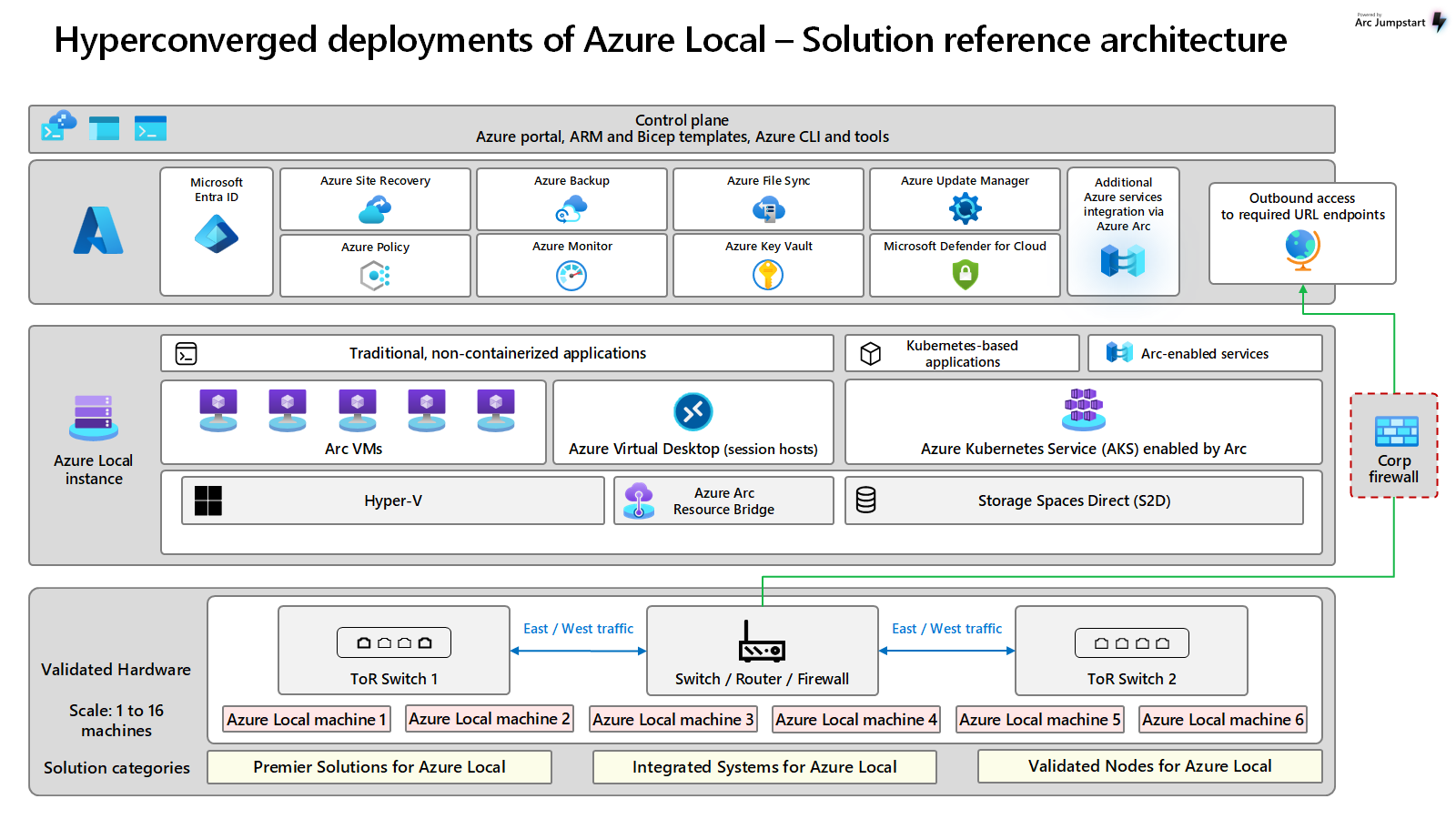
To download architecture diagrams in high resolution, visit Jumpstart Gems.
For information on the latest enhancements, see What's new in hyperconverged deployments of Azure Local?.
Benefits
Azure Local for hyperconverged deployments offers the following key benefits:
Azure Local is priced per physical core on your on-premises machines, plus any consumption-based charges for extra Azure services you use. All charges roll up to your existing Azure subscription.
It provides a resilient infrastructure that you can configure for high availability.
Flexible hardware choices let you choose the vendor with the best service and support in your geography. Joint support between Microsoft and the hardware vendor improves the customer experience.
Built on familiar technologies such as Hyper-V and Failover Clustering, Azure Local lets admins use existing virtualization and storage concepts and skills.
Azure Local includes all the familiar Azure management plane tooling such as Azure portal, Azure CLI, and Azure Resource Manager (ARM) templates to create and manage resources.
Solution updates make it easy to keep the entire solution up-to-date.
Azure Local allows you to access key Arc-enabled Azure services within your on-premises environment.
Azure Local offers unified governance and compliance across cloud and on-premises infrastructure. You can use Azure role-based access control (RBAC) and Azure Policy to unify data governance and enforce security and compliance policies.
Common Azure services used with Azure Local
The following table lists commonly used Azure services with Azure Local:
| Use case | Description |
|---|---|
| Azure Local VMs enabled by Azure Arc | Deploy Windows and Linux VMs hosted on your Azure Local instance. To learn more, see Create Azure Local virtual machines enabled by Azure Arc. Additionally, Trusted launch for Azure Local VMs enables secure boot and vTPM. It automatically transfers the vTPM state within a cluster and supports the ability to attest whether the VM started in a known good state. |
| Azure Virtual Desktop (AVD) | Deploy and manage Azure Virtual Desktop session hosts on your on-premises Azure Local. To learn more, see Azure Virtual Desktop for Azure Local. |
| Azure Kubernetes Service (AKS) enabled by Azure Arc | Use Azure Local to host container-based deployments using Azure Kubernetes Service (AKS) enabled by Azure Arc. To learn more, see Azure Kubernetes Service on Azure Local. |
| Run Azure Arc services on-premises | Azure Arc allows you to run select Azure services to support hybrid workloads. To learn more, see Azure Arc overview. |
| Highly performant SQL Server | Azure Local provides extra resiliency to highly available, mission-critical deployments of SQL Server. To learn more, see Deploy SQL Server on Azure Local. |
| Azure Video Indexer | Extract insights from your videos using Azure AI Video Indexer video and audio models. To learn more, see What is Azure AI Video Indexer enabled by Azure Arc? |
| Azure Edge RAG (Preview) | Azure Edge RAG, enabled by Azure Arc is a turnkey solution that packages everything that's necessary to allow customers to build custom chat assistants and derive insights from their private data. To learn more, see What is Edge Retrieval Augmented Generation (RAG)? |
| Azure IoT Operations | Deploy Azure IoT Operations on Azure Kubernetes Service (AKS) enabled by Azure Arc clusters running on Azure Local to manage and process IoT data at the edge. To learn more, see Azure IoT Operations overview. |
For more information on the cloud service components of Azure Local, see Azure Local hybrid capabilities with Azure services.
What you need to get started with Azure Local
To get started, you need:
One or more machines from the Azure Local Catalog, purchased from your preferred Microsoft hardware partner.
Operating system licenses for your workload VMs, such as Windows Server. See Activate Windows Server VMs.
An internet connection for each machine in the system that can connect via HTTPS outbound traffic to well-known Azure endpoints at least every 30 days. For more information, see Azure connectivity requirements.
If you plan to use SDN, read SDN overview.
Make sure your hardware meets the System requirements and that your network meets the physical network and host network requirements for Azure Local.
For Azure Kubernetes Service on Azure Local, see AKS network requirements.
Hardware and software partners
Microsoft recommends purchasing Premier Solutions offered in collaboration with our hardware partners to provide the best experience for Azure Local solution. Microsoft partners also offer a single point of contact for implementation and support services.
Browse the Azure Local Catalog to view Azure Local solutions from Microsoft partners. Partners include ASUS, Blue Chip, DataON, Dell EMC, Fujitsu, HPE, Hitachi, Lenovo, NEC, primeLine Solutions, QCT, and Supermicro.
Next steps
- Learn more About Azure Local hyperconverged deployments.