Note
Access to this page requires authorization. You can try signing in or changing directories.
Access to this page requires authorization. You can try changing directories.
Azure Monitor issues and investigations (preview) are AIOps capabilities that automate the troubleshooting processes for Azure monitor alerts. The observability agent is the AI-powered system that investigates issues and produces findings to help resolve problems with Azure resources.
This article explains how Azure Monitor issues and investigations (preview) are used to triage and mitigate problems with an Azure resource.
What is an issue?
An issue is a holistic view of service-related problems providing a structured framework for managing incidents. It uses AI for automated analysis and diagnostic processes to deliver high-quality insights using all observability-related data for fast and accurate troubleshooting service health degradations.
An issue presents an overview, the investigation, details about the alerts, and the resources involved.
You can set the severity, status, and impact time of an issue.

What is an investigation?
An investigation is an analysis performed by the observability agent that produces findings within the context of an issue. The observability agent uses AI-based, iterative triage and diagnostic processes to minimize manual effort and enable faster and more accurate troubleshooting.
Only the latest investigation is displayed. Users can edit the scope and impact time and trigger the observability agent to run a new investigation. The observability agent scans up to two hours of telemetry from the issue impact time.
Findings
Findings identify anomalous behavior that could explain a problem with a service resource. They summarize the analysis of multiple anomalies (for example, "VM performance is low due to possible memory leak") based on relevant signals (metrics, logs, etc.) and might suggest further investigation steps and potential mitigations.
A finding contains a summary that can include:
- What happened? A description of the finding with the resources included in the investigation.
- A possible explanation. A description of what might be causing problems for the specific finding and related supporting data.
- Next steps. Suggestions for continuing the investigation or mitigating the problems.
- Supporting data. Supporting data is the information that justifies the finding, such as anomalies, diagnostics insights, health data, resource changes, related resources, and related alerts.
Note
Up to five findings are displayed and all other anomalies are grouped into Additional data.
Supporting data types for findings
Metric anomaly explanations
In addition to detecting anomalies, explanations are created based the metric dimensions, for example, the specific region or error code of the anomaly.

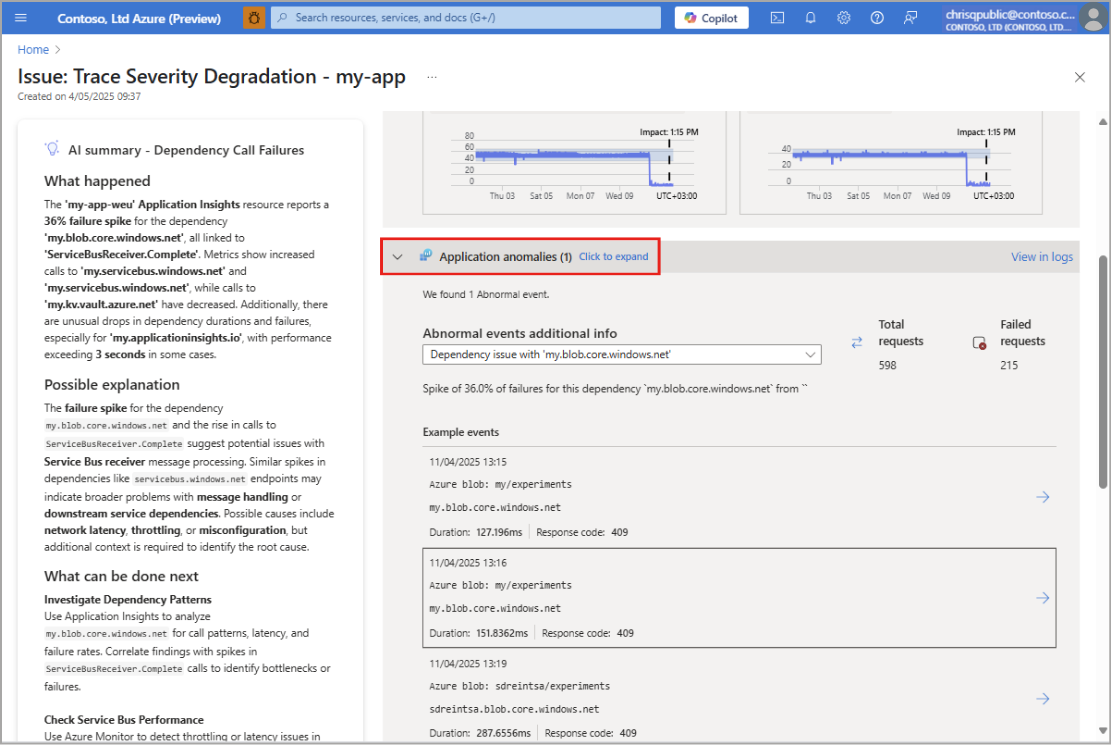
Application logs Analysis
The observability agent scans the application logs for anomalies. The top three failure events (for dependencies, requests and exceptions) are analyzed. For each event:
- Explanation: An explanation of what happened is generated for the failure.
- Transaction Examples: A list of examples of transactions in which the specific failure event exists. Selecting the example displays the end-to-end transaction in Application Insights.
- Exceptions: If there are specific exception problem identifiers (IDs) that correlate with the failure, they are displayed with the count of appearance in the logs. The problem IDs are explained in natural language and an example is provided.
- Transaction Pattern: If there's a specific transaction pattern for the failure, it's displayed. This information can help explain the issue and show the root cause. If there are multiple transaction patterns, no pattern is displayed.
- Trace Message Patterns: If there are specific trace message patterns that correlate with the failure, they are displayed with the count of appearance in the logs. The patterns are explained in natural language and an example is provided.
Diagnostic insights
Provides actionable solutions and diagnostics based on abnormal telemetry from Azure support best practices, enhancing issue resolution efficiency.

Related Alerts
Contains data from related, high-severity alerts on the issue scoped resource that occurred in the last 15 minutes. Those alerts are synced back to the issue and appear in the Alerts tab.

Resource Health
Provides events data from Azure Resource Health about resource health degradation in the investigated period.
Capabilities
Configurable scope
The observability agent makes suggestions for which resources to analyze based on the scope of the investigation. The default scope includes all metrics of the resource. You can change the scope to include up to five resources. See Scope the investigation in Use issue and investigation.
Smart scoping
The observability agent also offers smart scoping for Application Insight resources. In this case, possible suspected resources are automatically identified by looking at the dependencies and the infrastructure where the service is running then includes them in the analysis. This process happens during the investigation and the results are synced to the issue.

Issue and investigation initial workflow example
- An alert email from Azure Monitor is received.
- A select on the investigate button in the email creates an issue and starts an observability agent investigation. The issue page on the Azure portal opens in your browser.
- On the Issue page, you're presented with:
- The issue overview where the findings of the last investigation are presented with summarized supporting data.
- Each finding contains the observability agent analysis summary, suggested actions to take and the supporting data used for the analysis.
- Every finding produced by the observability agent presents more details on the potential cause and present next steps to choose from.
Regions
These regions are the supported Azure regions for issues and investigation services:
| Public preview region availability |
|---|
| australiacentral |
| australiaeast |
| australisoutheast |
| brazilsouth |
| canadacentral |
| canadaeast |
| centralindia |
| centralus |
| chilecentral |
| eastasia |
| eastus |
| eastus2 |
| eastus2euap |
| francecentral |
| germanywestcentral |
| indonesiacentral |
| israelcentral |
| italynorth |
| japaneast |
| japanwest |
| koreacentral |
| koreasouth |
| malaysiawest |
| mexicocentral |
| newzealandnorth |
| northcentralus |
| northeurope |
| northwayeast |
| polandcentral |
| southafricanorth |
| southcentralus |
| southindia |
| southeastasia |
| spaincentral |
| swedencentral |
| swedensouth |
| switzerland north |
| uaenorth |
| uksouth |
| ukwest |
| westcentralus |
| westeurope |
| westus |
| westus2 |
| westus3 |