Note
Access to this page requires authorization. You can try signing in or changing directories.
Access to this page requires authorization. You can try changing directories.
Azure AI Video Indexer is a comprehensive AI solution that enables organizations to extract deep insights from video (live and uploaded) and audio content. It uses advanced machine learning and generative AI models and supports a wide range of capabilities including transcription, translation, object detection, and video summarization. Designed for flexibility, Video Indexer can be used in the cloud or deployed to edge locations via Azure Arc, so you can choose the deployment model that best fits your operational and compliance needs.
Video Indexer offers two usage options: as an Azure Arc extension or as a cloud-based web application. These offerings aren't identical. They differ in capabilities, supported video sources, and the AI models available.
Keep reading to find the option that best fits your needs.
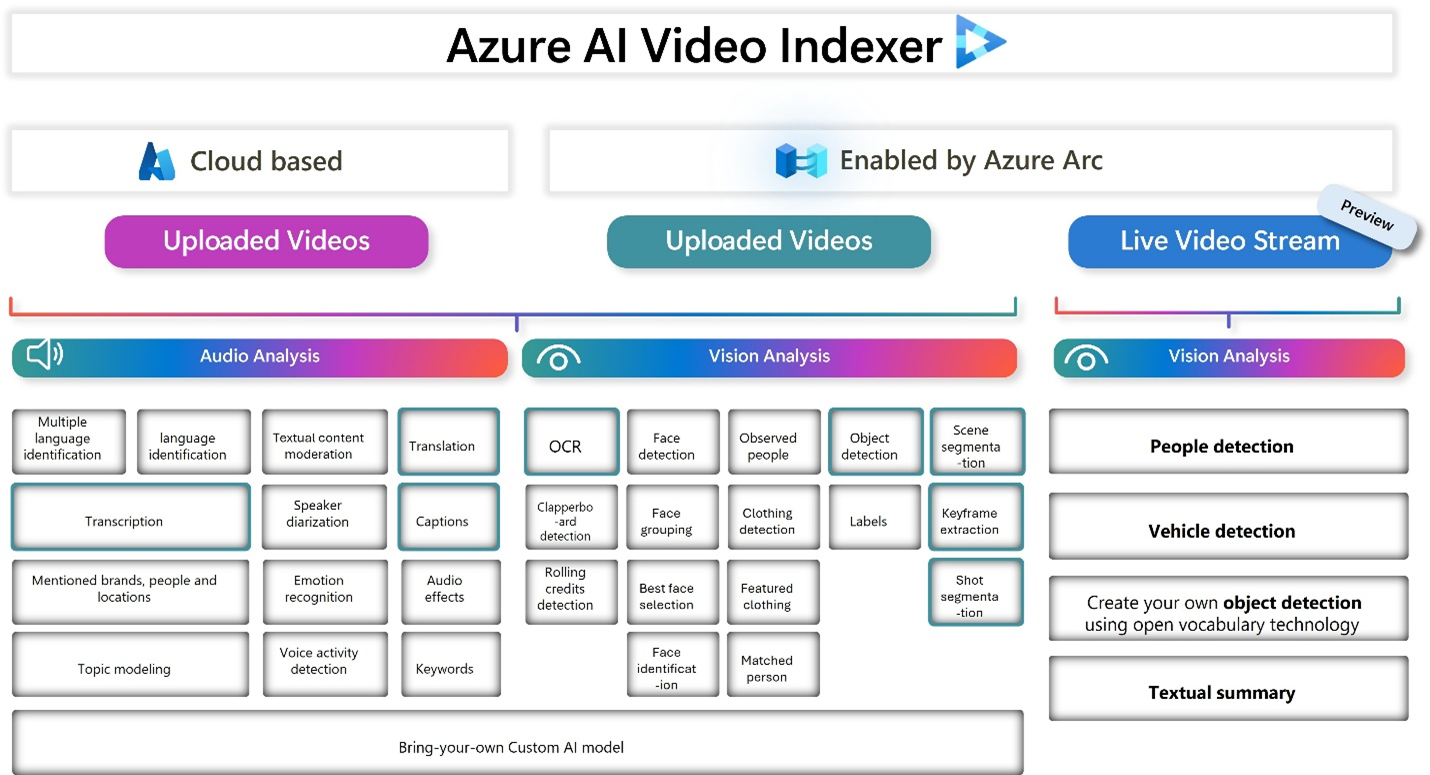
Green boxes represent features available in Video Indexer enabled by Azure Arc.
Video Indexer Enabled by Azure Arc
Azure AI Video Indexer enabled by Arc is an Azure Arc extension enabled service that runs video and audio analysis and generative AI on edge devices. This hybrid deployment model extends VI’s capabilities to edge environments via Azure Arc-enabled Kubernetes clusters. The solution was validated on Azure Local but is compatible with any Kubernetes infrastructure. It supports both uploaded and live video streams, enabling real-time analysis directly at the data source. And you can create an Arc extension that supports both video types or just one. Keep in mind that the AI insights available vary based on the selected video type. This model is particularly suited for industries with strict data residency requirements or low-latency operational needs.
Live video stream
Enables you to extract real time insights from your live video footage, allowing you to customize the analysis to your specific needs. You can view live insights directly on top of your video stream, with bounding boxes highlighting detected objects. You can also save streams and insights as files. And you can upload and index external media files. With Azure AI Video Indexer, you can generate concise summaries for segments of your recorded video footage, helping you quickly catch up on key events without watching the entire video.
To start extracting insights with Azure AI Video Indexer enabled by Arc, sign up at Application for Azure AI Video Indexer enabled by Arc. For more information, see What is Azure AI Video Indexer enabled by Arc?.
Uploaded videos
Enables you to analyze video and audio content and extract meaningful insights. It uses multimodal generative AI models and it can generate rich textual summaries of video content, enhancing discoverability.
Cloud-based Video Indexer
Azure AI Video Indexer is a cloud application that's part of Azure AI services. It's built on Azure AI services such as Face, Translator, Azure AI Vision, and Speech. With Azure AI Video Indexer, you can extract insights from your videos by using its video and audio models.
Azure AI Video Indexer analyzes the video and audio content by running more than 30 AI models. It generates rich insights. The following illustration shows the audio and video analysis that Azure AI Video Indexer performs in the background:

To start extracting insights with Azure AI Video Indexer, see the how can I get started section.
What can I do with Azure AI Video Indexer?
You can use both Video Indexer enabled by Azure Arc and cloud-based Video Indexer in various scenarios. The following sections describe the scenarios for each option.
Video Indexer Enabled by Azure Arc
Live video streams
You can integrate the live analysis central video AI service with camera live streaming to use AI-based detection from different locations. This service analyzes live and recorded videos, turning raw footage into actionable insights.
- Retail - Optimize store layouts and improve customer experience and safety. With live analysis, you can monitor the number of customers in checkout lines in real time, helping retailers to act immediately to optimize staffing and reduce wait times.
- Manufacturing - Ensure quality control and worker safety through video analysis. For example, workers who aren't wearing protective gear, which requires real-time detection of critical events and locating specific moments in video streams.
- Modern Safety - Detect and identify security and safety issues before they cause a risk.
Uploaded videos
- Data governance – Bring the AI to the content instead of vice versa. Use Azure AI Video Indexer enabled by Arc when you can't move indexed content from on-premises to the cloud due to:
- Regulations.
- Architecture decisions.
- Data store being too large, making lift and shift a significant effort.
- On-premises workflow – Your indexing process is part of an on-premises workflow, and you want to lower the indexing duration latency affecting the flow.
- Pre-indexing – You want to index before uploading the content to the cloud. To create clarity, you can presort your on-premises video or audio archive, and then only upload it for standard or advanced indexing in the cloud.
Cloud-based Video Indexer
You can apply Azure AI Video Indexer's insights to many scenarios:
- Deep search: To enhance the search experience across a video library, use the insights extracted from the video. For example, indexing spoken words and faces can enable the search experience of finding moments in a video where a person spoke certain words or when two people were seen together. Search based on such insights from videos is applicable to news agencies, educational institutes, broadcasters, entertainment content owners, enterprise LOB apps, and in general to any industry that has a video library that users need to search against.
- Content creation: Create trailers, highlight reels, social media content, or news clips based on the insights Azure AI Video Indexer extracts from your content. Keyframes, scenes markers, and timestamps of the people and label appearances make the creation process smoother and easier, enabling you to easily get to the parts of the video you need when creating content.
- Accessibility: Whether you want to make your content available for people with disabilities or if you want your content to be distributed to different regions using different languages, you can use the transcription and translation provided by Azure AI Video Indexer in multiple languages.
- Monetization: Azure AI Video Indexer can help increase the value of videos. For example, industries that rely on ad revenue (news media, social media, and so on) can deliver relevant ads by using the extracted insights as other signals to the ad server.
- Content moderation: Use textual and visual content moderation models to keep your users safe from inappropriate content and validate that the content you publish matches your organization's values. You can automatically block certain videos or alert your users about the content.
- Recommendations: Video insights can be used to improve user engagement by highlighting the relevant video moments to users. By tagging each video with more metadata, you can recommend to users the most relevant videos and highlight the parts of the video that matches their needs.
AI features
You can use different AI features (models) to extract insights from your video and audio files. The following sections describe the AI features available in each option.
Video Indexer Enabled by Azure Arc
Azure AI Video Indexer enabled by Arc supports the following indexing presets for uploaded video files:
| Model | Basic video | Basic audio | Basic video and audio |
|---|---|---|---|
| Transcription | ✔ | ✔ | |
| Translation | ✔ | ✔ | |
| Captioning | ✔ | ✔ | |
| Key frame detection | ✔ | ✔ | |
| Object detection | ✔ | ✔ | |
| Scene detection | ✔ | ✔ | |
| Shot detection | ✔ | ✔ | |
| Summarization | ✔ | ✔ | ✔ |
For live video streams, you can create your own presets that include:
- First-party detections (people, vehicles)
- Custom AI insights – create a new object detection using natural language or an image. For more information, see (link to the new page).
Cloud-based Video Indexer
The following list shows the insights you can retrieve from your video and audio files by using Azure AI Video Indexer video and audio AI features (models).
Note
Given privacy and regulatory requirements, some of these features are restricted for use and require authorization to fully utilize.
Unless specified otherwise, a model is generally available.
Video models
Face detection: Detects and groups faces appearing in the video.
Celebrity identification: Identifies over 1 million celebrities, such as world leaders, actors, artists, athletes, researchers, business, and tech leaders across the globe. You can find data about these celebrities on various websites like IMDB and Wikipedia.
Account-based face identification: Trains a model for a specific account. It then recognizes faces in the video based on the trained model. For more information, see Customize a Person model from the Azure AI Video Indexer website and Customize a Person model with the Azure AI Video Indexer API.
Thumbnail extraction for faces: Identifies the best captured face in each group of faces based on quality, size, and frontal position, and extracts it as an image asset.
Optical character recognition (OCR): Extracts text from images like pictures, street signs, and products in media files to create insights.
Visual content moderation: Detects adult and racy visuals.
Labels identification: Identifies visual objects and actions displayed.
Scene segmentation: Determines when a scene changes in video based on visual cues. A scene depicts a single event and it's composed by a series of consecutive shots, which are semantically related.
Shot detection: Determines when a shot changes in video based on visual cues. A shot is a series of frames taken from the same motion-picture camera. For more information, see Scenes, shots, and keyframes.
Black frame detection: Identifies black frames presented in the video.
Keyframe extraction: Detects stable keyframes in a video.
Rolling credits: Identifies the beginning and end of the rolling credits in the end of TV shows and movies.
Editorial shot type detection: Tags shots based on their type, such as wide shot, medium shot, close up, extreme close up, two shot, multiple people, outdoor, and indoor. For more information, see Editorial shot type detection.
Observed people detection: Detects observed people in videos and provides information such as the location of the person in the video frame using bounding boxes, and the exact timestamp with start, end, and confidence when a person appears. For more information, see Trace observed people in a video.
- Matched person: Matches people that were observed in the video with the corresponding faces detected. The matching between the observed people and the faces contain a confidence level.
- Detected clothing: Detects the clothing types of people appearing in the video and provides information such as long or short sleeves, long or short pants, and skirt or dress. The detected clothing is associated with the people wearing it and the exact timestamp with start, end, and a confidence level for the detection.
- Featured clothing: Captures featured clothing images appearing in a video. You can improve your targeted ads by using the featured clothing insight. For information on how the featured clothing images are ranked and how to get the insights, see featured clothing.
Object detection: Detects unique objects that are also tracked so that if they return to the frame they're recognized. See Azure AI Video Indexer object detection.
Slate detection: Identifies the following movie post-production insights when indexing a video using the advanced indexing option:
- Clapperboard detection with metadata extraction.
- Digital patterns detection, including color bars.
- Textless slate detection, including scene matching.
For details, see Slate detection.
Textual logo detection: Matches a specific predefined text using Azure AI Video Indexer OCR. For example, if a user created a textual logo:
Microsoft, different appearances of the wordMicrosoftare detected as theMicrosoftlogo. For more information, see Detect textual logo.
Audio models
Audio transcription: Converts speech to text in over 50 languages and supports extensions. For more information, see Azure AI Video Indexer language support.
Automatic language detection: Identifies the dominant spoken language. For more information, see Azure AI Video Indexer language support. If the language can't be identified with confidence, Azure AI Video Indexer assumes the spoken language is English.
Multilanguage speech identification and transcription: Identifies the spoken language in different segments of audio. It sends each segment of the media file to be transcribed and then combines the transcriptions into one unified transcription. For more information about transcription, see Transcription.
Closed captioning: Creates closed captioning in three formats: VTT, TTML, and SRT.
Two channel processing: Autodetects separate transcripts and merges them into a single timeline.
Noise reduction: Clears up telephony audio or noisy recordings (based on Skype filters).
Transcript customization (CRIS): Trains custom speech-to-text models to create industry-specific transcripts. For more information, see Customize a Language model.
Speaker enumeration: Maps and understands which speaker spoke which words and when. Sixteen speakers can be detected in a single audio file.
Speaker statistics: Provides statistics for speakers' speech ratios.
Textual content moderation: Detects explicit text in the audio transcript.
Text-based emotion detection: Detects emotions such as joy, sadness, anger, and fear through transcript analysis.
Translation: Creates translations of the audio transcript in many different languages. For more information, see Azure AI Video Indexer language support.
Audio effects detection: Detects the following audio effects in the nonspeech segments of the content: alarm or siren, dog barking, crowd reactions (cheering, clapping, and booing), gunshot or explosion, laughter, breaking glass, and silence.
The detected acoustic events are in the closed captions file. You can download the file from the Azure AI Video Indexer website. For more information, see Audio effects detection.
Note
The full set of events is available only when you choose Advanced Audio Analysis when uploading a file, in upload preset. By default, only silence is detected.
Audio and video models (multichannels)
When you index by one channel, you get partial results for those models.
- Keywords extraction: Extracts keywords from speech and visual text.
- Named entities extraction: Extracts brands, locations, and people from speech and visual text through natural language processing (NLP).
- Topic inference: Extracts topics based on various keywords (for example, the keywords 'Stock Exchange' and 'Wall Street' produce the topic 'Economics'). The model uses three different ontologies (IPTC, Wikipedia, and the Video Indexer hierarchical topic ontology). The model uses transcription (spoken words), OCR content (visual text), and celebrities recognized in the video by using the Video Indexer facial recognition model.
- Artifacts: Extracts a rich set of "next level of details" artifacts for each of the models.
- Sentiment analysis: Identifies positive, negative, and neutral sentiments from speech and visual text.
How can I get started with Azure AI Video Indexer?
Learn how to get started with Azure AI Video Indexer enabled by Azure Arc.
Learn how to get started with Azure AI Video Indexer.
After you set up the service, start using insights and check out other How to guides.
Compliance, privacy, and security
Note
On June 11, 2020, Microsoft announced that it won't sell facial recognition technology to police departments in the United States until strong regulation, grounded in human rights, is enacted. As such, customers can't use facial recognition features or functionality included in Azure AI services, such as Face or Video Indexer, if a customer is, or is allowing use of such services by or for, a police department in the United States.
Note
To support our Responsible AI principles, access to face identification, customization, and celebrity recognition features is limited based on eligibility and usage criteria. These features are only available to Microsoft managed customers and partners. Use the Face Recognition intake form to apply for access.
You must comply with all applicable laws in your use of Azure AI Video Indexer. You can't use Azure AI Video Indexer or any Azure service in a manner that violates the rights of others or that could be harmful to others.
Before uploading any video or image to Azure AI Video Indexer, you must have all the appropriate and legal rights to use the video or image. Where required by law, you must have all the necessary consents from individuals (if any) in the video or image for the use, processing, and storage of their data in Azure AI Video Indexer and Azure. Some jurisdictions might impose special legal requirements for the collection, online processing, and storage of certain categories of data, such as biometric data. Before using Azure AI Video Indexer and Azure for the processing and storage of any data subject to special legal requirements, you must ensure your use complies with all such legal requirements that might apply to you and your intended use.
To learn about compliance, privacy, and security in Azure AI Video Indexer, visit the Microsoft Trust Center. For Microsoft's privacy obligations, data handling and retention practices, including how to delete your data, review Microsoft's Privacy Statement, the Online Services Terms ("OST"), and Data Processing Addendum ("DPA"). By using Azure AI Video Indexer, you agree to be bound by the OST, DPA, and the Privacy Statement.