Note
Access to this page requires authorization. You can try signing in or changing directories.
Access to this page requires authorization. You can try changing directories.
This article builds on the core network concepts for Oracle Exadata Database@Azure. It describes best practices for how to configure and manage Azure networking to connect your application tier to Oracle Exadata Database@Azure.
Locate application tiers
Use one of the following methods to position the application tier in an architecture design.
Colocate in the same virtual network: Place application and database tiers in a single virtual network.
Deploy in a separate virtual network and connect via virtual network peering: Place application and database tiers in distinct virtual networks that connect via peering.
The colocated approach provides simpler management and no extra peering costs, but it might be less flexible if multiple teams or applications need separate networks. The following diagram shows the database and application tiers colocated in the same virtual network.

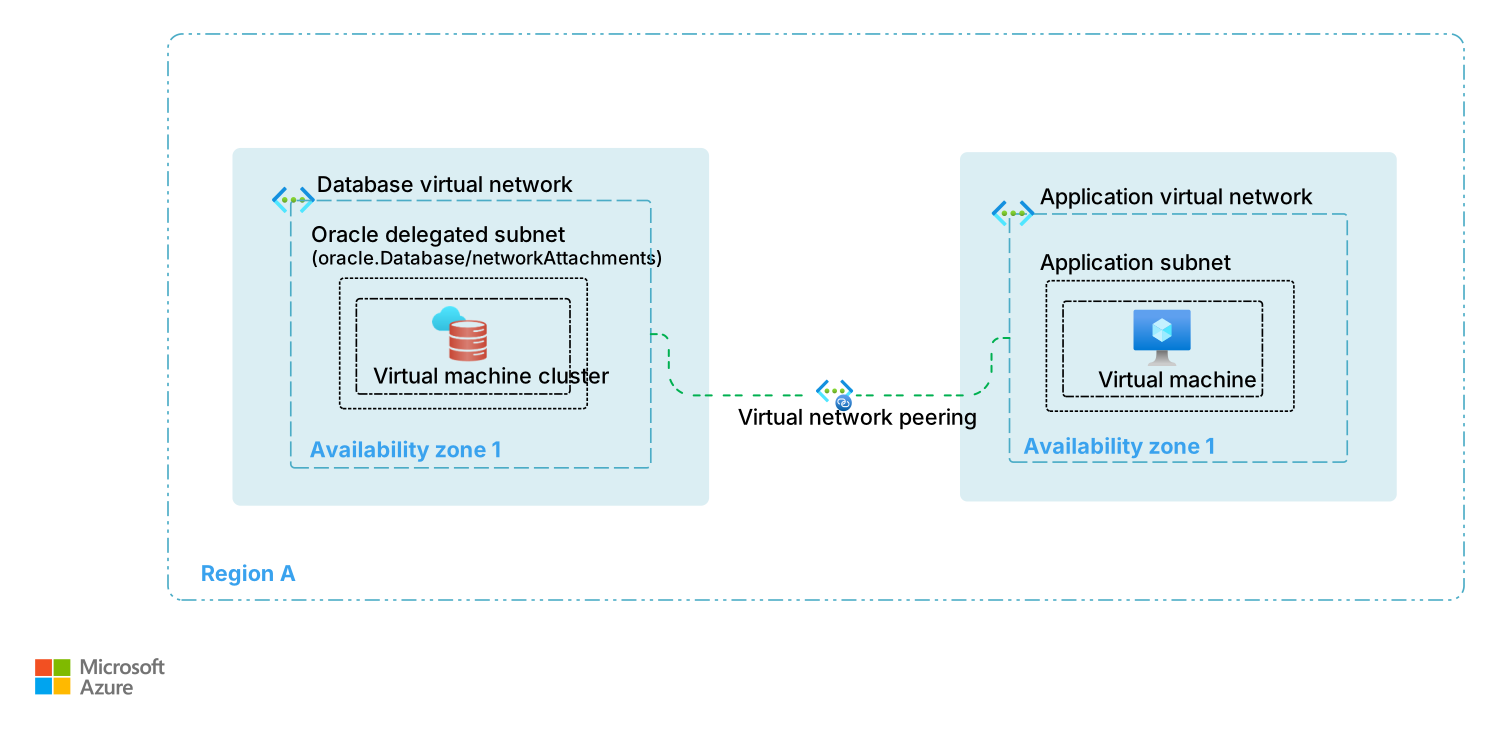
The peered virtual network approach adds virtual network peering costs and more complexity, but it provides enhanced isolation, independent scalability, and governance boundaries. This approach can also improve your security posture by providing more granular access control over the resources and enhanced network segmentation. The following diagram shows the database and application tiers in directly peered virtual networks.
In a full mesh pattern, each application virtual network is directly peered to the database virtual network. Application and database virtual networks connect to a hub network for shared services like firewalls or Domain Name System (DNS). This design helps ensure low-latency direct communication while enabling centralized traffic inspection and management. The following diagram shows a full mesh pattern among database, application, and hub virtual networks.
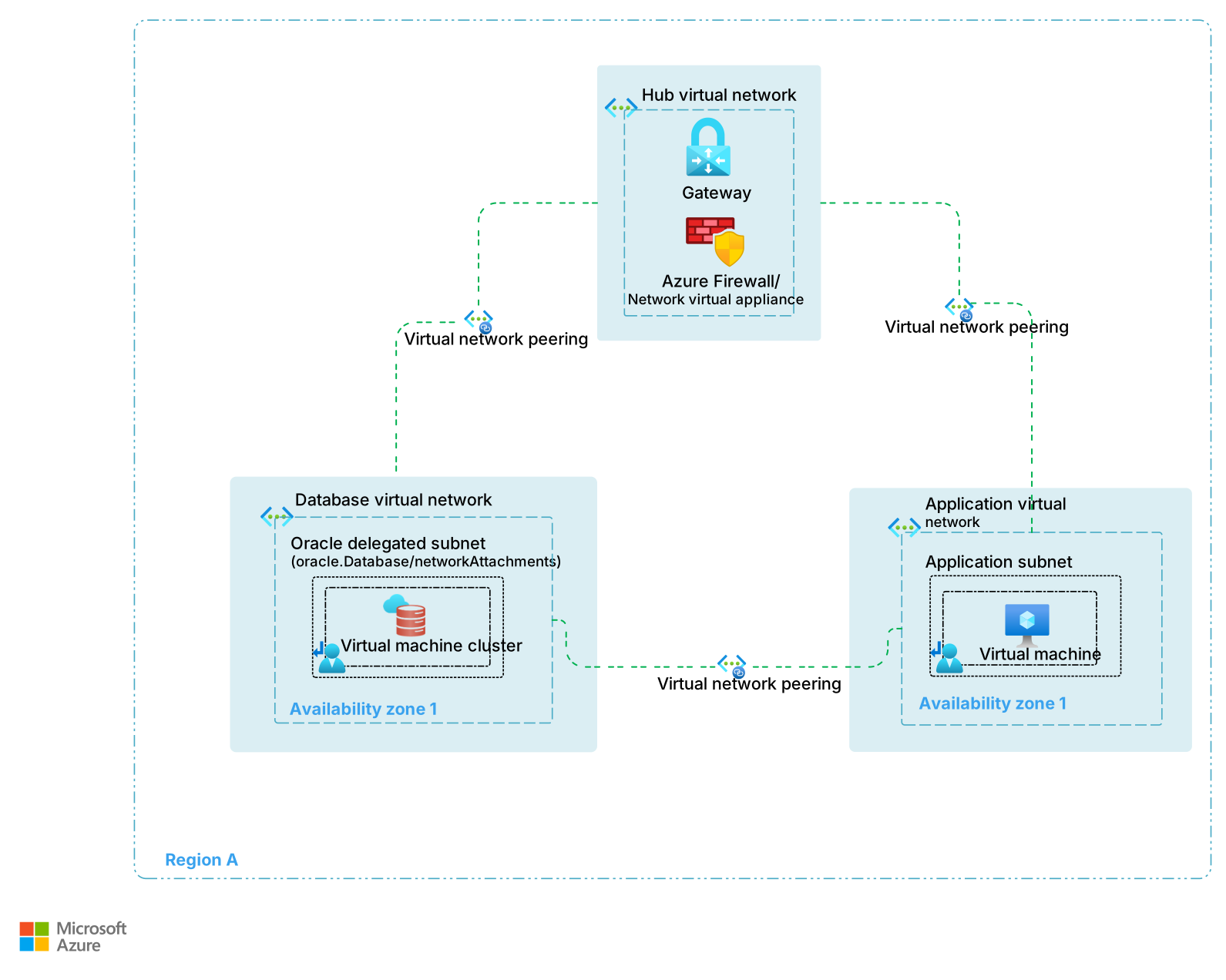
This pattern helps ensure direct connectivity from the database and application virtual networks and protection from other networks.
Design considerations
Connectivity options: There are two main options for achieving optimal performance between the application and database tiers. You can deploy them in either the same virtual network or in peered virtual networks. Both options provide comparable latency and throughput when resources are deployed in the same physical availability zone. The choice between them depends more on management scope, team boundaries, and network segmentation requirements than on performance.
Availability zone placement: If you deploy the application tier in a separate subscription from the subscription that hosts the Oracle Exadata Database@Azure service, logical availability zones might differ from physical availability zones across subscriptions. To validate the correct availability zones, use the following command. Replace
eastuswith your desired region.az rest --method get --uri '/subscriptions/{subscriptionId}/locations?api-version=2022-12-01' \ --query 'value' | jq '.[] | .availabilityZoneMappings | .[]? | select(.physicalZone | contains("eastus"))'
Design recommendations
Optimize for bandwidth and latency: Colocate workload-related resources within the same physical availability zones to minimize latency and maximize throughput.
Optimize for smaller workload scopes: Colocate applications and databases in the same virtual network if you have a limited number of Oracle databases that serve a small application portfolio that a single team manages. This approach reduces latency and simplifies the network design.
Use segmentation for complex environments: For larger or more complex environments, treat Oracle Exadata Database@Azure as a dedicated service by deploying it in one or more dedicated subscriptions to manage multiple databases for different applications and teams. Deploy application solutions in separate subscriptions and use virtual network peering to connect the application networks to the database networks. This approach enables independent management of application and database resources while helping to maintain secure and performant connectivity.
Next step
Now that you understand how to connect your application tier to Oracle Exadata Database@Azure, see the BCDR connectivity design guidance. This guidance helps you establish the required network foundations and best practices needed to support business continuity and disaster recovery strategies.