Note
Access to this page requires authorization. You can try signing in or changing directories.
Access to this page requires authorization. You can try changing directories.
Azure Container Registry is available in multiple SKUs. These SKUs provide predictable pricing and several options for aligning to the capacity and usage patterns of your private container registry in Azure.
| SKU | Description |
|---|---|
| Basic | A cost-optimized entry point for developers learning about Azure Container Registry. Basic registries have the same programmatic capabilities as Standard and Premium (such as Microsoft Entra authentication integration, image deletion, and webhooks). However, the included storage and image throughput are most appropriate for lower usage scenarios. |
| Standard | Standard registries offer the same capabilities as Basic, with increased included storage and image throughput. Standard registries should satisfy the needs of most production scenarios. |
| Premium | Premium registries provide the highest amount of included storage and concurrent operations, enabling high-volume scenarios. In addition to higher image throughput, Premium adds features such as high availability and resiliency through geo-replication for managing a single registry across multiple regions, private link with private endpoints to restrict access to the registry, as well as higher API concurrency and bandwidth throughput for large-scale concurrent deployments. |
The Basic, Standard, and Premium SKUs all provide the same programmatic capabilities and data plane APIs. They also all benefit from image storage managed entirely by Azure. Azure Container Registry recommends the Premium SKU for most scenarios to take advantage of the additional features and higher limits.
Note
Some limits listed in this table can be increased by contacting Azure Support. See the Request a limit increase section for details on the various limits that can be increased.
SKU features and limits
The following table details the features and registry limits of the Basic, Standard, and Premium SKUs.
| Resource | Basic | Standard | Premium |
|---|---|---|---|
| Included storage1 (GiB) | 10 | 100 | 500 |
| Storage limit (TiB) | 40 | 40 | 40 |
| Maximum image layer size (GiB) | 200 | 200 | 200 |
| Maximum manifest size (MiB) | 4 | 4 | 4 |
| Webhooks | 2 | 10 | 500 |
| Geo-replication | N/A | N/A | Supported |
| Availability zones | Supported | Supported | Supported |
| Content trust | N/A | N/A | Supported |
| Private link with private endpoints | N/A | N/A | Supported |
| • Private endpoints | N/A | N/A | 200 |
| Public IP network rules | N/A | N/A | 100 |
| Service endpoint VNet access | N/A | N/A | Preview |
| • Virtual network rules | N/A | N/A | 100 |
| Customer-managed keys | N/A | N/A | Supported |
| Repository-scoped permissions with Microsoft Entra role assignments | Supported | Supported | Supported |
| Repository-scoped permissions with non-Microsoft Entra tokens and scope maps | Supported | Supported | Supported |
| • Non-Microsoft Entra tokens | 100 | 500 | 50,000 |
| • Non-Microsoft Entra token scope maps | 100 | 500 | 50,000 |
| • Actions per non-Microsoft Entra token scope map | 500 | 500 | 500 |
| • Repositories per non-Microsoft Entra token scope map2 | 500 | 500 | 500 |
| Anonymous pull access | N/A | Supported | Supported |
1 Storage included in the daily rate for each tier. Additional storage may be used, up to the registry storage limit, at an additional daily rate per GiB. For rate information, see Azure Container Registry pricing. If you need storage beyond the registry storage limit, please contact Azure Support.
2 Individual actions of content/delete, content/read, content/write, metadata/read, metadata/write corresponds to the limit of Repositories per non-Microsoft Entra token scope map.
Private endpoint limits
Private endpoints are available exclusively in the Premium SKU and enable secure, private network access to your container registry. With private endpoints, you can restrict registry access to specific Azure virtual networks using Azure Private Link.
The Premium SKU supports a maximum number of private endpoints per registry. Consult the Premium SKU's limit in the SKU features and limits table.
Registry image pull and push performance limits
Image pull and push performance is primarily affected by API concurrency, bandwidth throughput, and throttling during high-volume operations. These factors depend on your registry SKU, network configuration, and client configuration.
API concurrency and bandwidth throughput limits
API concurrency and bandwidth throughput depend on your SKU. Higher-SKU registries support more concurrent operations and greater bandwidth for data-plane operations like listing, deleting, pushing, and pulling images.
API concurrency and bandwidth throughput during image pulls and pushes is affected by:
- Number and size of image layers
- Reuse of layers across images in the registry
- Additional API calls required for each operation
- Scale of concurrent deployments (for example, Kubernetes deployments pulling images across multiple nodes simultaneously)
Client environment factors:
- Docker daemon or Podman configuration for concurrent operations
- Container runtime configuration, such as containerd or CRI-O concurrency settings
- Cluster configuration or cluster data plane settings
Network factors:
- Network bandwidth and latency for the network hops from clients to the registry
- Client-side network configuration (for example, firewall rules, proxy settings)
- Geographic distance to the registry (or nearest replica if geo-replicated)
For API operation details that happen during image push and pull, see the Docker HTTP API V2 documentation.
For troubleshooting, see Troubleshoot registry performance.
Example
Pushing a single 133 MB nginx:latest image to an Azure container registry requires multiple read and write API operations for the image's five layers, all of which consume bandwidth throughput and API concurrency:
- Read operations to read the image manifest, if it exists in the registry
- Write operations to write the configuration blob of the image
- Write operations to write the image manifest
Throttling and bandwidth constraints
During periods of high request volume, you may experience throttling with an HTTP 429 Too many requests error or slow bandwidth throughput. To mitigate these issues:
- Implement retry logic with exponential backoff
- Reduce the rate of concurrent requests
- Space out large-scale deployments to reduce simultaneous image pulls across multiple nodes
Note
If you experience persistent API throttling or slow bandwidth throughput, see Request a limit increase for information on contacting Azure Support to discuss increasing your registry's image pull/push performance limits.
Registry storage limits
Azure fully manages registry storage, which varies by SKU. Each SKU includes a specific amount of free storage, with additional storage available at a per-GB rate. Each SKU also has a different maximum storage limit.
Show registry usage
Use the az acr show-usage command in the Azure CLI, Get-AzContainerRegistryUsage in Azure PowerShell, or the Registries - List Usages REST API, to get a snapshot of your registry's current consumption of storage and other resources, compared with the limits for that registry's SKU. Storage usage also appears on the registry's Overview page in the portal.
Usage information helps you make decisions about changing the SKU when your registry nears a limit. This information also helps you manage consumption.
Note
The registry's storage usage should only be used as a guide and may not reflect recent registry operations. Monitor the registry's StorageUsed metric for up-to-date data.
Depending on your registry's SKU, usage information includes some or all of the following, along with the limit in that SKU:
- Storage consumed in bytes1
- Number of webhooks
- Number of geo-replications (includes the home replica)
- Number of private endpoints
- Number of IP access rules
- Number of virtual network rules
1In a geo-replicated registry, storage usage is shown for the home region. Multiply by the number of replications for total storage consumed.
Changing SKUs
You can change a registry's SKU with the Azure CLI or in the Azure portal. You can move freely between SKUs as long as the SKU you're switching to has the required maximum storage capacity.
There is no registry downtime or impact on registry operations when you move between SKUs.
Azure CLI
To move between SKUs in the Azure CLI, use the az acr update command. For example, to switch to Premium:
az acr update --name myContainerRegistry --sku Premium
Azure PowerShell
To move between service SKUs in Azure PowerShell, use the Update-AzContainerRegistry cmdlet. For example, to switch to Premium:
Update-AzContainerRegistry -ResourceGroupName myResourceGroup -Name myContainerRegistry -Sku Premium
Azure portal
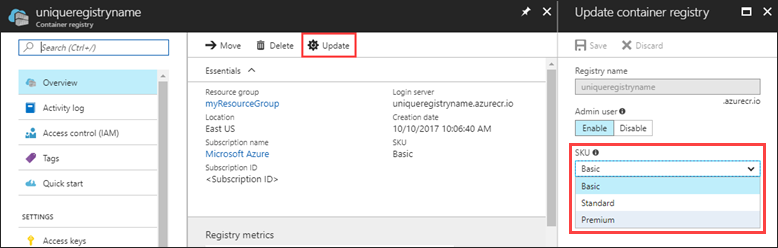
In the container registry Overview in the Azure portal, select Update, then select a new SKU from the SKU drop-down.
Pricing
For pricing information on each of the Azure Container Registry SKUs, see Container Registry pricing.
For details about pricing for data transfers, see Bandwidth Pricing Details.
Request a limit increase
If you need to increase limits for your registry, contact Azure Support to discuss:
- Increasing private endpoint limits
- Increasing image pull/push performance if you experience throttling, low API concurrency, or slow bandwidth
- Increasing storage limits
Next steps
Azure Container Registry Roadmap
Visit the Roadmap on GitHub to find information about upcoming features in the service.