Note
Access to this page requires authorization. You can try signing in or changing directories.
Access to this page requires authorization. You can try changing directories.
Azure DevOps Services
Azure Artifacts provides an easy way to share packages with users outside your organization, including external customers, by using public feeds. Packages stored in public feeds can be accessed and installed by anyone on the internet without requiring an Azure DevOps account.
Prerequisites
| Product | Requirements |
|---|---|
| Azure DevOps | - An Azure DevOps organization. - An Azure DevOps project. |
Note
Public feeds are only available in Azure DevOps Services.
Create a public feed
Important
Only organizations with the Allow public project policy already enabled can create projects or change the visibility of a project to public. The policy is no longer available to organizations that aren't using it already. Microsoft recommends using GitHub for all your public project needs.
Public feeds are project-scoped feeds in a public project. Public feeds inherit the visibility settings of the hosting project.
Sign in to your Azure DevOps organization, and then navigate to your public project.
Select Artifacts, and then select Create Feed.
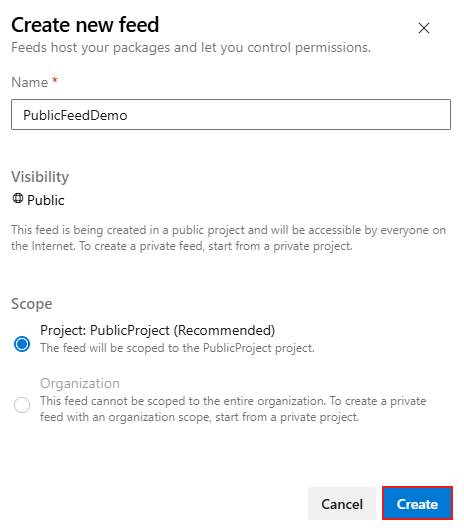
Enter a Name for your feed, select Project: PublicProject (Recommended) for its scope, and then select Create.
Share packages
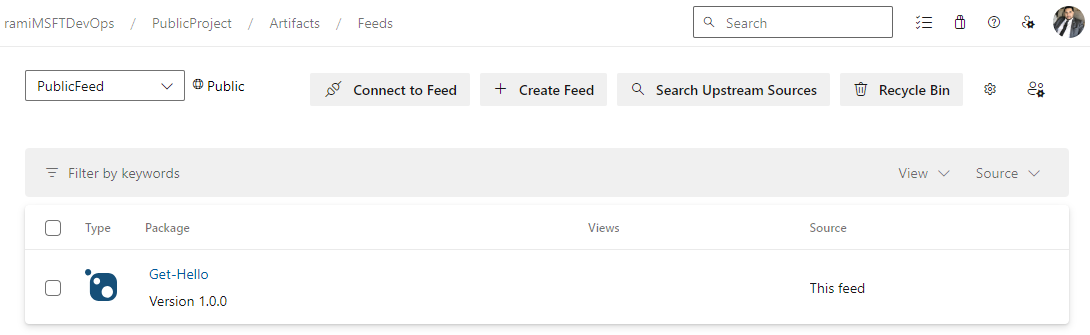
To share your packages publicly, you can simply share your feed URL, for example: https://dev.azure.com/<ORGANIZATION_NAME>/<PROJECT-NAME>/_artifacts/feed/<FEED_NAME> or share individual packages using package badges. As long as your project remains public, anyone can access and download packages from your public feed without requiring an Azure DevOps account.
Note
You must be a Feed Administrator to enable package badges. See Manage permissions for more details.
Publish packages (CLI)
| Package Type | Articles |
|---|---|
| NuGet | - Publish NuGet packages - (NuGet.exe) - Publish NuGet packages - (dotnet) |
| Npm | - Publish npm packages |
| Maven | - Publish Maven Artifacts |
| Gradle | - Publish Artifacts using Gradle |
| Python | - Publish Python packages |
| Cargo | - Publish Cargo packages |
| Universal Packages | - Publish Universal Packages |
Publish packages with Azure Pipelines
| Package Type | Articles |
|---|---|
| NuGet | - Publish NuGet packages |
| Npm | - Publish npm packages |
| Maven | - Publish Maven Artifacts |
| Gradle | - Publish Artifacts with Gradle |
| Python | - Publish Python packages |
| Cargo | - Publish Cargo packages (YAML/Classic) |
| Universal Packages | - Publish Universal Packages |
Note
If your organization is using a firewall or a proxy server, make sure you allow Azure Artifacts Domain URLs and IP addresses.