Note
Access to this page requires authorization. You can try signing in or changing directories.
Access to this page requires authorization. You can try changing directories.
A virtual network gateway connects your Azure virtual network to your on-premises network through Azure ExpressRoute. The gateway serves two key purposes: exchanging IP routes between networks and routing network traffic between them.
This article explains gateway types, gateway SKUs, estimated performance by SKU, and key features. It also covers ExpressRoute FastPath, which enables network traffic from your on-premises network to bypass the virtual network gateway for improved performance.
Gateway SKUs
When you create a virtual network gateway, you need to specify the gateway SKU that you want to use. When you select a higher gateway SKU, more CPUs and network bandwidth are allocated to the gateway. As a result, the gateway can support higher network throughput to the virtual network.
ExpressRoute virtual network gateways can use the following SKUs:
- ErGwScale: For more information, see ExpressRoute Scalable Gateway
- Standard
- HighPerformance
- UltraPerformance
- ErGw1Az
- ErGw2Az
- ErGw3Az
You can upgrade your gateway to a higher-capacity SKU within the same SKU family (non-availability zone or availability zone-enabled). For example:
- Upgrade from one non-availability zone SKU to another non-availability zone SKU
- Upgrade from one availability zone-enabled SKU to another availability zone-enabled SKU
For all other scenarios, including downgrades or switching between availability zone types, you must delete and recreate the gateway. This process incurs downtime.
Note
If the gateway is connected to a Private Link, customers should expect up to 2 hours of downtime during the upgrade.
Gateway subnet
Before you create an ExpressRoute gateway, you must create a gateway subnet. The gateway subnet contains the IP addresses that the virtual network gateway virtual machines (VMs) and services use.
When you create your virtual network gateway, Azure deploys gateway VMs to the gateway subnet and configures them with the required ExpressRoute settings. Never deploy anything else into the gateway subnet. The gateway subnet must be named GatewaySubnet for Azure to recognize it and deploy the gateway components correctly.
Note
User-defined routes with a 0.0.0.0/0 destination and network security groups (NSGs) on the gateway subnet are not supported. User-defined routes, containing GatewaySubnet address space, with next-hop set to none or with next-hop set to NVA (which has policy to drop the traffic) are not supported. Gateways with this configuration are blocked from being created. Gateways require access to the management controllers in order to function properly. Border Gateway Protocol (BGP) route propagation should be enabled on the gateway subnet to ensure availability of the gateway. If BGP route propagation is disabled, the gateway won't function.
Diagnostics, data path, and control path can be affected if a user-defined route overlaps with the gateway subnet range or the gateway public IP range.
Don't deploy Azure DNS Private Resolver into a virtual network that has an ExpressRoute virtual network gateway with wildcard rules directing all name resolution to a specific DNS server. This configuration can cause management connectivity problems.
Gateway subnet size
When you create the gateway subnet, you specify how many IP addresses it contains. The gateway VMs and services use these IP addresses. Some configurations require more IP addresses than others.
When planning your gateway subnet size, refer to the documentation for your specific configuration. For example, ExpressRoute/VPN gateway coexistence configurations require larger gateway subnets than most other configurations. We recommend that you create a gateway subnet that can accommodate possible future configurations.
Recommendations:
- Create a gateway subnet of /27 or larger for most configurations.
- If you plan to connect 16 ExpressRoute circuits to your gateway, you must create a gateway subnet of /26 or larger.
- For dual stack gateway subnets, we recommend an IPv6 range of /64 or larger.
The following Azure Resource Manager PowerShell example shows a gateway subnet named GatewaySubnet. The CIDR notation specifies a /27, which provides enough IP addresses for most configurations.
Add-AzVirtualNetworkSubnetConfig -Name 'GatewaySubnet' -AddressPrefix 10.0.3.0/27
Important
NSGs on the gateway subnet aren't supported. Associating a network security group to this subnet might cause your virtual network gateway (VPN and ExpressRoute gateways) to stop functioning as expected. For more information about network security groups, see What is a network security group?.
Gateway limitations and performance
Feature support by gateway SKU
The following table shows the features that each gateway SKU supports and the maximum number of ExpressRoute circuit connections.
| Gateway SKU | VPN and ExpressRoute coexistence | FastPath | Maximum circuit connections |
|---|---|---|---|
| Standard/ERGw1Az | Yes | No | 4 |
| High Performance/ERGw2Az | Yes | No | 8 |
| Ultra Performance/ErGw3Az | Yes | Yes | 16 |
| ErGwScale | Yes | Yes (minimum 10 scale units) | 4 (minimum 1 scale unit) 8 (minimum 2 scale units) 16 (minimum 10 scale units) |
Note
The maximum number of ExpressRoute circuits from the same peering location that can connect to the same virtual network is 4 for all gateways.
Estimated performance by gateway SKU
The following tables provide an overview of the different types of gateways, their respective limitations, and their expected performance metrics.
Maximum supported limits
This table applies to both the Azure Resource Manager and classic deployment models.
| Gateway SKU | Megabits per second | Packets per second | Supported number of VMs in the virtual network 1 | Flow count limit | Number of routes learned by gateway |
|---|---|---|---|---|---|
| Standard/ERGw1Az | 1,000 | 100,000 | 2,000 | 200,000 | 4,000 |
| High Performance/ERGw2Az | 2,000 | 200,000 | 4,500 | 400,000 | 9,500 |
| Ultra Performance/ErGw3Az | 10,000 | 1,000,000 | 11,000 | 1,000,000 | 9,500 |
| ErGwScale (per scale unit 1-10) | 1,000 per scale unit | 100,000 per scale unit | 2,000 per scale unit | 100,000 per scale unit | 9,500 total per gateway |
| ErGwScale (per scale unit 11-40) | 1,000 per scale unit | 200,000 per scale unit | 1,000 per scale unit | 100,000 per scale unit | 9,500 total per gateway |
1 The values in the table are estimates and vary depending on the CPU utilization of the gateway. If the CPU utilization is high and the number of supported VMs is exceeded, the gateway will start to drop packets.
Note
ExpressRoute can facilitate up to 11,000 routes that span virtual network address spaces, on-premises networks, and any relevant virtual network peering connections. To ensure stability of your ExpressRoute connection, refrain from advertising more than 11,000 routes to ExpressRoute. The maximum number of routes advertised by gateway is 1,000 routes.
Important
- Application performance depends on multiple factors, such as end-to-end latency and the number of traffic flows that the application opens. The numbers in the table represent the upper limit that the application can theoretically achieve in an ideal environment. Additionally, we perform routine host and OS maintenance on the ExpressRoute virtual network gateway, to maintain reliability of the service. During a maintenance period, the control plane and data path capacity of the gateway is reduced.
- During a maintenance period, you might experience intermittent connectivity problems to private endpoint resources.
- ExpressRoute supports a maximum TCP and UDP packet size of 1,400 bytes. Fragmented packets are not supported by ExpressRoute Gateways. Please adjust your application to prevent IP fragmentation. If IP fragmentation support is required, enable the ExpressRoute FastPath feature to bypass the ExpressRoute gateway.
- Azure Route Server can support up to 4,000 VMs. This limit includes VMs in virtual networks that are peered. For more information, see Azure Route Server limitations.
- The values in the table above represent the limits at each Gateway SKU.
Auto-assigned public IP
The auto-assigned public IP feature simplifies ExpressRoute gateway deployment by allowing Microsoft to manage the required public IP address on your behalf. For PowerShell and Command-Line Interface (CLI), you're no longer required to create or maintain a separate public IP resource for your gateway.
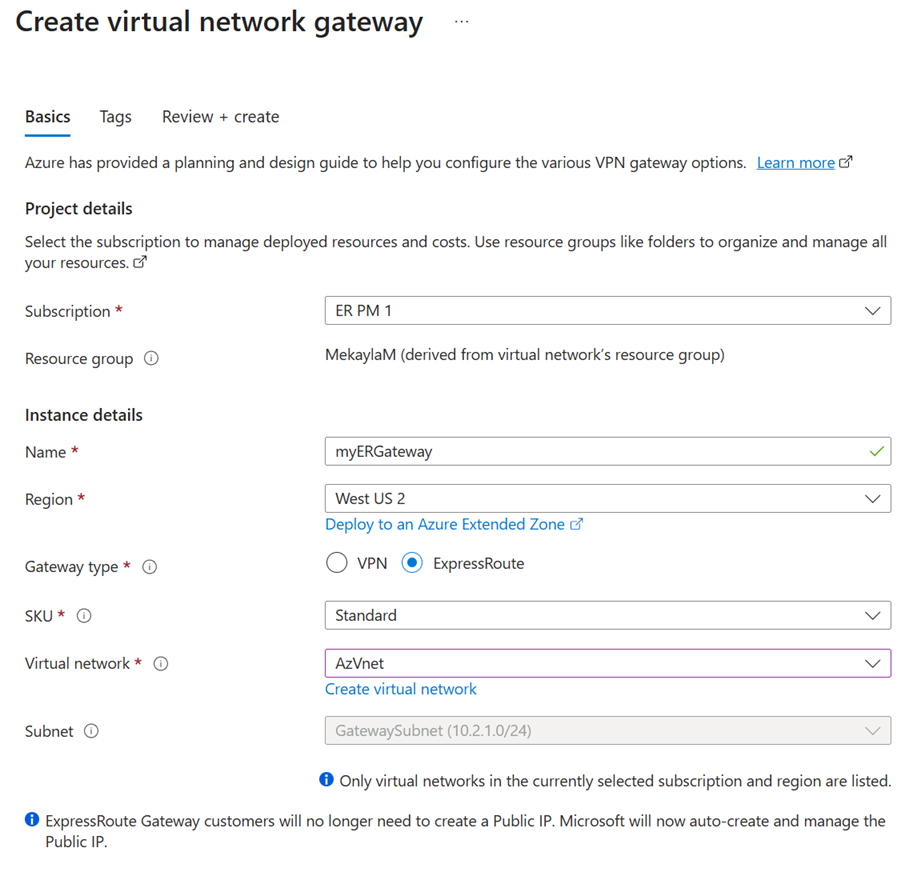
When auto-assigned public IP is enabled, the ExpressRoute gateway's Overview page no longer shows a Public IP address field — this means the gateway's public IP is automatically provisioned and managed by Microsoft.

Key benefits:
- Improved security: The public IP is managed internally by Microsoft and isn't exposed to you, reducing risks associated with open management ports.
- Reduced complexity: You're no longer required to provision or manage a public IP resource.
- Streamlined deployment: The Azure PowerShell and CLI no longer prompt for a public IP during gateway creation.
How it works:
When you create an ExpressRoute gateway, Microsoft automatically provisions and manages the public IP address in a secure, backend subscription. This IP is encapsulated within the gateway resource, enabling Microsoft to enforce policies such as data rate limits and enhance auditability. Previously it was possible to create the public IP resource as a zonal resource which ensured that all instances of the gateway in that zone shared the same public IP address. New behavior is that the gateway is always zone redundant.
Availability:
Auto-assigned public IP isn't available for Virtual WAN (vWAN) or Extended Zone deployments.
Connectivity from virtual network to virtual network and from virtual network to virtual WAN
By default, virtual network-to-virtual network and virtual network-to-virtual WAN connectivity is disabled through an ExpressRoute circuit for all gateway SKUs. To enable this connectivity, you must configure the ExpressRoute virtual network gateway to allow this traffic. For more information, see guidance about virtual network connectivity over ExpressRoute. To enable this traffic, see Enable virtual network-to-virtual network or virtual network-to-virtual WAN connectivity through ExpressRoute.
FastPath
ExpressRoute FastPath improves the data path performance between your on-premises network and your virtual network. When enabled, FastPath sends network traffic directly to virtual machines in the virtual network, bypassing the gateway.
For more information about FastPath, including limitations and requirements, see About FastPath.
Private endpoint connectivity
The ExpressRoute virtual network gateway facilitates connectivity to private endpoints deployed in the same virtual network and across peered virtual networks.
Important
- The throughput and control plane capacity for connectivity to private endpoint resources might be reduced by half compared to connectivity to non-private endpoint resources.
- During a maintenance period, you might experience intermittent connectivity problems to private endpoint resources.
- You need to ensure that on-premises configuration, including router and firewall settings, are correctly set up to ensure that packets for the IP 5-tuple transits use a single next hop (Microsoft Enterprise Edge router) unless there's a maintenance event. If your on-premises firewall or router configuration is causing the same IP 5-tuple to frequently switch next hops, you experience connectivity problems.
- Ensure that network policies (at a minimum, for UDR support) are enabled on the subnet(s) where private endpoints are deployed
Private endpoint connectivity and planned maintenance events
Private endpoint connectivity is stateful. When you establish a connection to a private endpoint over ExpressRoute private peering, the gateway infrastructure routes inbound and outbound connections through one of its back-end instances. During maintenance events, back-end instances reboot one at a time, which can cause intermittent connectivity problems.
To avoid or minimize connectivity problems with private endpoints during maintenance activities, set the TCP time-out value to fall between 15 and 30 seconds on your on-premises applications. Test and configure the optimal value based on your application requirements.
REST APIs and PowerShell cmdlets
For technical resources and specific syntax requirements when using REST APIs and PowerShell cmdlets for virtual network gateway configurations, see:
| Classic | Resource Manager |
|---|---|
| PowerShell | PowerShell |
| REST API | REST API |
Virtual network-to-virtual network connectivity
By default, connectivity between virtual networks is enabled when you link multiple virtual networks to the same ExpressRoute circuit. We don't recommend using your ExpressRoute circuit for communication between virtual networks. Instead, we recommend that you use virtual network peering. For more information about why virtual network-to-virtual network connectivity isn't recommended over ExpressRoute, see Connectivity between virtual networks over ExpressRoute.
Virtual network peering limits
A virtual network with an ExpressRoute gateway can have virtual network peering with up to 500 other virtual networks. Virtual networks without an ExpressRoute gateway might have higher peering limits.