Note
Access to this page requires authorization. You can try signing in or changing directories.
Access to this page requires authorization. You can try changing directories.
Healthcare organizations can use Microsoft Entra External ID with the FHIR® service in Azure Health Data Services to grant access to their applications and users.
Create an Entra External ID tenant for the FHIR service
Creating an Entra External ID tenant for the FHIR service sets up a secure infrastructure for managing user identities in your healthcare applications.
If you already created an Entra External ID tenant, you can skip to Deploy the FHIR service with Entra External ID.
Deploy an Entra External ID tenant by using an ARM template
Use PowerShell or Azure CLI to deploy the ARM template programmatically to an Azure subscription. For more information about syntax, properties, and usage of the template, see Deploy an instance of Entra External ID.
Run the code in Azure Cloud Shell or in PowerShell locally in Visual Studio Code to deploy the FHIR service to the Entra External ID tenant.
Use
Connect-AzAccountto sign in to Azure. After you sign in, useGet-AzContextto verify the subscription and tenant you want to use. Change the subscription and tenant if needed.Create a new resource group (or use an existing one) by skipping the "create resource group" step, or commenting out the line starting with
New-AzResourceGroup.
### variables
$tenantid="your tenant id"
$subscriptionid="your subscription id"
$resourceGroupName="your resource group name"
$location="your desired location"
$directoryName="your entra external id tenant name(don't include .onmicrosoft.com)"

### login to azure
Connect-AzAccount -Tenant $tenantid -SubscriptionId $subscriptionid

# create the resource group
New-AzResourceGroup -Name $resourceGroupName -Location $location

# deploy the resource
New-AzResourceGroupDeployment -ResourceGroupName $resourceGroupName -TemplateUri https://raw.githubusercontent.com/Azure-Samples/azure-health-data-and-ai-samples/samples/fhir-aad-entra-external/entra-external-arm-template.json -directoryName $directoryName
Use
az loginto sign in to Azure. After you sign in, useaz account show --output tableto verify the subscription and tenant you want to use. Change the subscription and tenant if needed.Create a new resource group (or use an existing one) by skipping the "create resource group" step or commenting out the line starting with
az group create.
# variables
tenantid="your tenant id"
subscriptionid="your subscription id"
resourceGroupName="your resource group name"
region="your desired region"
directoryName="your directory name"

# login to azure
az login
az account show --output table
az account set --subscription $subscriptionid

# create resource group
az group create --name $resourceGroupName --location $region

# deploy the resource
az deployment group create --resource-group $resourceGroupName --template-uri https://raw.githubusercontent.com/Azure-Samples/azure-health-data-and-ai-samples/samples/fhir-aad-entra-external/entra-external-arm-template.json  --parameters directoryName=$directoryName
Add a test user to the Microsoft Entra External ID tenant
Note
You will be asked to set up MFA when logging in for the first time.
You need a test user in your Microsoft Entra External ID tenant to associate with a specific patient resource in the FHIR service and to verify that the authentication flow works as expected.
Sign in to the Microsoft Entra admin center.
If you have access to multiple tenants, use the Settings icon
 in the top menu to switch to your external tenant from the Directories + subscriptions menu. Here you will be asked for MFA setup.
In the Users section of the Microsoft Entra admin center, select + New user, then choose Create new user.

On the Basics tab, enter the User principal name and Display name, then select Review + create.

Review the information you entered to validate the input, then select Create to create the user.
Link an Entra External ID user with the fhirUser custom user attribute
The fhirUser custom user attribute is used to link a user in Microsoft Entra External ID with a corresponding patient resource in the FHIR service. In this example, a user named Test Patient1 is created in the Entra External ID tenant. In a later step, a patient resource is created in the FHIR service. The Test Patient1 user is associated with the patient resource by setting the fhirUser attribute to the patient's FHIR resource identifier. For more information about custom attributes in Microsoft Entra External ID, see
User flow custom attributes in Entra External ID.
Search for External Identities
Navigate to Custom user attributes,
Choose + Add.
In the Add custom attribute pane:
In the Name field, Enter fhirUser (case-sensitive)
From the Data Type dropdown list, select String.
In the Description field, enter a description for the custom attribute. For example, "The fully qualified FHIR resource ID associated with the user. (e.g. Patient Resource)"
Choose Create.

Create a new user flow in Microsoft Entra External ID
User flows define the sequence of steps users must follow to sign in. In this example, a user flow is defined so that when a user signs in and the access token provided includes the fhirUser claim. For more information, see Create user flows and custom policies in Microsoft Entra External ID.
On the External Identities page in the left pane, choose User flows.
Choose + New user flow.

Give the user flow a name unique to the Microsoft Entra External ID tenant. The name doesn't have to be globally unique. In this example, the name of the user flow is USER_FLOW_1. Make note of the name.
Under Identity providers, keep Email with password selected (default).

On the Create a user flow page Select Show more to view additional attributes.
Under Collect attribute,
Select the fhirUser claim.
Choose Ok.
Choose Create.

Create an Entra External Resource Application
The Microsoft Entra External ID resource application handles authentication requests from your healthcare application to Microsoft Entra External ID.
In the Microsoft Entra admin center, navigate to Applications > App registrations.
Choose + New registration.

In the Register an application pane:
Enter a display name. This example uses FHIR Service.
In the Redirect URI (recommended) drop-down list, select Public client/native (mobile & desktop). Populate the value with the callback URI. This callback URI is for testing purposes.
Choose Register. Wait for the application registration to complete. The browser automatically navigates to the application Overview page.

Configure API permissions for the app
On the App registrations page in the left pane, choose Manifest.
Scroll until you find the
oauth2PermissionScopesarray inMicrosoft Graph App Manifest (New)tab. Replace the array with one or more values in theoauth2Permissions.jsonfile. Copy the entire array or individual permissions.If you add a permission to the list, any user in the Microsoft Entra External ID tenant can obtain an access token with that API permission. If a permission level isn't appropriate for all users, do not include it in the permission array.
After the oauth2PermissionScopes array is populated
In the same manifest, set the
acceptMappedClaimsproperty totrue. This enables the app to receive custom claims, likefhirUserin the token.choose Save.

Expose the web API and assign an application ID URI
On the App registrations page in the left pane, choose Expose an API.
Choose Add.
By default, the Application ID URI field is populated with the application (client) ID. Change the value if desired.
Choose Save.

On the App registrations page in the left pane, choose API permissions.
Choose + Add a permission.

On the Request API permissions pane, select APIs my organization uses.
Select the resource application from the list.

On the Request API permissions pane in the Patient section, select at least one permission. In this example, the permission
patient.all.readis selected, which means a user that requests an access token with the scopepatient.all.readhas Read privileges (patient.all.read) for all FHIR resources (patient.all.read) in the Patient compartment (patient.all.read) For more information, see Patient compartment.Choose Add permissions.

On the API permissions page in the Configured permissions section, choose Grant admin consent.
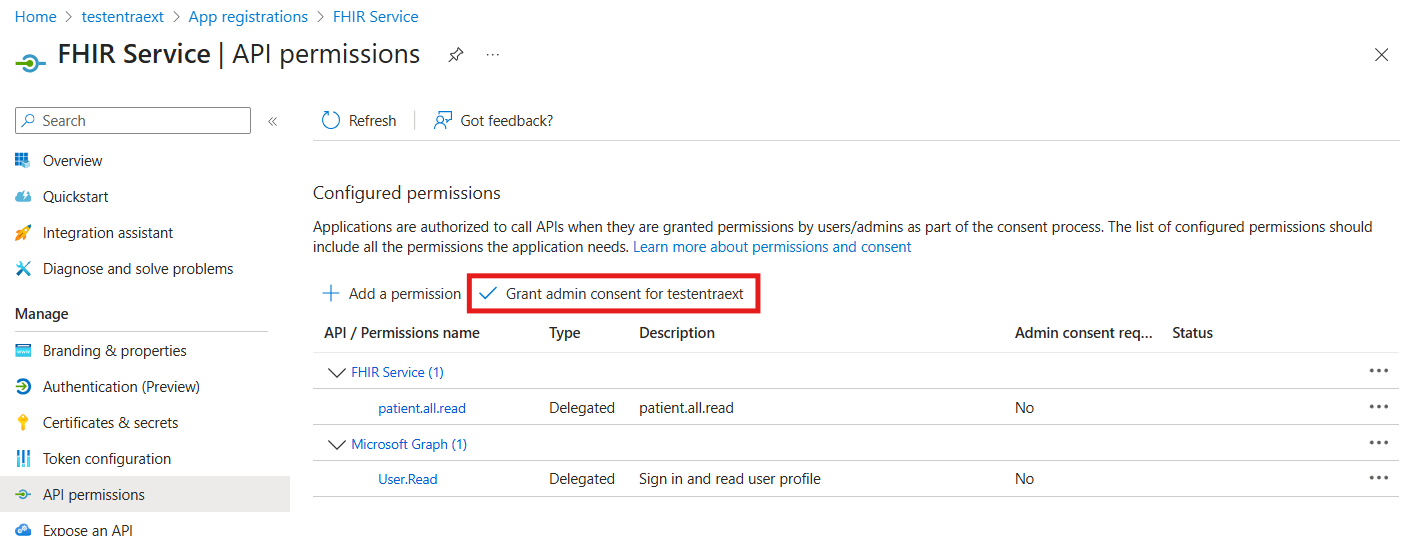
Configure Single sign-on (Preview) for the app
On the Enterprise apps page in the left pane, choose All applications.
Select your registered application from the list.
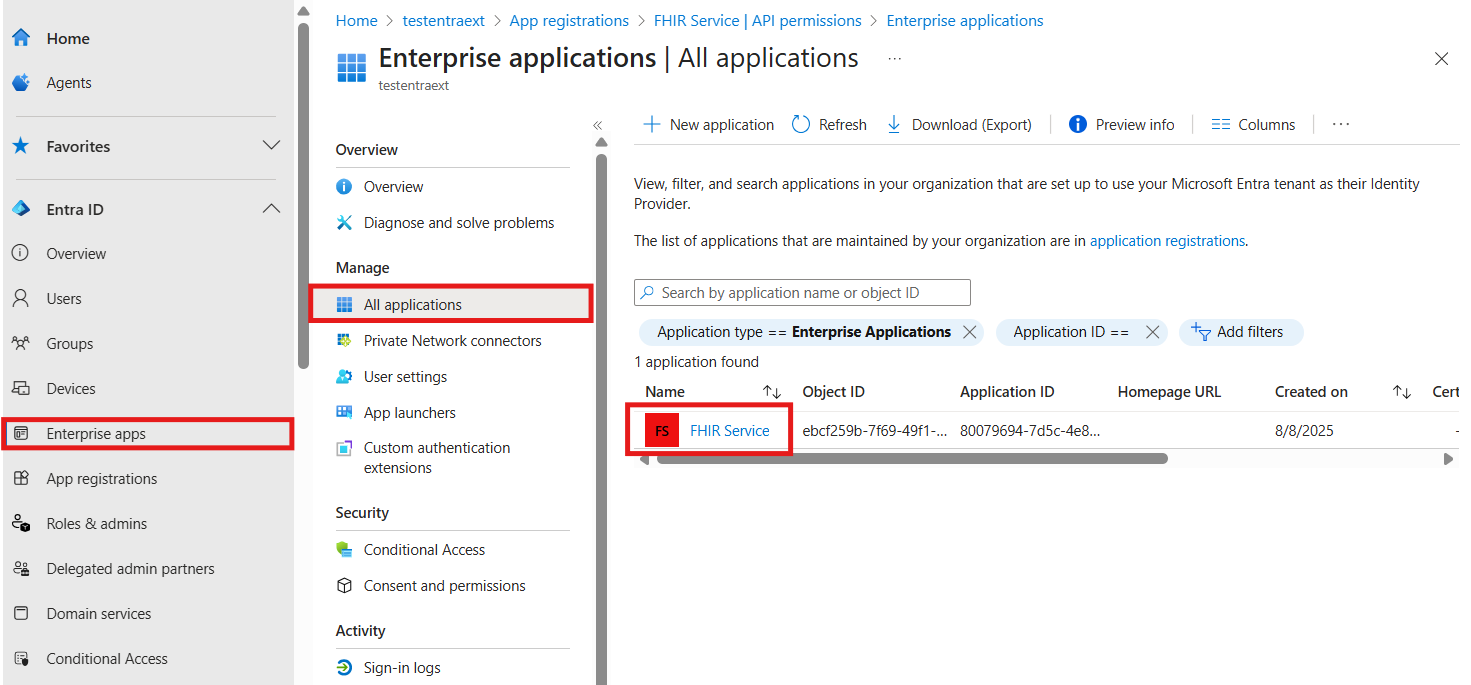
In your application’s pane, under Manage, select Single sign-on (Preview).
Select Edit to configure the single sign-on settings.
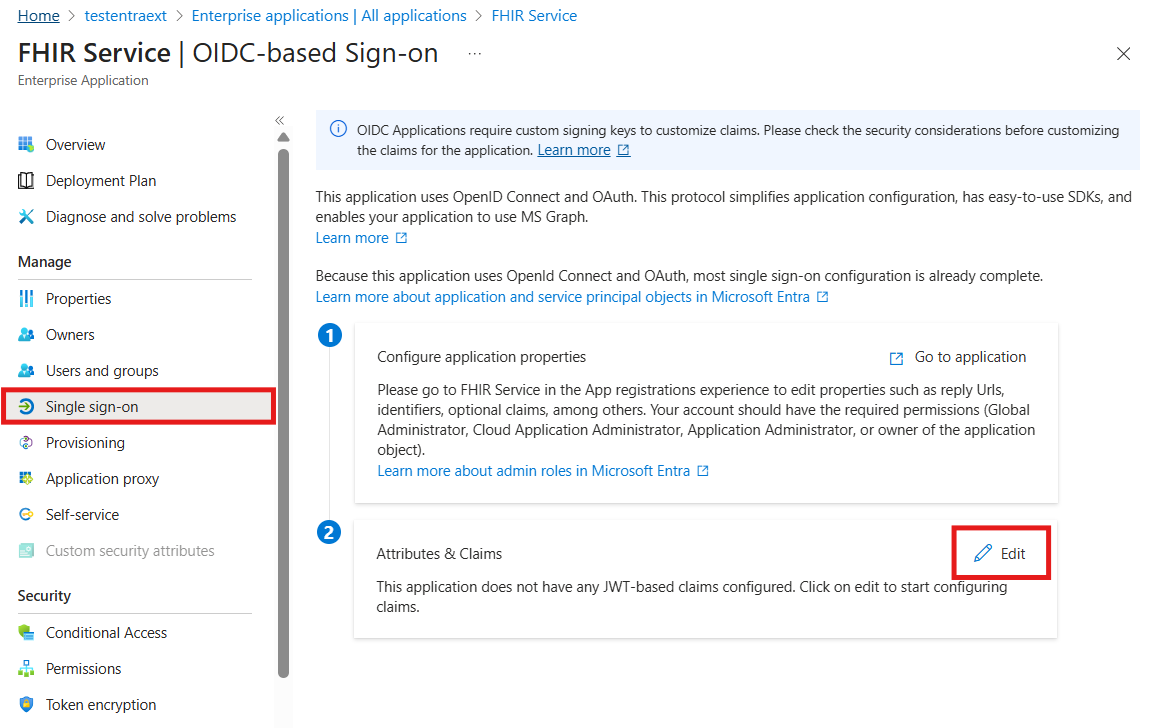
Under Attributes & Claims, select + Add new claim.

Configure the new claim:
Name:
fhirUserSource: Select Directory schema extension
Source attribute: Select b2c-extensions-app

Click Select. This opens the Add Extension Attributes window.

In the list, select the user.fhirUser attribute.
Click Add to include the attribute in the claim.

select save

Deploy the FHIR service with Entra External ID as the identity provider
Deploying the FHIR service with Entra External ID as the identity provider allows the FHIR service to authenticate users based on their Entra External ID credentials, ensuring that only authorized users can access sensitive patient information
Obtain the Entra External ID authority and client ID
Use the authority and client ID (or application ID) parameters to configure the FHIR service to use an Entra External ID tenant as an identity provider.
Create the authority string by using the name of the Entra External ID tenant and the name of the user flow.
https://<YOUR_EXTERNAL_ID_TENANT_NAME>.ciamlogin.com/<YOUR_EXTERNAL_ID_TENANT_ID>/v2.0Test the authority string by making a request to the
.well-known/openid-configurationendpoint. Enter the string into a browser to confirm it navigates to the OpenId Configuration JSON file. If the OpenId Configuration JSON fails to load, make sure the Entra External ID tenant name and Entra External ID tenant ID are correct.https://<YOUR_EXTERNAL_ID_TENANT_NAME>.ciamlogin.com/<YOUR_EXTERNAL_ID_TENANT_ID>/v2.0/.well-known/openid-configurationRetrieve the client ID from the resource application overview page.

Deploy the FHIR service by using ARM Template
Use an ARM template to simplify deploying the FHIR service. Use PowerShell or Azure CLI to deploy the ARM template to an Azure subscription..
Run the code in Azure Cloud Shell or in PowerShell locally using Visual Studio Code to deploy the FHIR service with Microsoft Entra External ID as the identity provider.
Use
Connect-AzAccountto sign in to Azure. UseGet-AzContextto verify the subscription and tenant you want to use. Change the subscription and tenant if needed.Create a new resource group (or use an existing one) by skipping the "create resource group" step, or commenting out the line starting with
New-AzResourceGroup.
### variables
$tenantid="your tenant id"
$subscriptionid="your subscription id"
$resourcegroupname="your resource group name"
$region="your desired region"
$workspacename="your workspace name"
$fhirServiceName="your fhir service name"
$smartAuthorityUrl="your authority (from previous step)"
$smartClientId="your client id (from previous step)"

### Login to Azure
Connect-AzAccount

#Connect-AzAccount SubscriptionId $subscriptionid
Set-AzContext -Subscription $subscriptionid
Connect-AzAccount -Tenant $tenantid -SubscriptionId $subscriptionid
# Get-AzContext

### create resource group
New-AzResourceGroup -Name $resourcegroupname -Location $region

### deploy the resource
New-AzResourceGroupDeployment -ResourceGroupName $resourcegroupname -TemplateUri https://raw.githubusercontent.com/Azure-Samples/azure-health-data-and-ai-samples/main/samples/fhir-aad-b2c/fhir-service-arm-template.json -tenantid $tenantid -region $region -workspaceName $workspacename -fhirServiceName $fhirservicename -smartAuthorityUrl $smartAuthorityUrl -smartClientId $smartClientId
Use
az loginto sign in to Azure. Useaz account show --output tableto verify the subscription and tenant you want to use. Change the subscription and tenant if needed.Create a new resource group (or use an existing one) by skipping the "create resource group" step, or commenting out the line starting with
az group create.
### variables
tenantid=your tenant id
subscriptionid=your subscription id
resourcegroupname=your resource group name
region=your desired region
workspacename=your workspace name
fhirServiceName=your fhir service name
smartAuthorityUrl=your authority (from previous step)
smartClientId=your client id (from previous step)

### login to azure
az login
az account show --output table
az account set --subscription $subscriptionid

### create resource group
az group create --name $resourcegroupname --location $region

### deploy the resource
az deployment group create --resource-group $resourcegroupname --template-uri https://raw.githubusercontent.com/Azure-Samples/azure-health-data-and-ai-samples/main/samples/fhir-aad-b2c/fhir-service-arm-template.json --parameters tenantid=$tenantid region=$region workspaceName=$workspacename fhirServiceName=$fhirservicename smartAuthorityUrl=$smartAuthorityUrl smartClientId=$smartClientId
Validate Microsoft Entra External ID Users are able to access FHIR Resources
The validation process involves creating a patient resource in the FHIR service, linking the patient resource to the Microsoft Entra External ID user, and configuring REST Client to get an access token for External ID users. After the validation process is complete, you can fetch the patient resource by using the External ID test user.
Use REST Client to get an access token
For steps to obtain the proper access to the FHIR service, see Access the FHIR service using REST Client.
When you follow the steps in the Get the FHIR patient data section, the request returns an empty response because the FHIR service is new and doesn't have any patient resources.
Create a patient resource in the FHIR service
It's important to note that users in the Microsoft Entra External ID tenant aren't able to read any resources until the user (such as a patient or practitioner) is linked to a FHIR resource. A user with the FhirDataWriter or FhirDataContributor role in the Microsoft Entra ID where the FHIR service is tenanted must perform this step.
- Create a patient with a specific identifier by changing the method to
PUTand executing a request to{{fhirurl}}/Patient/1with this body:
{
    "resourceType": "Patient",
    "id": "1",
    "name": [
        {
            "family": "Patient1",
            "given": [
                "Test"
            ]
        }
    ]
}
- Verify the patient is created by changing the method back to
GETand verifying that a request to{{fhirurl}}/Patientreturns the newly created patient.
Link the patient resource to Microsoft Entra External ID User.
Create an explicit link between the test user in the Microsoft Entra External ID tenant and the resource in the FHIR service. Use extension attributes in Microsoft Graph to define this link. For more information, see Create custom user attributes in Entra External ID.
Go to the Entra External ID tenant. On the left pane, choose App registrations.
Select All applications.
Select the application with the prefix b2c-extensions-app.
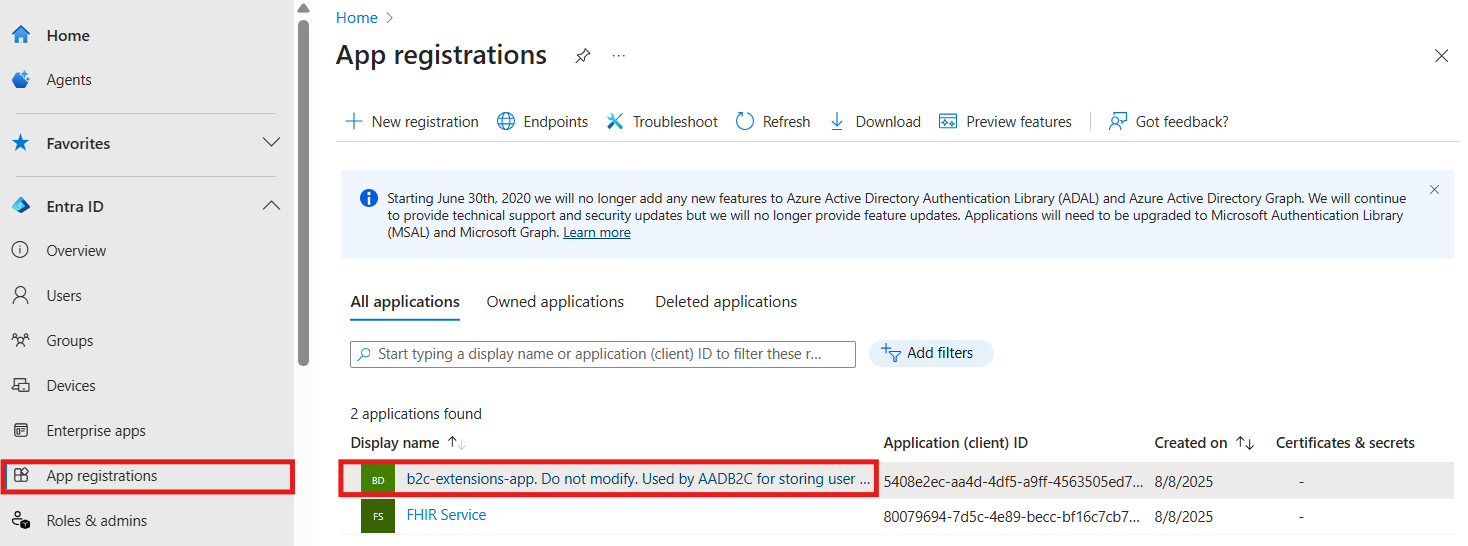
Note the Application (client) ID value.

Navigate back to the Entra External ID tenant home page, on the left pane select Users.
Under Users > All users, select Test Patient1.
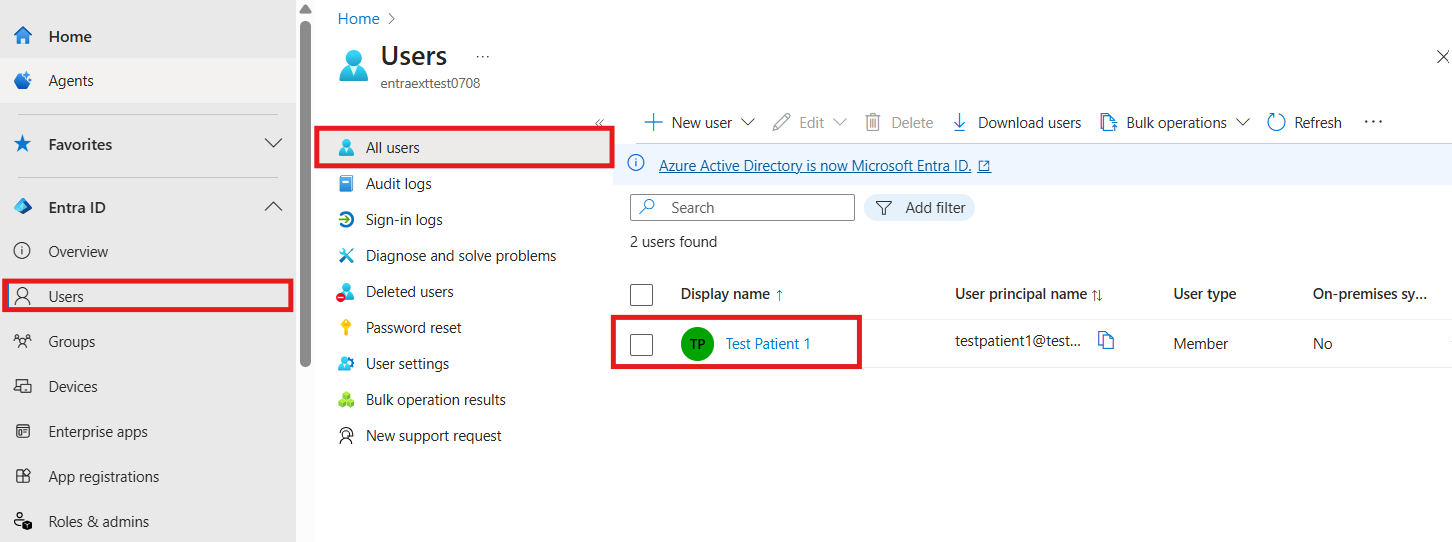
Note the Object ID.

Open Microsoft Graph Explorer Sign in with a user assigned to the Global Administrator role for the Microsoft Entra External ID tenant. (It's a good idea to create a new admin user in the Microsoft Entra tenant to manage users.)
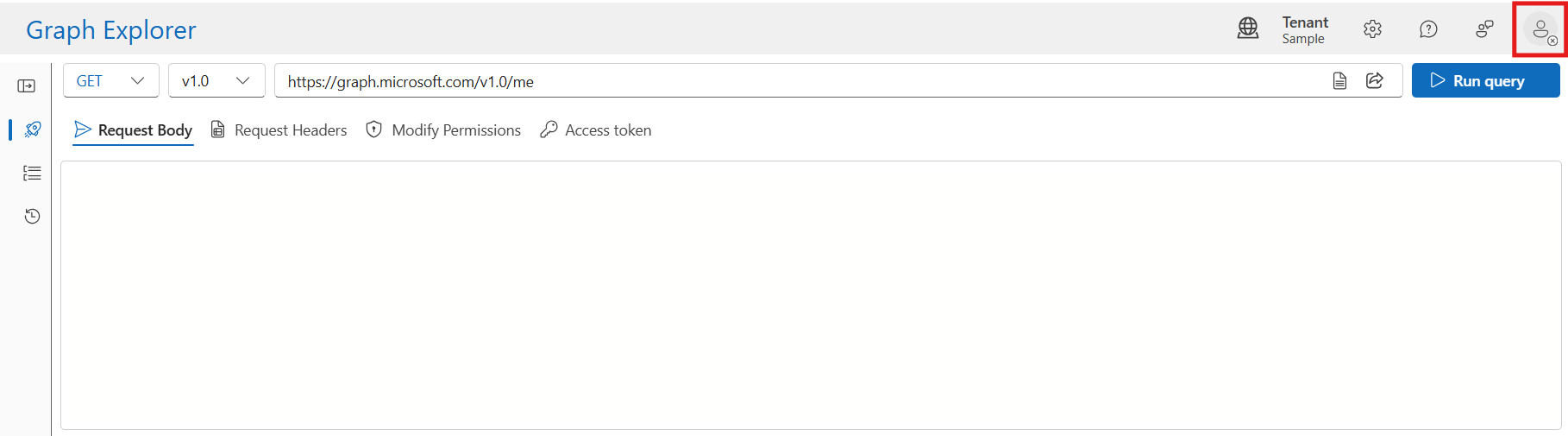
Select the avatar for the user, and then choose Consent to permissions.
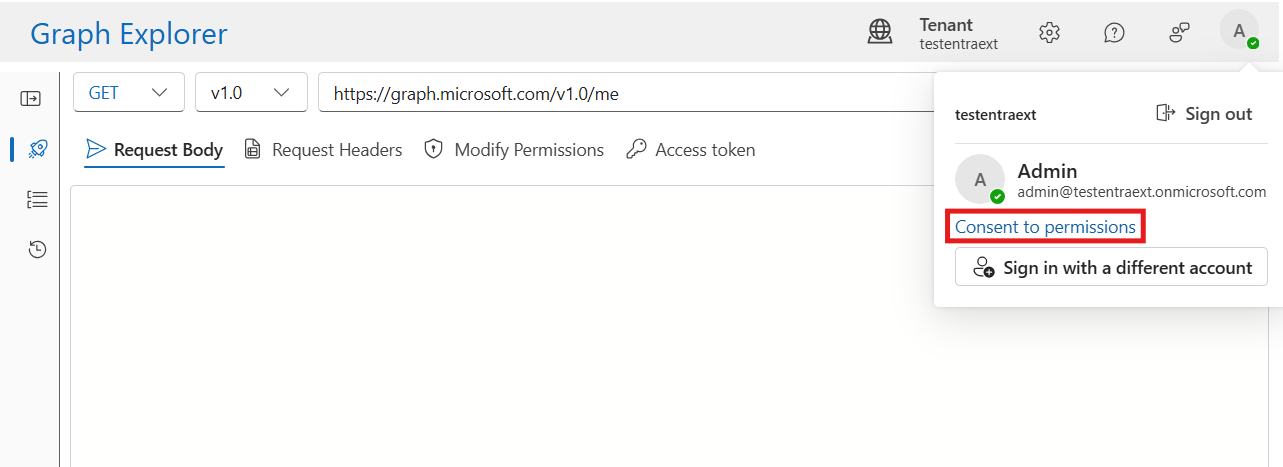
Scroll to User. Consent to
User.ReadWrite.All. This permission allows you to update the Test Patient1 user with thefhirUserclaim value.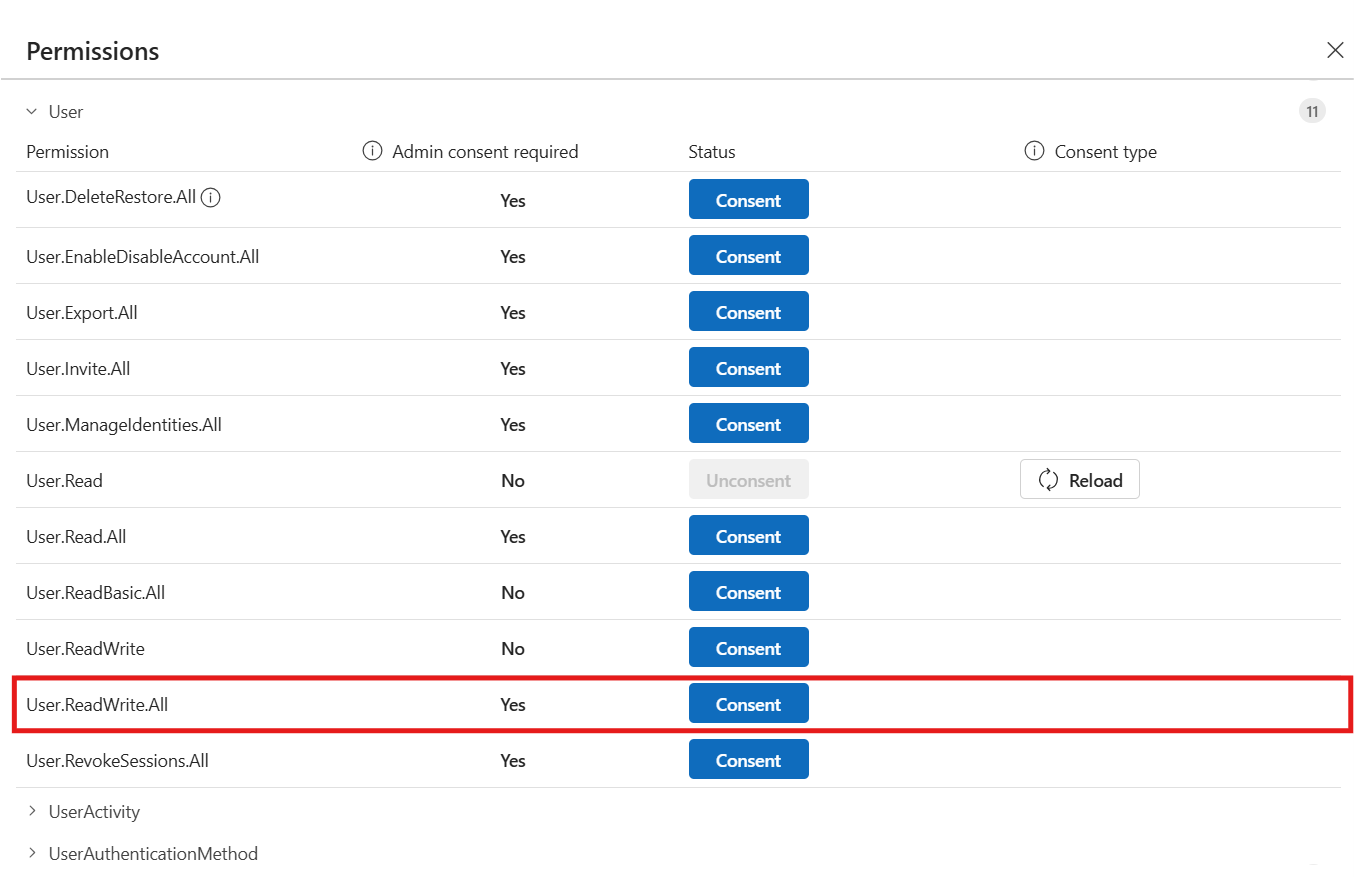
After the consent process completes, update the user. You need the b2c-extensions-app application (client) ID and the user Object ID.
Change the method to
PATCH.Change the URL to https://graph.microsoft.com/v1.0/users/{USER_OBJECT_ID}.
Create the
PATCHbody. APATCHbody is a single key-value-pair, where the key format isextension_{B2C_EXTENSION_APP_ID_NO_HYPHENS}_fhirUserand the value is the fully qualified FHIR resource ID for the patienthttps://{YOUR_FHIR_SERVICE}.azurehealthcareapis.com/Patient/1".
For more information, see Manage extension attributes through Microsoft Graph.
After the request is formatted, choose Run query. Wait for a successful response that confirms the user in the Entra External ID tenant is linked to the patient resource in the FHIR service.
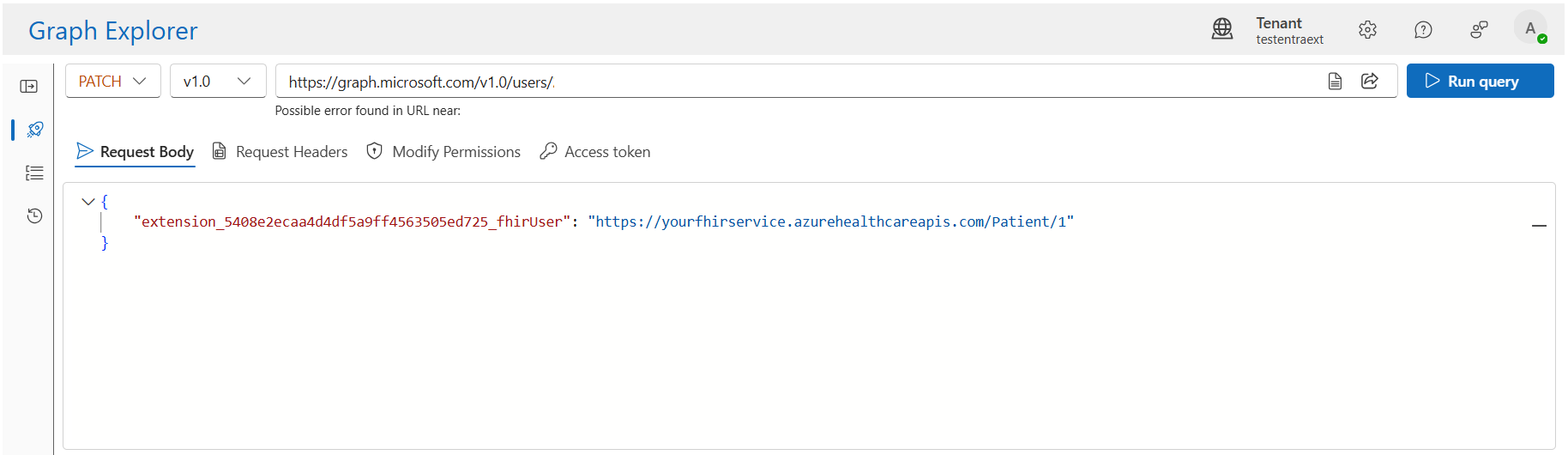
Configuration to obtain an access token for Entra External ID users
Obtain an access token to test the authentication flow.
Note
The grant_type of authorization_code is used to obtain an access token.
There are tools available online offering intuitive interfaces for API testing and development.
Launch the API testing application.
Select the Authorization tab in the tool.
In the Type dropdown list, select OAuth 2.0.
Enter the following values.
Callback URL. This value is configured when the Entra External ID resource application is created.
Auth URL. This value can be created using the name of the Entra External ID tenant and the Entra External ID tenant ID.
https://{YOUR_EXTERNAL_ID_TENANT_NAME}.ciamlogin.com/{YOUR_EXTERNAL_ID_TENANT_ID}/oauth2/v2.0/authorizeAccess Token URL. This value can be created using the name of the Entra External ID tenant and the Entra External ID tenant ID.
https://{YOUR_EXTERNAL_ID_TENANT_NAME}.ciamlogin.com/{YOUR_EXTERNAL_ID_TENANT_ID}/oauth2/v2.0/tokenClient ID: This value is the application (client) ID of the Entra External resource application.
{YOUR_APPLICATION_ID}Scope. This value is defined in the Entra External ID resource application in the Expose an API section. The scope granted permission is
patient.all.read. The scope request must be a fully qualified URL, for example,https://testentraexternal.onmicrosoft.com/fhir/patient.all.read.Copy the fully qualified scope from the Expose an API section of the Entra External resource application. Example:
{YOUR_APPLICATION_ID_URI}/patient.all.read
Fetch the patient resource by using the Microsoft Entra External ID user
Verify that Microsoft Entra External ID users can access FHIR resources.
When the authorization configuration is set up to launch the Microsoft Entra External ID user flow, choose Get New Access Token to get an access token.
Use the Test Patient credentials to sign in.
Copy the access token and use it in fetching the Patient data.
Follow the steps in the Get the FHIR patient data guide to fetch the patient resource:
Set the HTTP method to
GET, enter the fully qualified FHIR service URL, and append the path/Patient.Use the fetched token in the authorization header.
Choose Send Request.
Verify that the response contains the single patient resource.
Next steps
Configure multiple identity providers
Troubleshoot identity provider configuration
Note
FHIR® is a registered trademark of HL7 and is used with the permission of HL7.
Feedback
Was this page helpful?
No
Need help with this topic?
Want to try using Ask Learn to clarify or guide you through this topic?
Additional resources
-
Last updated on
2025-10-01