Note
Access to this page requires authorization. You can try signing in or changing directories.
Access to this page requires authorization. You can try changing directories.
This article describes the key components of a PostgreSQL assessment and shows you how to review results, explore migration options, and evaluate cost and readiness for migrating to Azure.
Prerequisites
Before you begin, ensure you’ve reviewed the discovered application. Learn more.
View an assessment
To view the assessment, you create, follow these steps:
Go to the Assessment and select View all reports under Overview or select Assessments under the Decide and plan.
Select the assessment you want to view, for example, azmigrate-demo.
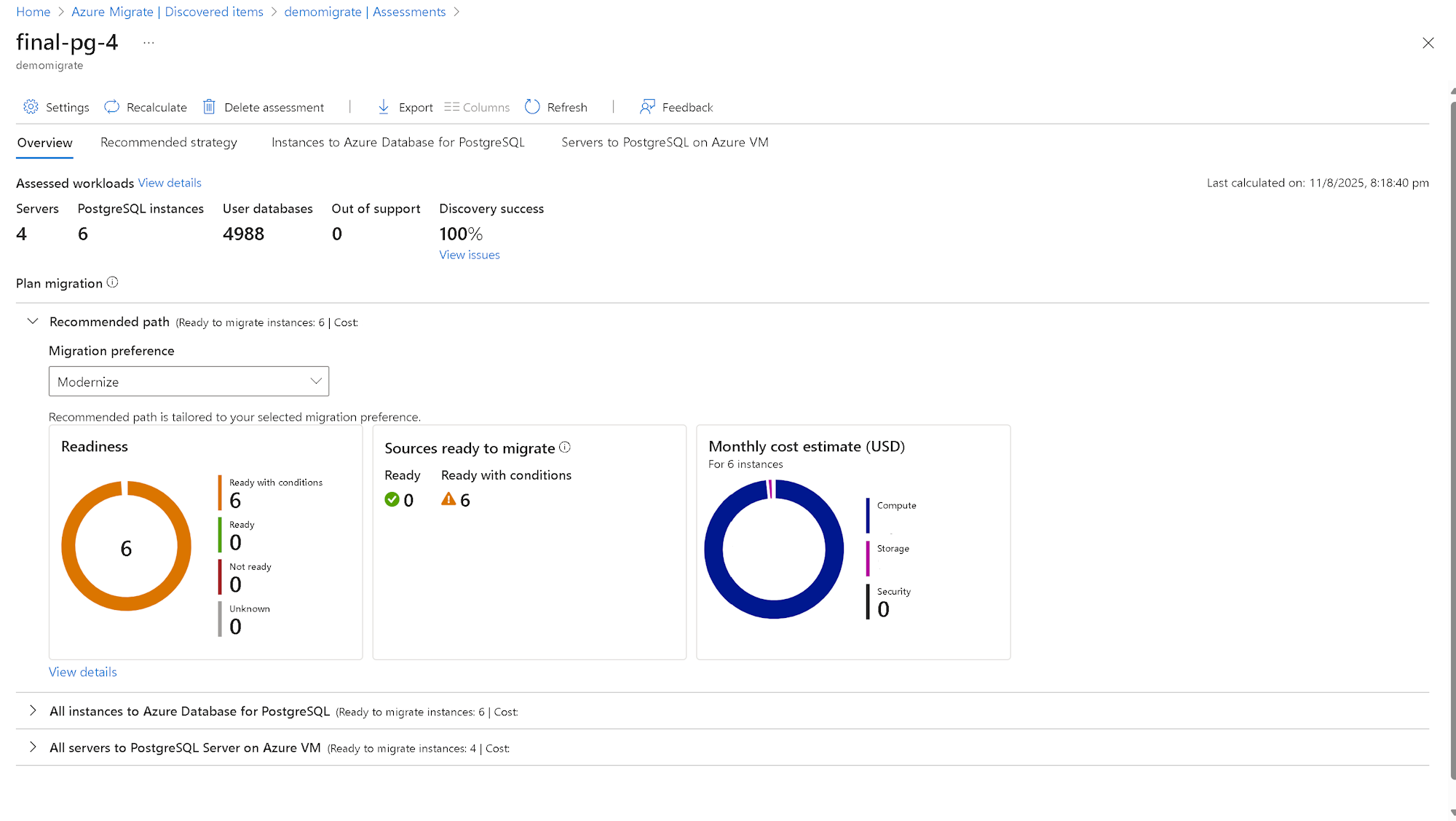
Review the summary of the assessment. You can also edit the assessment settings or recalculate the assessment.
Assessed Workloads
This section provides a summary of the assessment, including the following metrics:
- Servers: Total number of servers assessed.
- PostgreSQL instances: Number of PostgreSQL instances discovered.
- Databases: Total number of databases across all instances.
- Out of support: Number of instances running unsupported PostgreSQL versions.
- Discovery success: Percentage of successful discovery operations.
PostgreSQL migration
This indicates the different migration strategies that you can consider for your PostgreSQL deployments. You can review the readiness for target deployment types and the cost estimates for PostgreSQL instances that are marked ready or ready with conditions.
Recommended target
Azure Database for PostgreSQL provides the best compatibility and cost-effectiveness for your PostgreSQL instance. Choosing a Microsoft-recommended target reduces migration effort.
The recommended option is both cost-effective and migration ready. It includes readiness checks and monthly cost estimates for instances marked as Ready or Ready with conditions.
You can view the readiness of PostgreSQL instances for recommended deployment targets, along with monthly cost estimates for instances marked as Ready or Ready with conditions.
Readiness report:
- Review the recommended Azure Database for PostgreSQL configurations for migrating to Azure Database for PostgreSQL flexible server.
- Understand migration issues and warnings you can resolve before moving to the recommended Azure targets.
- Review the monthly cost of each PostgreSQL instance based on compute and storage.
Migration strategies
Migrate all instances to Azure Database for PostgreSQL: This strategy provides readiness insights and cost estimates for migrating all PostgreSQL instances to Azure Database for PostgreSQL.
Migrate all servers to PostgreSQL Server on Azure VM: This strategy outlines how to rehost servers running PostgreSQL instances to PostgreSQL on Azure Virtual Machines. It includes readiness and cost estimates. Even if PostgreSQL credentials aren't available, the report provides right-sized lift-and-shift recommendations for migrating servers to PostgreSQL on Azure VMs. The readiness and sizing logic aligns with the Azure VM assessment methodology.
Support status of assessed PostgreSQL instances
The Supportability section shows the support status of the PostgreSQL versions identified during the assessment. The Discovery Details section provides a visual summary of the number of discovered PostgreSQL instances, categorized by version.
To view the list of assessed PostgreSQL instances, select the graph in the Supportability.
The Database instance version support status column indicates whether the PostgreSQL version is in mainstream support or out of support.
To view detailed support information, select the support status. A pane opens on the right and shows the following details:
- Type of support status (Mainstream or Out of support)
- Remaining support duration
- Recommended actions to help secure workloads.
To view the remaining support duration (in months) for each PostgreSQL version:
- Select Columns > Support ends in > Submit.
- The Support ends in column shows the number of months remaining for support.
Support status categories:
- Mainstream support: The PostgreSQL version is actively supported and receives regular updates.
- Out of support: The PostgreSQL version no longer receives updates and should be upgraded to a supported version.
Note
PostgreSQL instances running unsupported versions should be prioritized for migration to maintain security compliance and ensure continued support in Azure.
Review readiness
Assess the migration readiness of your PostgreSQL instances, identify potential issues, and review recommendations to ensure a smooth transition to Azure.
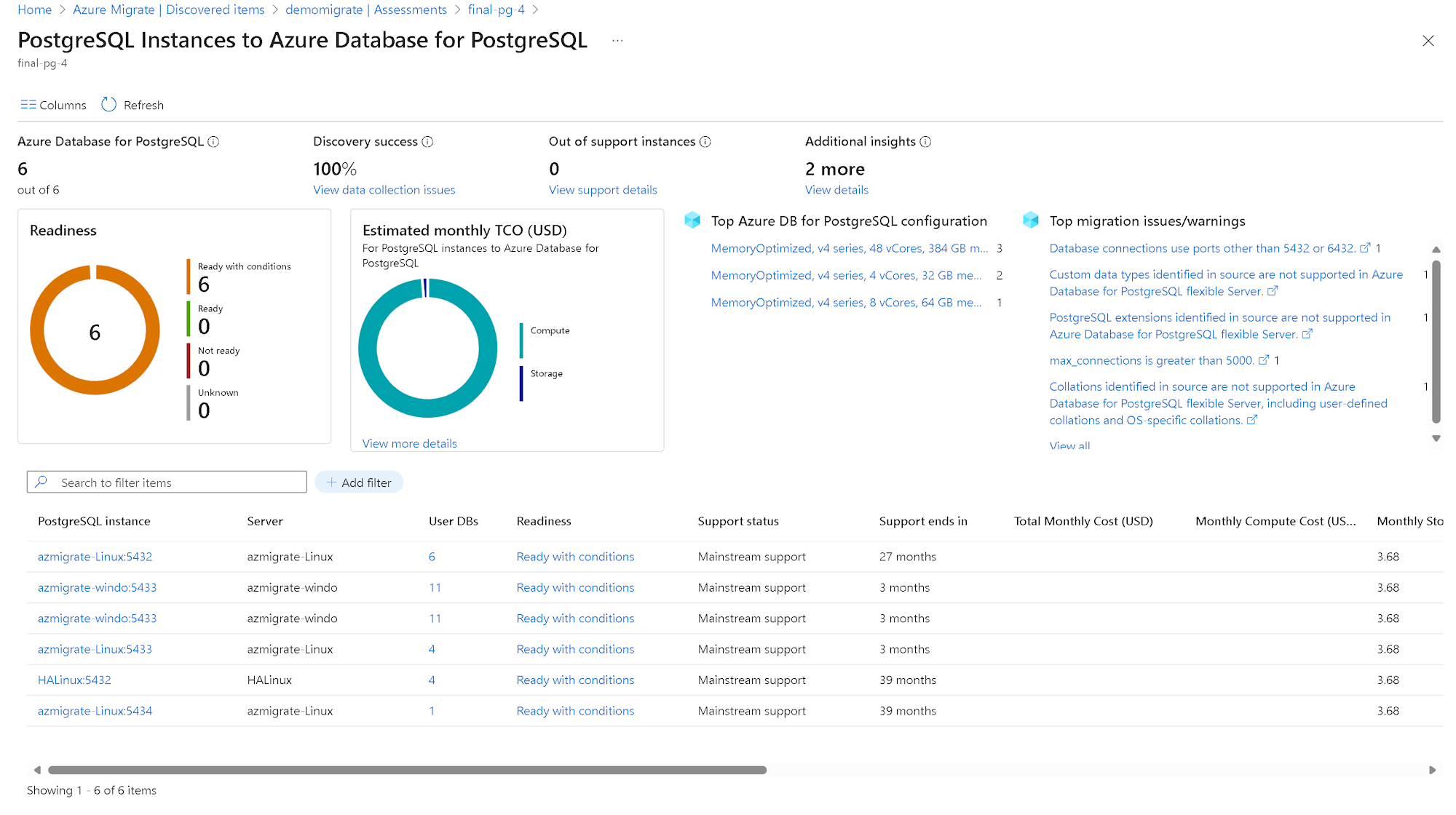
To review readiness reports for different migration strategies, follow these steps:
Select the Readiness report for the desired migration strategy.
Review the readiness columns in the selected report to assess migration preparedness.
Migration strategy Readiness Columns (Respective deployment target) Recommended Azure Database for PostgreSQL flexible Server readiness Instances to Azure Database for PostgreSQL Azure Database for PostgreSQL flexible Server readiness Servers to PostgreSQL Server on Azure VM Azure VM readiness (PostgreSQL Server on Azure VM) Review the readiness status for assessed PostgreSQL instances:
- Ready: The instance can be migrated to Azure Database for PostgreSQL flexible server without any migration issues.
- Ready with conditions: The instance has one or more migration issues. Select the hyperlink to view the identified issues and recommended remediation steps.
- Not ready: The assessment did not identify an Azure Database for PostgreSQL flexible server configuration that meets the desired performance and configuration requirements. Select the hyperlink to view recommendations that can help make the instance ready for the target deployment type.
- Unknown: Azure Migrate can't assess readiness because discovery is still in progress or there are issues that need to be resolved. To fix discovery issues, check the Notifications blade for details. If the issue persists, contact Microsoft support.
To view detailed information for a specific instance, select the instance name to drill down into the following details:
- Number of user databases
- Instance properties
- Configuration parameters scoped to the instance
- Source database storage details.
Important
If PostgreSQL credentials aren't provided or if the Azure Migrate appliance can't connect to the PostgreSQL instance, SKU recommendations are based on virtual machine-level configuration. In this case, the readiness status is marked as Ready with Conditions. To validate all assessment rules—including extensions, collations, data types, and other database-specific configurations—and to ensure optimal SKU sizing, provide PostgreSQL credentials with sufficient permissions.
To view the list of user databases and their details, select the number of user databases.
To review migration issues and warnings for a specific target deployment type, select Review details in the Migration issues column.
Cost distribution by configuration: The assessment shows how costs are distributed across various Azure Database for PostgreSQL flexible server configurations:
- Costs are calculated based on the recommended service tier and compute size.
- Each instance receives a specific SKU recommendation based on its configuration requirements.
- Recommended configurations vary depending on the workload characteristics of each instance.
Instance-level cost details: To view cost details for a specific PostgreSQL instance, select the instance name in the table. The following information is displayed:
- Total monthly cost: Combined compute and storage cost for the instance.
- Monthly compute cost: Cost based on the recommended compute configuration.
- Monthly storage cost: Cost based on the allocated storage capacity.
- Recommended configuration: Specific SKU recommendation based on assessment analysis.
- Cost variations: Reflect differences in resource requirements across instances.