Note
Access to this page requires authorization. You can try signing in or changing directories.
Access to this page requires authorization. You can try changing directories.
Microsoft Entra authentication is a mechanism of connecting to Azure Database for MySQL Flexible Server by using identities defined in Microsoft Entra ID. With Microsoft Entra authentication, you can manage database user identities and other Microsoft services in a central location, simplifying permission management.
Benefits of Entra authentication
- Authentication of users across Azure Services in a uniform way
- Management of password policies and password rotation in a single place
- Multiple forms of authentication supported by Microsoft Entra ID, which can eliminate the need to store passwords
- Customers can manage database permissions using external (Microsoft Entra ID) groups.
- Microsoft Entra authentication uses MySQL database users to authenticate identities at the database level
- Support of token-based authentication for applications connecting to Azure Database for MySQL Flexible Server
Configure and use Microsoft Entra authentication
Select your preferred authentication method for accessing the Flexible Server.
- By default, the authentication selected is set to MySQL authentication only.
- To enable Microsoft Entra authentication, you need to change the authentication method:
Microsoft Entra authentication only- or
MySQL and Microsoft Entra authentication
Select the user assigned managed identity (UAMI) with the following privileges:
- User.Read.All: Allows access to Microsoft Entra user information.
- GroupMember.Read.All: Allows access to Microsoft Entra group information.
- Application.Read.ALL: Allows access to Microsoft Entra service principal (application) information.
Add Microsoft Entra Admin. It can be Microsoft Entra users or Groups, which has access to a Flexible Server.
Create database users in your database mapped to Microsoft Entra identities.
Connect to your database by retrieving a token for a Microsoft Entra identity and logging in.
Note
For detailed, step-by-step instructions about how to configure Microsoft Entra authentication with Azure Database for MySQL Flexible Server, see Set up Microsoft Entra authentication for Azure Database for MySQL - Flexible Server
Architecture
User-managed identities are required for Microsoft Entra authentication. When a User-Assigned Identity is linked to the Flexible Server, the Managed Identity Resource Provider (MSRP) issues a certificate internally to that identity. When the managed identity is deleted, the corresponding service principal is automatically removed.
The service then uses the managed identity to request access tokens for services that support Microsoft Entra authentication. Azure Database currently supports only a User-assigned Managed Identity (UMI) for Azure Database for MySQL Flexible Server. For more information, see Managed identity types in Azure.
The following high-level diagram summarizes how authentication works using Microsoft Entra authentication with Azure Database for MySQL Flexible Server. The arrows indicate communication pathways.
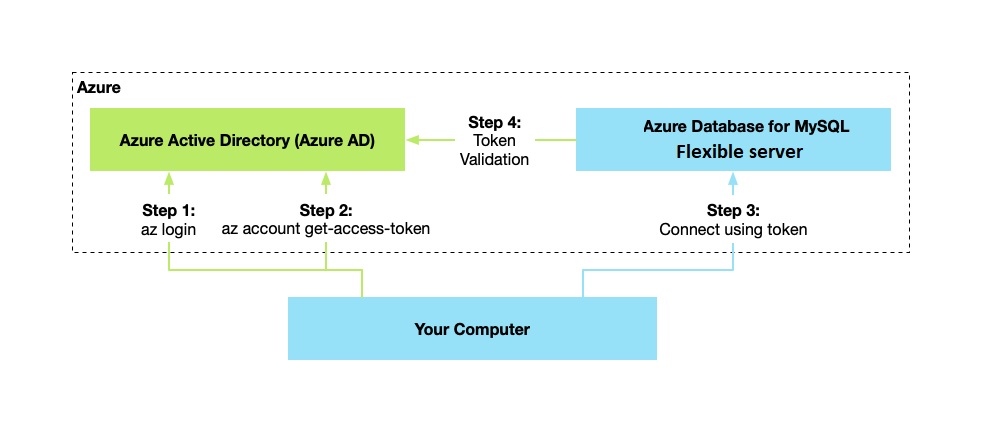
- Your application can request a token from the Azure Instance Metadata Service identity endpoint.
- When you use the client ID and certificate, a call is made to Microsoft Entra to request an access token.
- Microsoft Entra returns a JSON Web Token (JWT) access token. Your application sends the access token on calls to your server.
- The server validates the token with Microsoft Entra.
Administrator structure
There are two Administrator accounts for Azure Database for MySQL Flexible Server when using Microsoft Entra authentication: the original MySQL administrator and the Microsoft Entra administrator.
Only the administrator based on a Microsoft Entra account can create the first Microsoft Entra ID contained database user in a user database. The Microsoft Entra administrator sign-in can be a Microsoft Entra user or a Microsoft Entra group. When the administrator is a group account, any group member is a database server administrator. Group account enhances manageability by centrally adding and removing group members in Microsoft Entra without changing the users or permissions in the database server.
Important
Only one Microsoft Entra administrator (a user or group) can be configured at a time.
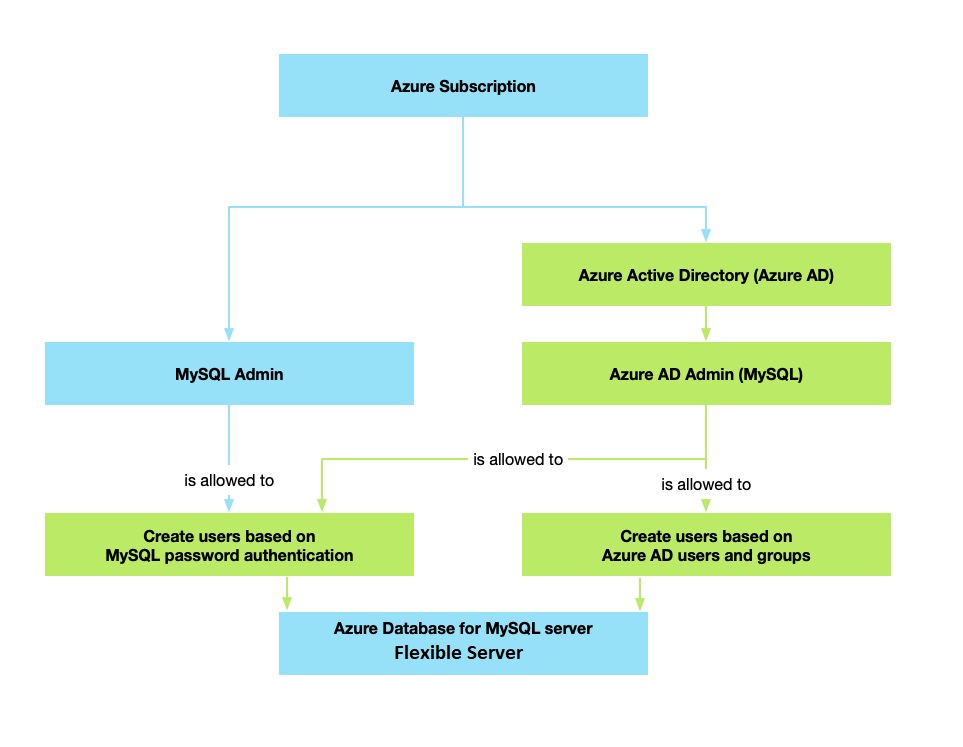
Methods of authentication for accessing the Flexible Server include:
- MySQL authentication only - default option allows native MySQL authentication only using MySQL sign-in and password.
- Only Microsoft Entra authentication - MySQL native authentication is disabled, and users and applications must authenticate using Microsoft Entra. To enable this mode, the server parameter
aad_auth_onlyis set toON. - Authentication with MySQL and Microsoft Entra ID - both native MySQL, and Microsoft Entra authentication are available. To enable this mode, the server parameter
aad_auth_onlyis set toOFF.
Permissions
The following permissions are required to allow the UMI to read from the Microsoft Graph as the server identity. Alternatively, give the user-assigned managed identity the Directory Readers role.
Important
Only a user with at least the Privileged Role Administrator role can grant these permissions.
- User.Read.All: Allows access to Microsoft Entra user information.
- GroupMember.Read.All: Allows access to Microsoft Entra group information.
- Application.Read.ALL: Allows access to Microsoft Entra service principal (application) information.
For guidance about how to grant and use the permissions, refer to Overview of Microsoft Graph permissions
After you grant the permissions to the UMI, they're enabled for all servers created with the UMI assigned as a server identity.
Token Validation
Microsoft Entra authentication in Azure Database for MySQL Flexible Server ensures that the user exists in the MySQL server and checks the token's validity by validating the token's contents. The following token validation steps are performed:
- Token is signed by Microsoft Entra.
- Token is issued by Microsoft Entra for the tenant associated with the server.
- Token isn't expired.
- Token is for the Flexible Server instance (and not another Azure resource).
Connect using Microsoft Entra identities
Microsoft Entra authentication supports the following methods of connecting to a database using Microsoft Entra identities:
- Microsoft Entra Password
- Microsoft Entra integrated
- Microsoft Entra Universal with MFA
- Using Active Directory Application certificates or client secrets
- Managed Identity
Once you authenticate against the Active Directory, you retrieve a token. This token is your password for logging in.
Note
That management operation, such as adding new users, is only supported for Microsoft Entra user roles.
Note
For more information on how to connect with an Active Directory token, see Set up Microsoft Entra authentication for Azure Database for MySQL - Flexible Server.
Other considerations
You can only configure one Microsoft Entra administrator per Flexible Server at any time.
If a user is deleted from Microsoft Entra, that user can no longer authenticate with Entra. Therefore, acquiring an access token for that user is no longer possible. Although the matching user is still in the database, connecting to the server with that user isn't possible.
Note
Log in with the deleted Microsoft Entra user can still be done until the token expires (up to 60 minutes from token issuing). If you remove the user from Azure Database for MySQL Flexible Server, this access is revoked immediately.
If the Microsoft Entra admin is removed from the server, the server is no longer associated with a Microsoft Entra tenant, and therefore all Microsoft Entra logins are disabled for the server. Adding a new Microsoft Entra admin from the same tenant re-enables Microsoft Entra logins.
A Flexible Server matches access tokens to the user's unique Entra ID instead of the user name. Therefore, if a user is deleted from Microsoft Entra and then a new user with the same name is added, the new user doesn't inherit the previous permissions.
To enable Entra authentication on a replica server, you need to apply the same configuration steps used on the primary server across all replica partners.
Note
The subscriptions of a Flexible Server with Microsoft Entra authentication enabled can't be transferred to another tenant or directory.