Note
Access to this page requires authorization. You can try signing in or changing directories.
Access to this page requires authorization. You can try changing directories.
The Health history pane in Azure Service Health is an archive of past health events (such as service issues, planned maintenance, health advisories, and security notices) that move out of the active view. Use this pane to review and manage the historical health events of your Azure resources.
Users with owner, contributor, or reader roles on the subscription can view information on the Health history pane. For sensitive events like security advisories, you should have Role-based Access Control (RBAC) permissions.
Get started with Health history
To view past health events that affected your Azure resources, select Health history from Azure Service Health. The information shown on this panel includes service issues, planned maintenance, health advisories, security advisories, and billing updates.
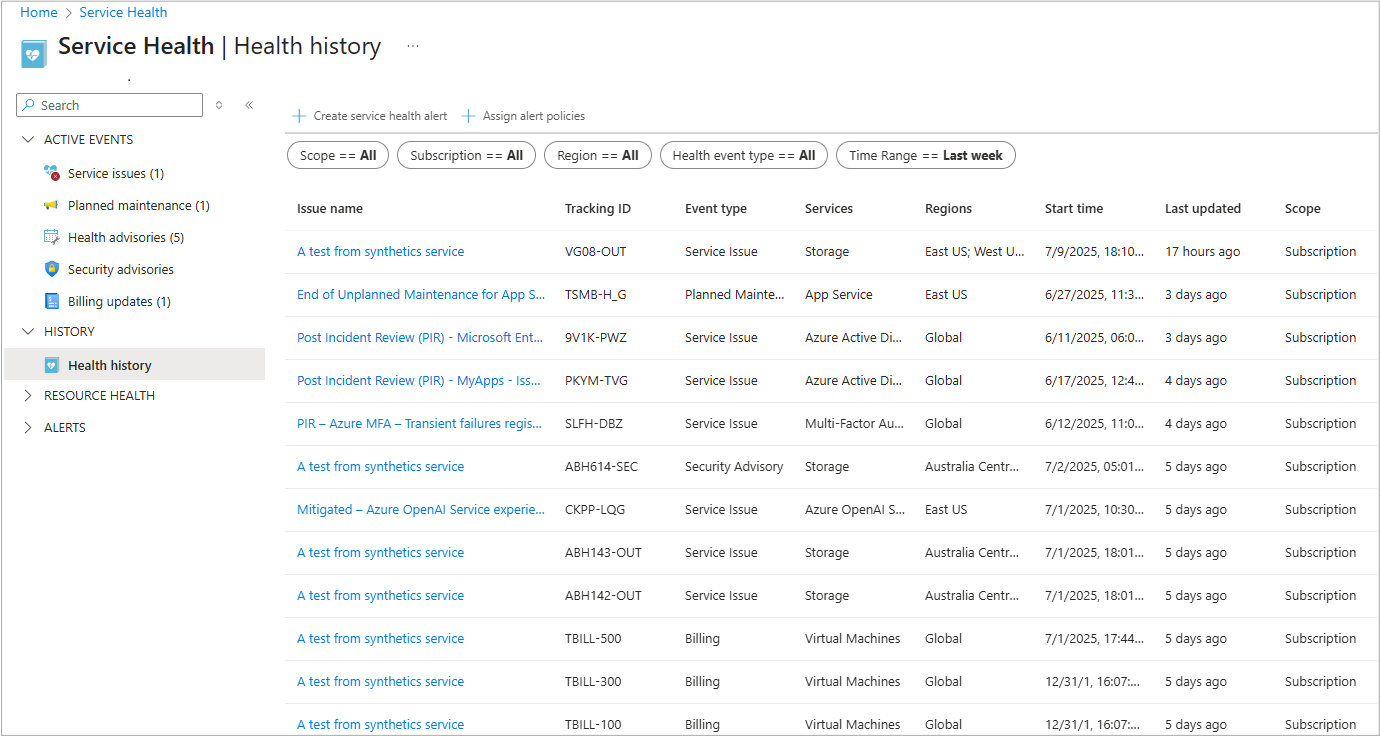
When you open the Health history pane, you can see detailed information about each historical event, including the type of event, its effect, and the actions taken to resolve it.
Select the Issue name link to open the tabs with the complete information about each event. For instance, if you select the link for a Service issue event type, it opens the page with all the information in the Service issue pane.
This pane contains the following information:
- Issue Name
- Tracking ID
- Event type
- Services
- Regions
- Start time
- Last updated
- Scope (Subscription or Tenant ID)
Note
Service health history events are displayed in the panel for 90 days and then they are stored in the backend API for up to a year.
This includes active problems, scheduled activities, notifications about changes requiring user attention, and alerts related to vulnerabilities or compliance issues.
Filtering and sorting
There are several options how to sort the information at the top of the pane.

- Scope: By Tenant or Subscription
- Subscription: Your Subscription ID
- Region: The region where your resources are located
- Health event type: All, Service issue, Planned Maintenance, Health Advisory, Security Advisory, or Billing
- Time Range: The last 24 hours up to the last three months
Health history common use cases and features
The information on this pane can be used for:
Troubleshooting
One of the primary uses of the Health history pane is to aid in troubleshooting. By reviewing past health events, you can quickly determine whether an issue is due to Azure service disruptions or user configuration errors. This historical context can help you identify patterns or recurring issues that might need to be addressed.
SLA Validation
The Health history pane is also useful for validating Service Level Agreements (SLAs). By examining the downtime history of your resources, you can verify whether Azure meets its SLA commitments. This information can be crucial for ensuring that you're receiving the level of service you're paying for.
Alerting
Setting up alerts based on historical health events is another common use case. You can configure Activity Log-based alerts to notify you of health status changes via email, SMS, or webhook. This proactive approach ensures that you're immediately informed of any issues that could affect your resources.
Compliance and Reporting
For organizations that need to maintain compliance with regulatory requirements, the Health history pane provides a detailed record of all health events. This information can be used for auditing purposes and generating reports that demonstrate compliance with industry standards.
Resource Management
The Health history pane can help you manage your resources more effectively by providing insights into their historical performance. This information can be used to make informed decisions about resource allocation, scaling, and optimization.