Note
Access to this page requires authorization. You can try signing in or changing directories.
Access to this page requires authorization. You can try changing directories.
You must perform the steps in the following sections to configure the Microsoft BizTalk Accelerator for SWIFT (A4SWIFT) FIN Response Reconciliation (FRR) feature, as shown in the following figure.
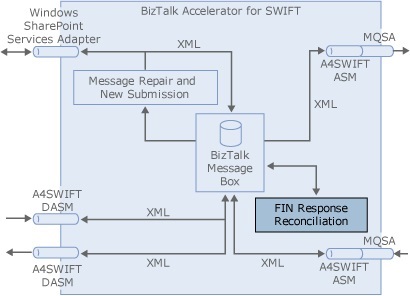
In the A4SWIFT Installation Wizard, you can choose to install Message Repair and New Submission and FRR, or Message Repair and New Submission without FRR, or FRR without Message Repair and New Submission. As a result, the instructions in this section do not assume that you are installing and configuring Message Repair and New Submission. They do, however, assume that you have performed the steps in the Configuring the A4SWIFT Runtime.
This section contains: