Note
Access to this page requires authorization. You can try signing in or changing directories.
Access to this page requires authorization. You can try changing directories.
Interactive agent experience in Microsoft Security Copilot is a platform capability that enables dynamic, multi-turn conversations between users and agents. It transforms static interactions into context-aware, iterative suggestions through prompts where agents can clarify, adapt, and collaborate proactively. Interactive agents scope chat experiences to the goals or jobs that truly matter to you and your users.
Users can explore the agent’s capabilities, get contextual next steps, and resolve issues directly in Security Copilot.
Interactive agents are most effective when agents and users need to collaborate for a guided experience to solve something. Users converse with the agent through prompts and the agent adapts based on context through proactive collaboration. For Security Operations teams, this interactivity enables the agent to ask clarifying questions and guide decision-making based on evolving context, resulting in more confident and accurate outcomes.
Key features
The following are some of the key features of a Security Copilot interactive agent:
Prompt skill integration: The capability enables developers and partners to scope and design the getting started experience for users. Prompt skills can be agents with clear instructions on how to handle inputs and structure outputs.
Starter and prompt suggestions: Starter prompts initiate conversations and set the scope of the agent’s capabilities; dynamic prompt suggestions guide follow-up questions.
Transparency: Every engagement between user and the agent is showcased with clear chain of thought and allow for deep-dives using activity map.
How it works
Interactive agents in Microsoft Security Copilot enable dynamic, context-aware conversations through prompts tailored to specific workflows. An agent qualifies as an interactive agent only if it meets the prerequisites defined in the Manifest, including prompt skill, instructions, and tools.
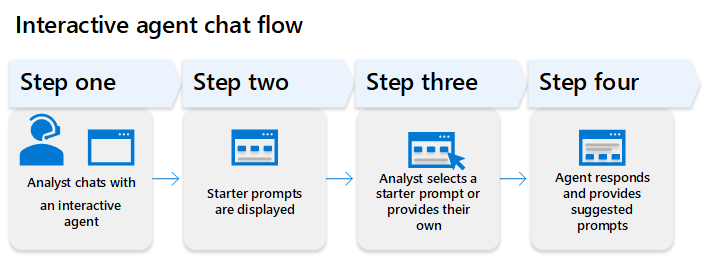
The platform capability provides:
For developers: Design agents that support iterative conversations using prompt suggestions that are unique to your workflows and environments.
For users: Start focused agent sessions that address specific tasks and maintain context throughout the interaction.
Prompt skill
Prompt skill allows you to define custom orchestration logic that controls how your agent processes requests and coordinates between different tools (skills). Prompt skill is a required skill for interactive agents, but optional for other types of agents (for example, autonomous agents). It allows agents to handle dynamic prompts, maintain context, and guide users through iterative workflows. For more information on the attributes needed in building an interactive agent, see Agent manifest.
The PromptSkill attribute in the agent definition enables you to specify a custom orchestrator skill that handles the agent's decision-making process. Instead of relying on the default orchestration logic, your agent can use a specialized tool that contains custom prompts and logic to determine:
- Which tools to invoke
- How to process and combine results
- When to terminate or continue processing
- How to handle different scenarios and edge cases
Prompts are scoped to the agent. In a guided chat experience, users can interact through:
- Starter prompts – Enable users to select from hand-curated suggestions to set the right context and scope.
The diagram shows example starter prompts that the end user can choose to begin interacting with the agent.

- Prompt suggestions – Provide dynamic, context-aware guidance for the next follow-up prompts.
The diagram shows example prompt suggestions that help users ask follow-up questions after viewing the initial prompt results.

These prompts help initiate relevant workflows, keep the conversation flowing, and ensure the agent can capture the right context to deliver meaningful, actionable insights throughout the interaction.
Tip
To get the most out of an interactive agent session in Microsoft Security Copilot, ask questions related to the agent’s defined tasks, as they are designed for specific scoped workflows.
Next steps
Learn how to define prompt skill and prompts suggestions in the Agent manifest to build the Chat with agent feature.