Note
Access to this page requires authorization. You can try signing in or changing directories.
Access to this page requires authorization. You can try changing directories.
Version 14.50 brings many updates and fixes to the Microsoft C++ compiler and other build tools.
- For more information about what's new in all of Visual Studio, see Visual Studio 2026 release notes.
What's new for MSVC Build Tools version 14.50
- Introduced in Visual Studio 2026 version 18.0 released November 2025.
Visual Studio 2026 version 18.0 ships with the v145 platform toolset for MSBuild C++ projects and Microsoft C++ (MSVC) Build Tools version 14.50, which offers the best conformance, build performance, and runtime performance story yet. To access all the new language features, build with /std:c++latest. Or, if you want to be restricted to features up to C++23, use /std:c++23preview.
MSVC Build Tools version 14.50 preserves binary compatibility with code built with MSVC tools shipped in Visual Studio 2015 or later. For more information about binary compatibility, see C++ binary compatibility between Visual Studio versions.
| For detailed information about | See |
|---|---|
| What's new for C++ developers | What’s New for C++ Developers in Visual Studio 2026 version 18.0 |
| Standard Library (STL) improvements | STL Changelog MSVC Build Tools 14.50 |
| C++ language updates | C++ Language Updates in MSVC Build Tools v14.50 |
| C++ language conformance improvements | C/C++ Conformance improvements, behavior changes, and bug fixes in Microsoft C++ (MSVC) Build Tools |
Here's a quick highlight of some of the new features in MSVC Build Tools version 14.50 and Visual Studio 2026 version 18.0:
C++ language enhancements
- C++20 is the default for new Console App, Windows Desktop Application, Dynamic-Link Library, and Static Library C++ projects.
- C++23 preprocessing directive
#warningallows you to generate a diagnostic message without stopping translation as#errordoes. For more information, see#warningdirective. - Easily set debugger command-line arguments for any C++ project using the toolbar for
.vcxproj, CMake, and Unreal Engine projects. This feature is no longer tied to the Game Development with C++ workload, and is available to all C++ developers without installing any other workloads or components. For more information, see Pass command-line arguments.
Standard Library enhancements
- Enhanced
<regex>reliability and speed. LWG-2503 added a multiline option tosyntax_option_type. This is aregexbehavioral change. By default,_REGEX_LEGACY_MULTILINE_MODEis 0, which requests Standard behavior. Set_REGEX_LEGACY_MULTILINE_MODEto 1 to request legacy behavior. For more information, see STL Changelog. - Added and improved vectorized implementations of many types and functions.
GitHub Copilot enhancements
- Copilot Chat allows you to use natural language to get answers to questions (Ask mode) or even implement changes for you automatically (Agent Mode).
- Copilot Chat is smarter with improved context for everyday tasks. Expect better results when searching your codebase and referencing specific lines in your code.
- A Copilot Actions option was added to the right-click context menu in the Visual Studio editor. Use it to quickly bring a specific file or lines of code you select to the attention of Copilot Chat. You can then ask Copilot to explain what the code does, make optimizations, generate comments, generate unit tests, and more.
- Better AI code completions for C++. GitHub Copilot uses context from relevant files to improve inline autocomplete for C++. GitHub Copilot includes other relevant files as context which reduces hallucinations while offering more relevant and accurate suggestions.
- For more information, see New GitHub Copilot capabilities for C++ developers: Upgrade MSVC, improve build performance, and refactor C++ code.
Build enhancements
- Visual Studio 2026 now includes CMake 4.1.1 by default. CMake also includes a Visual Studio 2026 generator and supports modern SLNX projects, so you can build Visual Studio C++ projects directly from CMake.
- Includes the latest version of the IncrediBuild engine and an updated extension that works with Visual Studio 2026 version 18.0.
- Compiler backend runtime performance improvements. Compared to Visual Studio version 17.14, there's up to a 6% improvement on Unreal Engine's City Sample RenderThread and up to +3% improvements on Unreal Engine's City Sample GameThread benchmark. For more information, see Why you should upgrade your C++ build tools.
- The Visual Studio setup assistant can help you retarget your projects to build with the latest MSVC Build Tools. For more information, see Retarget your projects with the setup assistant.
Code analysis enhancements
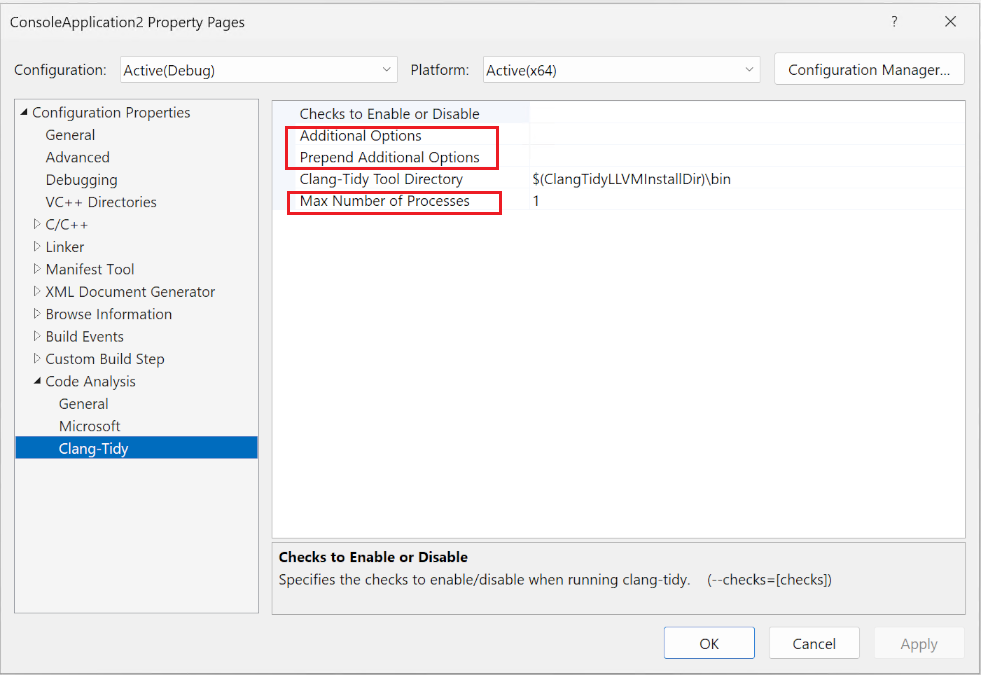
- Clang-Tidy code analysis improvements provide enhanced configuration options for faster builds and custom workflows:
- Code analysis has new configuration options. You can now allocate more processors to run code analysis as part of your build, speeding up your development workflow.
- You can add custom arguments to the command line used to invoke
clang-tidy, giving you complete control over your analysis setup. - Access the new options from Project Properties > Code Analysis > Clang-Tidy:
- AddressSanitizer support for ARM64 Builds (Preview): For some time, the MSVC Build Tools have supported building projects that target x64 and x86 with AddressSanitizer, which allows you to identify hard-to-find memory safety issues with zero false positives at runtime and increase memory safety. Now you can use AddressSanitizer to target ARM64. This feature is in preview.
Productivity enhancements
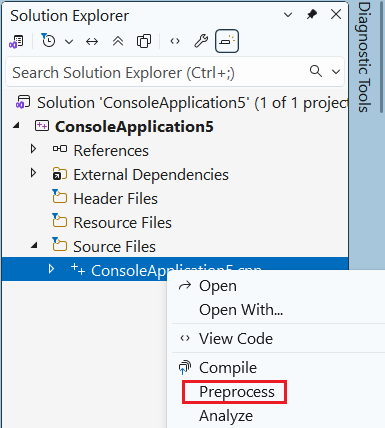
- Generate preprocessed output for a C++ file. In Visual Studio, right-click a C++ file to instantly generate its preprocessed output, making it easy to debug macros and includes, and see errors immediately:
- The Visual Studio debugger now shows the return values of functions inline. This provides real-time visibility into function behavior without stepping into code or setting up watches, making it faster to catch logic issues or unexpected results:

Other changes
- In the Visual Studio installer, the C++ Linux workload is renamed Linux, Mac, and embedded development with C++.
Deprecations
The minimum supported target operating systems for the MSVC Build Tools version 14.50 are Windows 10 or Windows Server 2016.
MSVC Build Tools version 14.50 no longer targets:
- Windows 7 / Windows Server 2008 R2
- Windows 8 / Windows Server 2012
- Windows 8.1 / Windows Server 2012 R2
These changes allow for better performance, enhanced security, and alignment with the most recent Windows platform capabilities.
The MSVC compiler switch /await is deprecated and will be removed in a future release. This switch enabled an early draft implementation of C++ coroutines using the <experimental/coroutine> header. Developers should transition to standard C++ coroutines by using the <coroutine> header available in C++20 and later. For C++14/17 projects, use /await:strict (which isn't being deprecated) to access the standard <coroutine> header without enabling other C++20 features.
The Mobile development with C++ workload for iOS and Android, as well as the Embedded and IoT tools (RTOS Viewer, Serial Monitor, Peripheral Viewer, and ST Project Import), are no longer supported and will be removed in a future update. The Android NDKs included in the Mobile development with C++ workload remain supported. This impacts tooling support for iOS and Android development, including new projects, building, and debugging.
Removed features
- C++AMP
- ARM32 toolchain: if you still need to build for ARM32, use an older version of the MSVC Build Tools. For more information, see Side-by-side Minor Version MSVC Toolsets in Visual Studio 2019.
/DEBUG:FASTLINKlinker switch. Use/DEBUG:FULLfor improved debugging support.
Feedback and suggestions
We'd love to hear from you! You can Report a Problem or Suggest a Feature by using the Send Feedback icon in the upper right-hand corner of either the installer or the Visual Studio IDE, or from Help > Send Feedback. You can track your issues by using Visual Studio Developer Community, where you add comments or find solutions. You can also get free installation help through our Live Chat support.
Blogs
Take advantage of the insights and recommendations available in the Microsoft Developer Blogs site to stay up to date on all new releases. The blogs include deep dive posts on a broad range of features. The C++ Team Blog and the Visual Studio Blog are of particular interest.