Note
Access to this page requires authorization. You can try signing in or changing directories.
Access to this page requires authorization. You can try changing directories.
China’s GB18030‑2022 standard is the latest update to the national character set requirements. It ensures compatibility with Unicode 11.0 and mandates support for additional characters, including minority scripts and emoji. For organizations operating in or with China, compliance is not optional; it’s a regulatory requirement.
Power BI can be configured to respect GB18030‑2022 encoding using the UnicodeCharacterBehavior setting. This setting is set to CodeUnits by default. To ensure your model is compatible with GB18030-2022, you’ll need to execute a specific XMLA command to set UnicodeCharacterBehavior to CodePoints, followed by a model refresh.
XMLA command
<Alter AllowCreate="true" ObjectExpansion="ObjectProperties" xmlns="http://schemas.microsoft.com/analysisservices/2003/engine">
	<Object>
		<DatabaseID>[your database id]</DatabaseID>
	</Object>
	<ObjectDefinition>
		<Database xmlns:xsd="http://www.w3.org/2001/XMLSchema" xmlns:xsi="http://www.w3.org/2001/XMLSchema-instance"
		xmlns:ddl2="http://schemas.microsoft.com/analysisservices/2003/engine/2"
		xmlns:ddl2_2="http://schemas.microsoft.com/analysisservices/2003/engine/2/2"
		xmlns:ddl100_100="http://schemas.microsoft.com/analysisservices/2008/engine/100/100"
		xmlns:ddl200="http://schemas.microsoft.com/analysisservices/2010/engine/200"
		xmlns:ddl200_200="http://schemas.microsoft.com/analysisservices/2010/engine/200/200"
		xmlns:ddl300="http://schemas.microsoft.com/analysisservices/2011/engine/300"
		xmlns:ddl300_300="http://schemas.microsoft.com/analysisservices/2011/engine/300/300"
		xmlns:ddl400="http://schemas.microsoft.com/analysisservices/2012/engine/400"
		xmlns:ddl400_400="http://schemas.microsoft.com/analysisservices/2012/engine/400/400"
		xmlns:ddl500="http://schemas.microsoft.com/analysisservices/2013/engine/500"
		xmlns:ddl500_500="http://schemas.microsoft.com/analysisservices/2013/engine/500/500">
			<ID>[your model id]</ID>
			<Name>[your model name]</Name>
			<ddl200:CompatibilityLevel>[your model compatibility level]</ddl200:CompatibilityLevel>
			<ddl200_200:StorageEngineUsed>TabularMetadata</ddl200_200:StorageEngineUsed>
			<Language>1033</Language>
			<UnicodeCharacterBehavior xmlns="http://schemas.microsoft.com/analysisservices/2025/engine/924/924">CodePoints</UnicodeCharacterBehavior>
		</Database>
	</ObjectDefinition>
</Alter>
After executing this XMLA command, perform a full refresh of your model.
Example
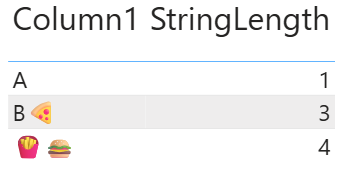
The UnicodeCharacterBehavior influences any DAX function that determines the length of a text string, which include FIND, LEFT, LEN, MID, REPLACE, RIGHT. These functions will exhibit different behaviors when working with text strings that contain Unicode characters. Let’s see the difference in action. Here’s a measure that uses LEN to calculate the length of a text string:
StringLength = LEN ( SELECTEDVALUE ( 'Table'[Column1] ) )
In this example, Column1 contains three values:
- A
- B🍕
- 🍟🍔
Here’s a before and after comparison of the result of StringLength on a column that contains Unicode characters:
UnicodeCharacterBehavior = CodeUnits (default) |
UnicodeCharacterBehavior = CodePoints |
|---|---|
|

|
Notice how on the left each Unicode character has length 2, where on the right, each Unicode character has length 1.
Note
Changes to UnicodeCharacterBehavior only take hold after a model refresh.