Note
Access to this page requires authorization. You can try signing in or changing directories.
Access to this page requires authorization. You can try changing directories.
Business Central Virtual Table Plugin is a virtual data source in Microsoft Dataverse, published on AppSource at Business Central Virtual Table. It enables creating, reading, updating, and deleting (CRUD) operations on Business Central data directly from Dataverse and Microsoft Power Platform. Virtual tables don't store data in Dataverse. The data stays in Business Central. To use Business Central tables in Dataverse, you need to make them available as virtual tables.
Prerequisite reading
Before working with Business Central Virtual Tables, it's helpful to fully understand how Dataverse and virtual tables work. We recommend getting started by reading more about Dataverse and tables inside Dataverse. It gives you a smooth introduction so you can fully understand our Business Central Virtual Tables documentation.
To work with Business Central virtual tables, you must understand how Dataverse and virtual tables work. Therefore, the following documentation is a prerequisite:
- What is Dataverse?
- Table overview
- Table relationships overview
- Create and edit virtual tables that contain data from an external data source
- Overview of creating apps in Power Apps
Virtual tables for Business Central
API (v2.0) for Business Central can be consumed in Dataverse as virtual tables. The response properties are transformed into table columns and APIs relations are transformed into table relations. Since the virtual tables depend on APIs exposed on Business Central side, custom APIs can also be used for generating virtual tables.
Dataverse can be used as a data source inside the Power Platform product family. It allows makers to build customer solutions containing data from multiple services and sources.
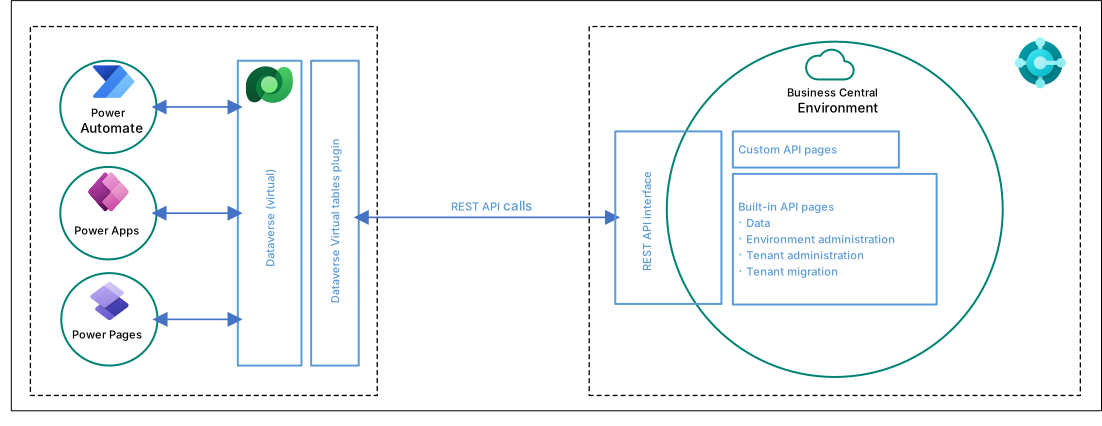
Virtual tables in Dataverse act as regular tables and therefore also in Power Platform. Makers can now build experiences in customer engagement apps with data directly from Business Central with full CRUD capability, without copying to Dataverse. They can apply all the logic already residing in Business Central.
Known limitations
There are known limitations with Business Central Virtual Tables plugin including:
Virtual tables inside Dataverse can't be used in Charts yet.
Attachment and Images/Pictures aren't supported inside virtual tables yet.
Multiline string (BLOB type field) isn't supported yet.
Advanced search has some limitations. Each query designed translates to an OData query against Business Central.
- The following predicates aren't supported: Does Not Equal, Does Not Contain, Does Not Begin With, Does Not End With, Does Not Contain Data, and Contains Data.
- Combining And and Or groups across columns.
- Filtering on related tables.
- Filtering on calculated fields.
Related information
Overview - Integrating Business Central with Microsoft Dataverse
Table Modeling
Application Lifecycle Management for Solutions that use Virtual tables
Business Central and Dataverse Admin Reference
FAQ
Developing a Custom API