Note
Access to this page requires authorization. You can try signing in or changing directories.
Access to this page requires authorization. You can try changing directories.
Applies to: Dynamics 365 Contact Center—standalone and Dynamics 365 Customer Service only
Note
Copilot Studio bot is renamed as Copilot agent (agent or AI agent). Human agent is now renamed as customer service representative (service representative or representative). You might come across references to the old and new terms while we update the product UI, documentation, and training content.
In the application, you can integrate both Azure and Copilot agents to perform tasks like starting a conversation with the customer, providing automated responses, and then transferring the conversation to customer service representatives (service representatives or representatives), as required. The bot dashboard shows key performance indicators (KPIs) and charts for chat and IVR AI agents. You can use the dashboard to understand how AI agents are performing in a support organization. Learn how to access the dashboard.
Based on your administrator's configuration of the Add historical analytics for bots option in the Copilot Service admin center, the dashboard is as follows:
- Enabled: Indicates that your organization only has Copilot agents configured and the dashboard is specific to them. Additional metrics, charts, and KPIs that are applicable only to Copilot agents are displayed.
- Disabled: Indicates that your organization has both Azure and Copilot agents configured. The dashboard shows you metrics, KPIs, and charts that are common to both.
Prerequisites
- You must have the Analytics Report Author role to use the visual customizations in the bot dashboard. Visual customization is limited to the data available in the embedded Power BI report. Specific licensing requirements apply when you use the feature with product environments. Learn more in Dynamics 365 Licensing Guide.
- To add additional data, enable data model customization.
- Make sure that Allow conversation transcripts and their associated metadata to be saved in Dataverse is selected in Power Platform admin center. This setting is required to save transcripts in Dataverse that the bot dashboard uses.
The bot dashboard displays metrics specific to Copilot agents only if Copilot agents are integrated with Omnichannel for Customer Service and the Add historical analytics for bots checkbox in Copilot Service admin center is enabled.

Report details
The report summarizes KPIs for the specified time period and the percentage change over that period. These metrics are specific to Copilot agents. You can filter these areas by duration, channel, queue, or service representatives.

Conversation-based metrics:
| KPI | Description |
|---|---|
| Total bot conversations | The total number of customer-initiated interactions with a bot, including those fully managed by the bot as well as those escalated to a service representative. |
| Bot escalation rate | The percentage of AI agent conversations escalated by the AI agent to a service representative or an external phone number. |
| Bot deflection rate | The percentage of AI agent conversations deflected by the AI agent. |
Copilt Studio based session metrics:
| KPI | Description |
|---|---|
| Total bot sessions | The total number of Copilot Studio sessions initiated during the selected time period. A session starts when the AI agent is triggered for a specific topic, and a single conversation might include multiple sessions if the user engages on different topics. A session ends when any of these conditions occur:
|
| Bot engagement rate | The percentage of Copilot Studio sessions that are in an engaged state over all Copilot Sessions. A session is considered engaged if any of the following conditions are met:
|
| Bot resolution rate | The percentage of resolved Copilot Studio sessions over all Copilot Sessions. A session is considered resolved when the End of Conversation topic is triggered and the user either confirms resolution, the session is timed out, or the Confirmed Success topic is triggered during the session. |
| Bot abandon rate | The percentage of engaged Copilot Studio sessions that are abandoned over all Copilot Sessions. A session is considered abandoned if it times out without reaching a resolved or escalated state. |
| Bot CSAT | The graphical view of the average Customer Satisfaction (CSAT) score from users who responded to a survey after a bot session. If this metric is blank, it indicates that AI agents aren't set up to request feedback through surveys after conversation ends. |
The following table shows the bot KPI chart metrics.

| Title | Description |
|---|---|
| Total bot conversations over time | A graphical view of the total number of AI agent conversations with the number of escalated and deflected conversations over time. |
| Bot session engagement rate over time | A graphical view of the number of engaged and unengaged bot sessions over time. An engaged session is a session in which a user-created topic is triggered or the session ends in escalation. |
| Bot session outcomes over time | A graphical view of the daily resolution rate, escalation rate, and abandon rate over the specified time period. |
Metrics by last session outcome
A conversation is an interaction between a user and a Copilot Studio bot, generating one omnichannel session that might include multiple internal Copilot Studio sessions. Each Copilot Studio session records its outcome and reason for outcome. The "lastSessionOutcome" and "lastSessionOutcomeReason" tags generated by the Copilot Studio conversationtranscript logs are used to show the conversation level outcome and outcome reasons.
You see the following categories on the Copilot conversationtranscript logs: An Engaged session Outcome is categorized as:
- Abandoned
- HandOff
- Resolved
And, the corresponding OutcomeReason is categorized as:
- SystemError
- UserError
- Resolved
- UserExit
- AgentTransferRequestedByUser
- AgentTransferFromQuestionMaxAttempts
- AgentTransferConfiguredByAuthor.
Unengaged: Sessions start in an unengaged state and stay unengaged until user input is provided or the session enters custom or escalate topic modes. For unengaged sessions, the Outcome is set to None and OutcomeReason is NoError.
However, on the Omnichannel Historical Bot dashboard, you see the following summarized categories:
- SystemError and UserError → Failure
- AgentTransferRequestedByUser → Requested by User
- AgentTransferFromQuestionMaxAttempts → Max Attempts
- AgentTransferConfiguredByAuthor → Business Rule
- Unengaged → No User Engagement

| Session outcome | Engagement type | Outcome Reason | Definition | Applies to | Channel |
|---|---|---|---|---|---|
| Abandoned | Engaged | UserExit | The number of conversations that end either because the customer ends the conversation or the session times out while waiting for the customer's response. | Historical | Chat and voice |
| Handoff | Engaged | AgentTransferConfiguredByAuthor | The number of bot conversations transferred to a service representative or external number based on the AI agent's configuration. For example, an AI agent flow includes "Transfer to an agent". When the user selects "No," the AI agent transfers the conversation without the user requesting escalation, per the AI agent's business rules. | Historical | Chat and voice |
| Handoff | Engaged | AgentTransferRequestedByUser | The number of AI agent conversations escalated to a service representative or external number at the user's request. | Historical | Chat and voice |
| Handoff | Engaged | AgentTransferFromQuestionMaxAttempts | The number of agent conversations escalated to a service representative or external number after threshold limit reaches silence detection or when no valid entity is found. | Historical | Chat and voice |
| Resolved | Engaged | Resolved | The number of bot conversations that the AI agent resolved. | Historical | Chat and voice |
| Abandoned | Engaged | UserError | The number of bot conversations that ended because of incorrect AI agent design. | Historical | Chat and voice |
| Abandoned | Engaged | SystemError | The number of AI agent conversations that ended due to systemic errors within Copilot Studio. | Historical | Chat and voice |
| None | Unengaged | NoError | The number of conversations that didn't have any engagement with AI agents. This can happen when the customer doesn't respond to the AI agent's greeting or when the AI agent doesn't enter a custom topic or Escalate topic due to the structure of the conversation flow. | Historical | Chat and voice |
Metrics by bot
The Metrics by bot is a conversation-level matrix table that shows all the bot conversations related metrics.
Summary
The Summary tab gives you a broad overview of your AI agent's performance.

KPIs for the following areas are displayed.
| Title | Description |
|---|---|
| Total conversations | The total number of customer-initiated interactions with a Copilot Studio bot includes conversations fully managed by the bot and those escalated to a service representative. The number of conversations deflected and escalated adds up to the total number of bot conversations. |
| Conversations escalated | The total number of Copilot Studio bot conversations escalated to a service representative by the Copilot Studio bot. Escalation can occur when a user requests a live agent, when there are too many attempts without an entity match or user input, or because of a business rule set by the Copilot Studio bot author. |
| Bot escalation rate | The percentage of Copilot Studio bot conversations that are escalated to a service representative or an external phone number. |
| Avg. escalation time (min) | The average number of minutes a customer interacts with a Copilot Studio bot before the conversation is escalated to a service representative or external number. |
| Conversations deflected | The total number of Copilot Studio bot conversations that were deflected. A conversation is considered deflected if the user abandons it midway or if the Copilot Studio bot resolves it. |
| Bot deflection rate | The percentage of conversations the Copilot Studio bot deflected out of all conversations. Here, the conversation can either be resolved by the Copilot Studio bot or abandoned by user before resolution. |
| Avg. deflection time (min) | The average number of minutes a customer interacts with a Copilot Studio bot before the conversation ends without escalation to a service representative. The conversation might be resolved by the Copilot Studio bot or abandoned by the user. For abandoned conversations, this time reflects how long the user interacted before leaving. |
| Bot CSAT | The graphical view of the average Customer Satisfaction (CSAT) score from users who responded to a survey after a bot session. If this metric is blank, it indicates that AI agents aren't set up to request feedback through surveys after conversation ends. |
Details
The Details tab gives you an insight into the bot sessions.
KPIs for the following areas are displayed.
| Title | Description |
|---|---|
| Total sessions | The total number of Copilot Studio bot sessions within the selected time period. Since each conversation can include one or more sessions, the session count might differ from the conversation count. If a conversation escalates to a representative, the Copilot Studio session ends at that point. |
| Bot sessions engaged | The number of engaged bot sessions the AI agent is engaged in within the specified time period. |
| Engaged session rate | The percentage of bot sessions where the AI agent engages with the customer out of the total number of sessions within the specified time period. |
| Bot sessions escalated | The number of bot sessions that are escalated to a service representative or an external number. |
| Escalated session rate | The percentage of total bot sessions that were escalated by the AI agent to a service representative or an external phone number within the specified time period. |
| Bot sessions resolved | The number of engaged bot sessions that are resolved by the AI agent. |
| Resolved session rate | The percentage of total bot sessions that were resolved by the AI agent within the specified time period. |
| Bot sessions abandoned | The number of engaged bot sessions that are abandoned. An abandoned session is an engaged session that is not resolved or escalated after one hour from the beginning of the session. |
| Abandoned session rate | The percentage of total bot sessions that were abandoned within the specified time period. |
| Bot sessions per conversation | The average number of AI agent sessions per conversation. |
Bot drill-down view
In the Metrics by bot section, you can select a Copilot agent to view the individual AI agent's performance on the bot drill-down view. Bot topics and their corresponding metrics are also displayed, giving supervisors further insights into individual topic performance.
To access the drill-down view, select the AI agent that you're interested in, and then select Detailed view.
The application displays the key performance metrics and charts for the individual AI agent.
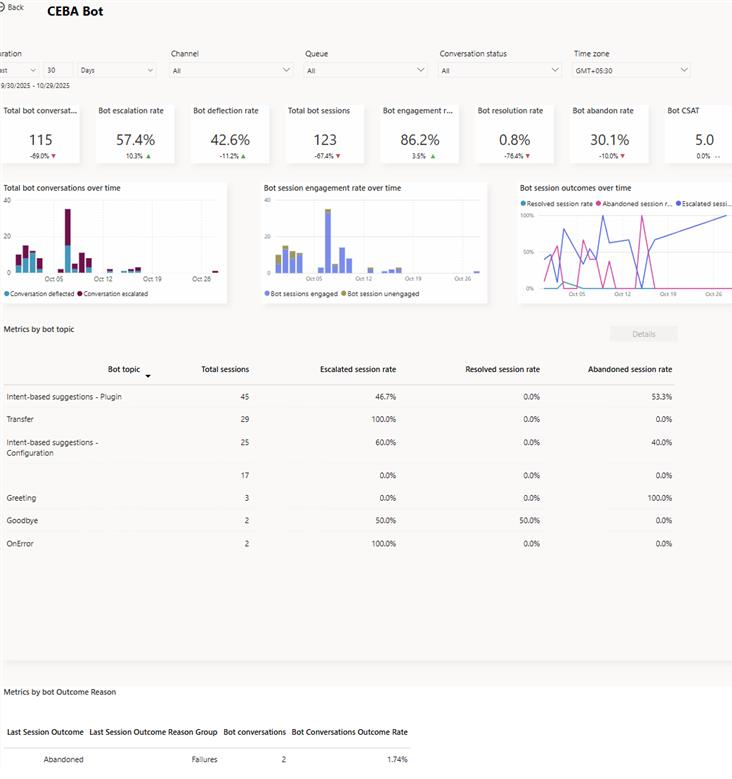
| Title | Description |
|---|---|
| Total bot conversations | The number of conversations initiated by the customer and engaged by the bot. |
| Total bot sessions | The total number of Copilot Studio bot sessions within the selected time period. Since each conversation can include one or more sessions, the session count may differ from the conversation count. If a conversation escalates to a representative, the Copilot Studio session ends at that point. |
| Bot engagement rate | The percentage of total bot sessions that are engaged by the AI agent. An engaged session is a session in which a user-created topic (as opposed to a system topic) is triggered, or the session ends in escalation. Engaged bot sessions can have one of three outcomes—they're either resolved, escalated, or abandoned. |
| Bot resolution rate | The percentage of engaged bot sessions that are resolved. A resolved session is an engaged session in which the user receives an end-of-conversation survey that asks the question "Did that answer your question?" and the user either doesn't respond or responds Yes. |
| Bot escalation rate | The percentage of engaged bot sessions that are escalated by the AI agent. An escalated session is an engaged session that is escalated to a service representative or an external phone number. |
| Bot abandon rate | The percentage of engaged bot sessions that are abandoned. An abandoned session is an engaged session that isn't resolved or escalated after one hour from the beginning of the session. |
| Bot CSAT | The average of customer satisfaction (CSAT) scores for bot sessions in which customers respond to an end-of-session request to take the survey. |
The following charts are displayed:
| Title | Description |
|---|---|
| Total conversations over time | The number of conversations initiated by the customer and engaged by the AI agent that were either escalated or deflected. |
| Engagement over time | Provides a graphical view of the number of engaged and unengaged bot sessions over time. An engaged session is a session in which a user-created topic is triggered or the session ends in escalation. |
| Session outcomes over time | Provides a graphical view of the daily resolution rate, escalation rate, and abandon rate over the specified time period. |
Metrics by bot topic
The Metrics by bot topic section provides insights into the performance of individual bot topics and their key business metrics. The metrics give the supervisor an overview of which topics the AI agent was able to deflect or escalate.
You can also select a topic and drill down into the individual topic performance and metrics. The topic-level metrics help supervisors further analyze how the AI agent is handling the topic.
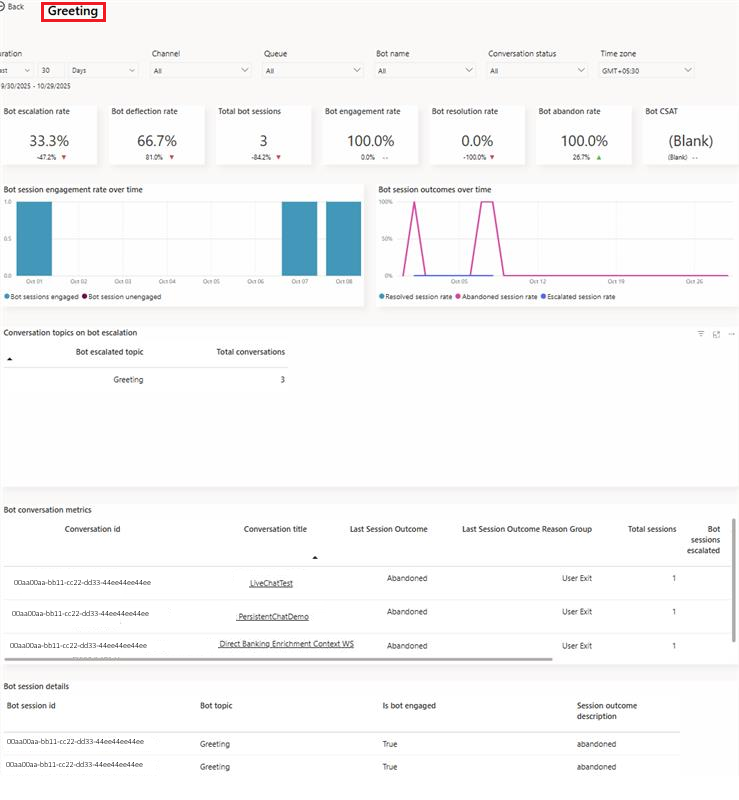
The Bot conversation metrics section provides the topic transcripts, allowing supervisors to go through the AI agent's interactions for the topic and take corrective measures.
View and improve bot topics
You can view and improve the performance of individual topics associated with a Copilot agent by performing the following steps:
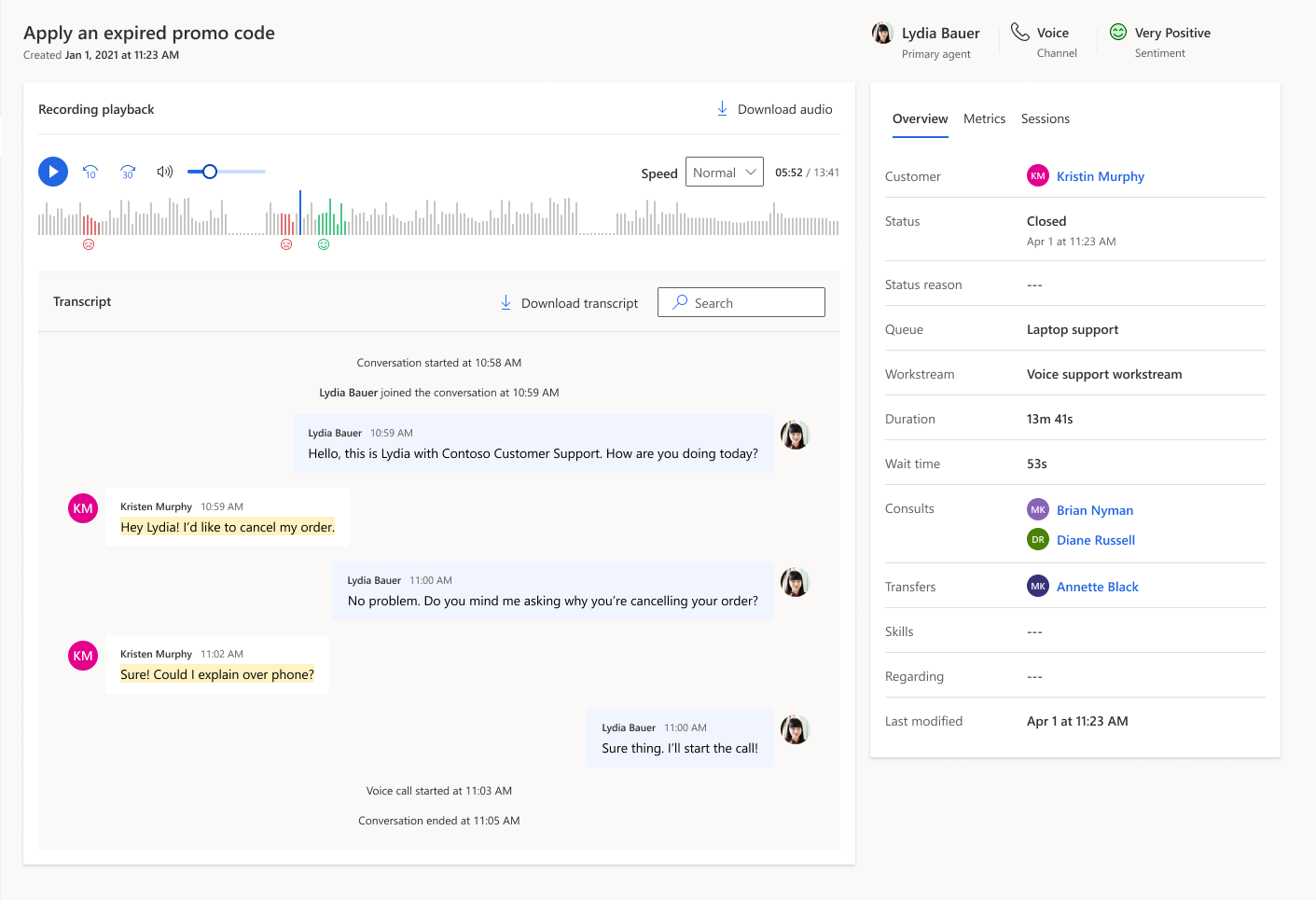
- On the bot drill-down page, for an AI agent, select the topic to view the topic-specific metrics. You can also view and download up to seven days of bot conversation transcript sessions from the past 30 days.
Customize bot dashboard
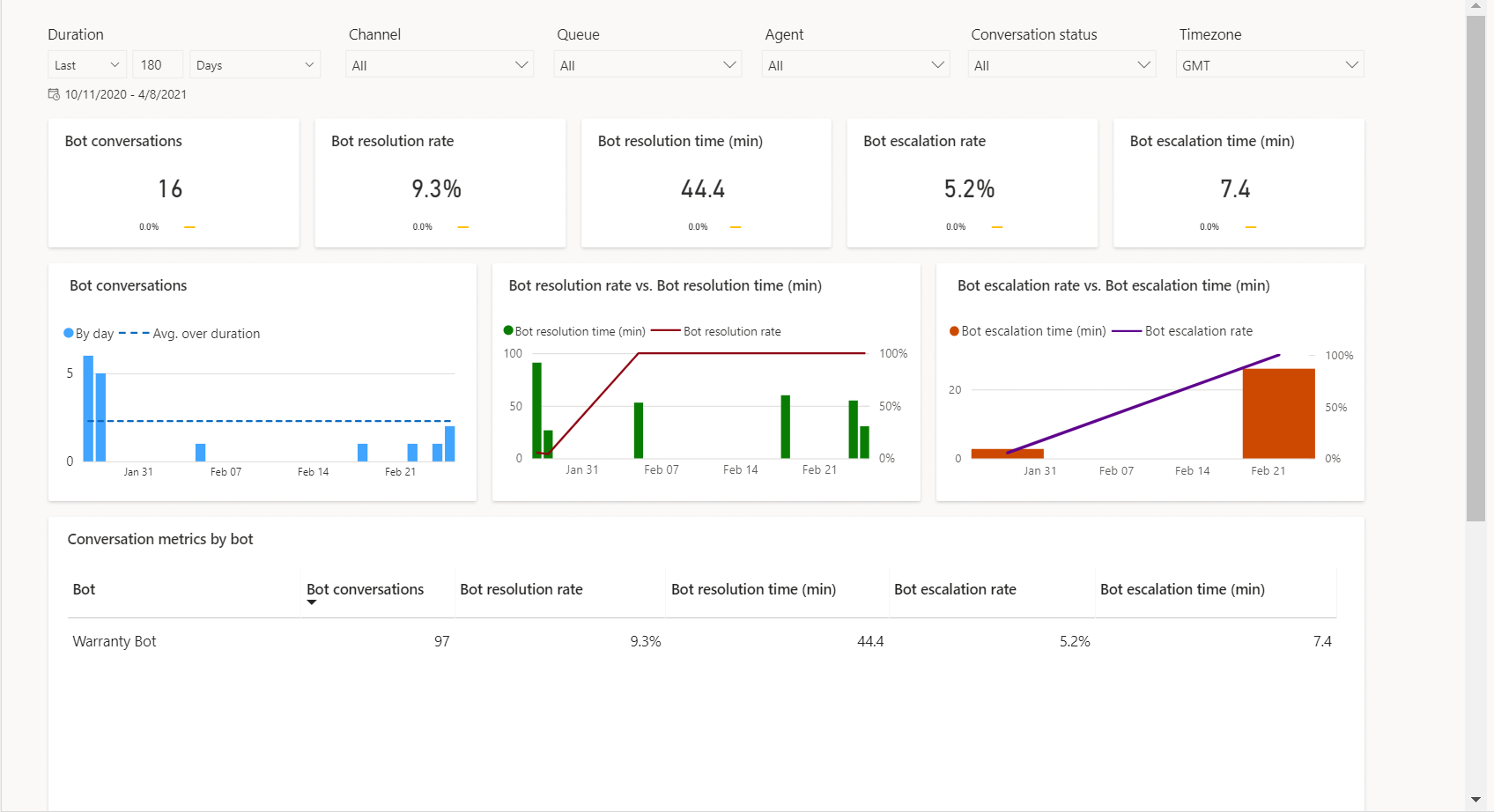
For Copilot agents, you can edit the report to add the additional metrics and filters to the AI agent. To customize the bot dashboard, see customize visual display.

Related information
Conversation dashboard
Dashboard overview
Queue dashboard
Conversation Topics dashboard
Manage report bookmarks