Note
Access to this page requires authorization. You can try signing in or changing directories.
Access to this page requires authorization. You can try changing directories.
Note
Community interest groups have now moved from Yammer to Microsoft Viva Engage. To join a Viva Engage community and take part in the latest discussions, fill out the Request access to Finance and Operations Viva Engage Community form and choose the community you want to join.
Before you begin the hardware and infrastructure sizing process for an on-premises environment, review the System requirements for cloud deployments and Setup and deployment instructions to understand the underlying infrastructure.
Note
For optimum performance, pay close attention to the system setup best practices.
After you review the documentation, estimate your transactional and concurrent user volume. Then, size your environment based on the average core throughput.
Factors that affect sizing
All the factors shown in the following illustration contribute to sizing. The more detailed information that you collect, the more precisely you can determine sizing. Hardware sizing without supporting data is likely to be inaccurate. The absolute minimum requirement for necessary data is the peak transaction line load per hour.
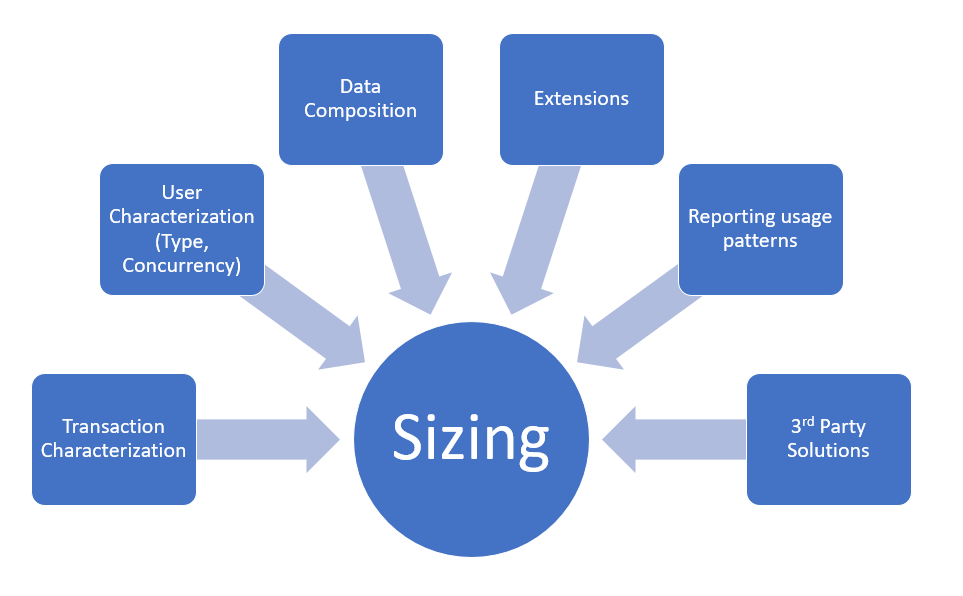
When you view from left to right, the first, and most important factor needed to accurately estimate sizing is a transaction profile or a transaction characterization. Always find the peak transactional volume per hour. If there are multiple peak periods, then you need to accurately define these periods.
As you understand the load that impacts your infrastructure, you also need to understand more detail about these factors:
Transactions – Depending on the type, transactions typically have certain peaks throughout the day or week. Time and expense entries usually show peaks once per week, whereas sales order entries often come in bulk via integration or trickle in during the day.
Number of concurrent users – The number of concurrent users is the second most important sizing factor. You can't get reliable sizing estimates based on the number of concurrent users. If this number is the only data you have available, estimate an approximate number, and then revisit when you have more data. An accurate concurrent user definition means that:
Named users aren't concurrent users.
Concurrent users are always a subset of named users.
Peak workload defines the maximum concurrency for sizing.
Criteria for concurrent users are that the user meets all the following criteria:
Signed in.
Working transactions or inquiries at the time of counting.
Not an idle session.
Data composition – Primarily, how your system is set up and configured. For example, how many legal entities you have, how many items, how many BOM levels, and how complex your security setup is. Each of those factors might have a small effect on performance, so these factors can be offset by using smart choices when it comes to infrastructure.
Extensions – Customizations can be simple or complex. The number of customizations and the nature of complexity and usage has a varied effect on the size of the infrastructure needed. For complex customizations, it's advised you conduct performance evaluations to ensure that they aren't only tested for efficiency but also help understand the infrastructure needs. This is even more critical when the extensions aren't coded according to best practices for performance and scalability.
Reporting and analytics – These factors typically include running heavy queries against the various databases in the system. Understanding and reducing the frequency when expensive reports run helps you understand the effect of them.
Third-party solutions – These solutions, like ISVs, have the same implications and recommendations as extensions.
Sizing your environment
To understand your sizing requirements, you need to know the peak volume of transactions that you need to process. Most auxiliary systems, like Management Reporter or SSRS, are less mission critical. As a result, this document focuses mostly on AOS and SQL Server.
Note
In general, the compute tiers scale out and should be set up in an N+1 fashion. For example, if you estimate three AOS, add a fourth AOS. Set up the database tier in an Always On highly available configuration.
SQL Server (OLTP)
Sizing
3,000 to 15,000 transaction lines per hour per core on the database server.
Typical AOS-to-SQL core ratio is 3:1 for the primary SQL Server. You need more cores based on the high availability configuration you choose.
Processing database-heavy operations might change this ratio to 2:1.
The following factors influence variations:
- Parameter settings in use.
- Levels of extensions.
- Usage of other functionality, such as database log and alerts. Extreme database logging further reduces throughput per hour per core to less than 3,000 lines.
- Complexity of data composition – A simple chart of accounts versus a detailed fine-grained chart of accounts affects throughput.
- Transaction characterization.
- 2 GB to 16-GB memory for each core.
- Auxiliary databases on the database server, such as Management Reporter and SSRS databases.
- Temp DB = 15% of DB size, with as many files as physical processors.
- SAN size and throughput based on total concurrent transaction volume and usage.
High availability
Always use SQL Server in a cluster or mirroring setup. The second SQL node should have the same number of cores as the primary node.
Note
Failover works only in an active or passive configuration. Read-only replicas aren't supported.
Active Directory Federation Services (AD FS)
For AD FS sizing, see the AD FS Server Capacity documentation.
You can use a sizing spreadsheet to plan the number of instances in your deployment.
AOS (Online and batch)
Sizing
Size by transaction volume and usage.
2,000 to 6,000 lines per core.
16 GB per instance.
Standard box with 4 to 24 cores.
10 to 15 Enterprise users per core.
15 to 25 Activity users per core.
25 to 50 Team members per core.
Batch processing.
1 to 4 batch threads per core.
Size based on batch window characterization.
You can configure nodes to handle both online and batch workloads simultaneously or dedicate them exclusively to online or batch processing.
The same variability factors for SQL Server apply here.
High availability
- Ensure that you have at least one to two more AOS available than you estimate.
- Ensure that you have at least three to four virtual hosts available.
SQL Server Integration Services (SSIS\DMF\DIXF)
Sizing
- Size Data Management nodes according to your integration (import and export) volumes.
Management reporter
In most cases, the recommended minimum requirements with two nodes work well. If you use the service heavily, you need more than two nodes. Scale as needed.
SQL Server Reporting Services
For the general availability release, you can deploy only one SSRS node. Monitor your SSRS node while testing and increase the number of cores available for SSRS as needed. Make sure that you have a preconfigured secondary node available on a virtual host that's different from the SSRS VM. This configuration is important if there's an issue with the virtual machine that hosts SSRS or the virtual host. If this issue occurs, you need to replace the affected resources.
Starting with version 10.0.17, you can configure more SSRS nodes to achieve high availability. For more information, see Configure high availability for SQL Server Reporting Services (SSRS) nodes.
Environment Orchestrator
The Orchestrator service manages your deployment and the related communication with LCS. Deploy this service as the primary Service Fabric service, and use at least three VMs. Colocate this service with the Service Fabric orchestration services, and size it for the peak load of the cluster. For more information, see Plan and prepare your Service Fabric Standalone cluster deployment.
Virtualization and oversubscription
Host mission critical services like the AOS on virtual hosts that have dedicated resources, including cores, memory, and disk.