Note
Access to this page requires authorization. You can try signing in or changing directories.
Access to this page requires authorization. You can try changing directories.
Note
Community interest groups have now moved from Yammer to Microsoft Viva Engage. To join a Viva Engage community and take part in the latest discussions, fill out the Request access to Finance and Operations Viva Engage Community form and choose the community you want to join.
This article describes features that are new or changed in Dynamics 365 for Finance and Operations platform update 20. This version was released in September 2018 and has a build number of 7.0.5030.
Note
This platform release is cumulative. It contains new or changed features from Platform update 16, Platform update 17, Platform update 18, Platform update 19, and Platform update 20, and all earlier updates.
Announcing the Dynamics 365 October '18 release notes
Wondering about upcoming and recently released capabilities in any of our business apps or platform?
Check out the October '18 release notes. We've captured all the details, end to end, top to bottom, in a single document that you can use for planning.
Platform update 20 bug fixes
For information about the bug fixes included in each of the updates that are part of Platform update 20, sign in to Lifecycle Services and use the following links:
- Platform update 20-KB article
- Platform update 19 wasn't released for general availability, no KB article
- Platform update 18-KB article
- Platform update 17-KB article
- Platform update 16 wasn't released for general availability, no KB article
Restyled web client
The Finance and Operations web client is aligning with Microsoft Fluent Design. As a result, users on Platform update 20 see several restyled elements in the product, including the following restyled elements:
General form styling - Small but effective styling changes were made to several page elements. FastTabs and grids now have box shadows that give the appearance of these controls being lifted off the page. This same treatment was also applied when hovering over input fields. Record context fields and FastTab headers have smaller but bolder fonts to maintain their importance but remove extra whitespace.
Dashboard - Workspace cards on the dashboard now have a more tile-like appearance, with a white background color and box shadow to make them stand out more from the page background. The font size and weight were also adjusted to allow more room for workspace titles.
The following image shows how workspace cards appeared on the dashboard before Platform update 20:

The following image shows how workspace cards appear in Platform update 20 and later:

Action pane - Action panes no longer display with a theme-inspired background color; instead, the Action pane has a gray background color. This change not only aligns with Fluent, but also addresses some usability issues where users didn't associate the Action pane with the rest of the page because of the stark difference in background color.
The following image shows how the Action pane appeared before Platform update 20:

The following image shows how the Action pane appears in Platform update 20 and later:

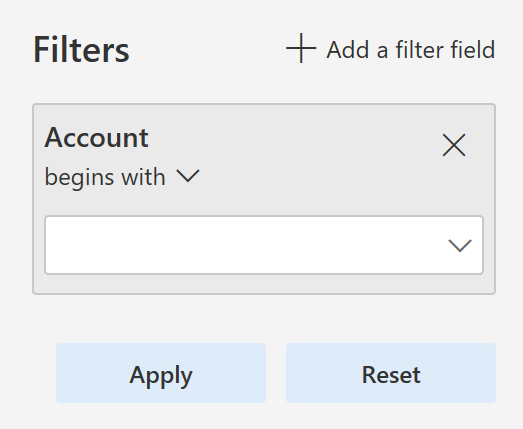
Filter pane - The Filter pane was restyled with a lighter background color, a pill-like appearance to filter fields, and repositioning of the "Add a filter field" button to the top of the pane.
The following image shows how the Filter pane appeared before Platform update 20:

The following image shows how the Filter pane appears in Platform update 20 and later:
FactBox pane - The FactBox pane also got a facelift. The pane now appears to span the full height of the page when open, and most importantly, the collapsed version is more discoverable and shows as a Related information blade along the right edge of the screen, instead of being an easily overlooked icon on the right.
The following image shows how the FactBox pane appeared before Platform update 20:

The following image shows how the FactBox pane appears in Platform update 20 and later:

Adding and removing columns in a grid is easier
Some of the most typical changes that a user makes to a grid are adding, removing, resizing, and reordering columns. In this update, we made adding and removing columns easier by promoting the Add columns and Hide this column actions directly into the grid column header context menus.
Improved behavior of non-replacing lookups
Some lookups in Finance and Operations are non-replacing, meaning that when a value is selected from the lookup, it doesn't replace what was already in the field, but instead it appends the selected value into the field. For example, the lookups in the Advanced filter/sort dialog box are non-replacing by default.
The behavior of non-replacing lookups has been improved in the following ways:
- Type-ahead behavior is turned off for non-replacing lookups.
- Only characters typed after the lookup opens are used to position in the lookup grid.
- The selected value from the lookup is appended to what was in the field before the lookup opened (that is, any characters typed while the lookup was open are replaced when appending the selected value from the lookup).
- A new icon now appears on non-replacing lookups to visually differentiate them from regular lookups.
These adjustments make it easier for users to filter data by using the Advanced filter/sort dialog box.
Suppressing hyperlinks
Developers can suppress hyperlinks on form controls by setting the EnableFormRef property to No. Set this property on both forms and form extensions. When a hyperlink is suppressed, the corresponding View details option in the right-click context menu is also suppressed.
Currently, when users select on some hyperlinks, the action results in an attempted navigation and then an error message, because there's no target form to open. Suppressing hyperlinks in these scenarios improves the user experience by removing these confusing hyperlinks.
Chain of Command on nested types
In this release, we enabled Chain of Command on nested types within forms including data sources and controls. This feature allows Chain of Command to be used for a wider range of extension scenarios involving forms. For more information, see Class extension - Method wrapping and Chain of Command. Methods on types nested within forms can be wrapped in Platform update 16 or later
Change form patterns to custom by using form extensions
With this update, you can change a form's pattern to custom by using a form extension. This change gives you more flexibility in the structure of the form that you're extending. However, keep the basic structure the same so that future form updates don't conflict with your customizations.
Client internet connection
Client internet connectivity options let an administrator manually turn off the external connections that the client makes, even when internet connectivity is available. Use these options for troubleshooting issues or to see what the client looks like when internet connectivity isn't available. For more information, see Client internet connectivity.
Data management updates
Platform update 20 fixes an issue related to data being truncated during export when using text qualifiers. When you use a text qualifier, the system pads the data value with the text qualifier character, which increases the total length of the data value. The issue was that the logic didn't handle the increased length correctly, which resulted in truncation.
This update also fixes an issue when exporting empty composite entities in nonbatch mode. To improve the performance of loading the data management workspace, a nonunique index made up of a partitionID and DefinitionGroup is added.
Previously, when you used a file to import data and there was a column with the same name as a column in the staging table but you didn't map the columns, the import failed if the column in the staging table was configured to default a value in the mapping details for the data project. This issue is fixed.
When an entity's child artifact had the configuration key disabled, the entire entity wasn't available in the OData flow, which affected the Excel-add in use cases. The logic is fixed to honor the configuration keys in a manner consistent with DIXF.
After updating to Platform update 15, some environments never completed an entity list refresh, which made certain entities unusable. Now the logic for all entities is available by default, which means that an entity is no longer enabled if the config key checks fail.
Under certain circumstances, data jobs failed if you executed them when the entity list refresh was still in progress. This failure occurred if there were mapping errors resulting from the entity refresh. This issue is addressed by adding validations to check for mapping errors in the flow and providing appropriate messages to the user. For batch and integration jobs, the messages are now logged to help investigate failures.
Previously, when taking API out of the queue, in cases when there was no file uploaded to the blob, the API still returned a URL in its response. This issue is fixed so that the URL returned is null along with the reason why it's null.
OData flows also excessively checked for user security privileges. This issue is fixed so that the number of times the check is made during an OData call processing is optimized.
Data task automation
Data task automation in Microsoft Dynamics 365 for Finance and Operations lets you easily repeat many types of data tasks and validate the outcome of each task. Data task automation is useful for projects that are in the implementation phase. For example, you can automate the creation and configuration of data projects. You can also configure and trigger the execution of import/export operations, such as the setup of demo data and golden configuration data, and other tasks that are related to data migration. You can also create automated testing of data entities by using task outcome validation.
For more information, see Data task automation.
Extensibility enhancements
Platform update 20 includes the following extensibility enhancements:
- Enable changing a form to use a custom pattern that includes a form extension. This change allows ISVs to add tabs and other form parts that don't fit the original pattern. Developers now have actions to Set pattern to custom and Restore original pattern.
- Allow an extension to change TableField.AssetClassification so that data classification information can be provided to comply with various privacy laws and regulations.
- Enable form extension methods to call methods and controls that are added by using other extensions. For example, now when a form has a button and methods added by extension, future extensions to that form can call the new button and methods.
- Add query object support for set-based update statements by using an update_recordset method.
- Allow a query extension to add a root data source to a union query.
- Enable the addition of ranges into a view using an extension.
- Enable setting SupportsSetBasedSqlOperations on data entity view extensions. You can only set Yes if all extensions are set to Yes, including the base element. If any extension or the base element has the value set to No, then the runtime result is No.
- Allow a form extension to add workflow to a form by editing WorkflowEnabled, WorkflowDataSource, and WorkflowType.
- Enable Chain of Command for form methods. This change allows an extension to add workflow to a form by overriding the canSubmitToWorkflow method. If the targeted form method is a kernel method without an X++ override, then you need to recompile the target form.
- Enable Chain of Command for data entities.
- Enable Chain of Command on nested types within forms, including data sources and controls.
For more information about all the extensibility capabilities, see the Extensibility home page.
Performance improvement in the Visual Studio development environment
This update includes fixes that improve your experience while using the X++ code editor and metadata properties window. This includes:
- When you hover the mouse pointer over a label ID in the X++ code editor, Visual Studio used to "freeze" in some cases. This bug has been