Note
Access to this page requires authorization. You can try signing in or changing directories.
Access to this page requires authorization. You can try changing directories.
| Enabled for | Public preview | General availability |
|---|---|---|
| Users by admins, makers, or analysts |  Mar 14, 2025
 |
Jun 6, 2025 |
Business value
This feature saves time troubleshooting for customers and partners. It makes it easier to find when data doesn't integrate between the finance and operations architecture and Microsoft Dataverse.
Feature details
The feature introduces a new workspace for the resource and nonstocked deployment type of Dynamics 365 Project Operations. This workspace enables new scenarios that save time when you troubleshoot errors and review configuration errors, system errors, and other potential issues that logs might otherwise bury or miss.
For example, the workspace enables you to identify and resolve dual-write sync issues that relate to vendor invoices and expenses. It provides detailed insights into the root causes of errors, including the number of affected records and associated amounts, so you clearly understand the scope of the issue.
New capabilities include:
- A new dashboard that supports accountants by highlighting pending journal postings, integration journal lines that aren't created, and missing records to help with efficient ledger reconciliation.
- A new batch process that resyncs data so you can address and resolve issues effectively, ensuring data consistency and operational continuity.
- A detailed view of several documents, such as expense reports and vendor invoices, that shows whether they're in sync between Dataverse and the finance and operations infrastructure.
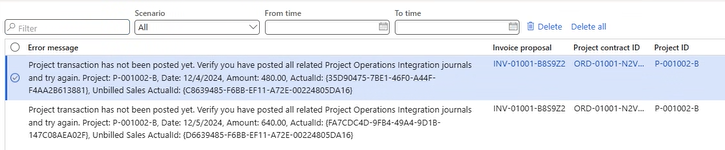
- A troubleshooting view where the full logs of the integration journal and invoice proposals are available without truncation.

Geographic areas
Visit the Explore Feature Geography report for Microsoft Azure areas where this feature is planned or available.
Language availability
Visit the Explore Feature Language report for information on this feature's availability.